
Osmedeus configuration is managed through YAML file which store in
~/osmedeus-base/osm-settings.yaml by default.1. Edit the YAML file directly
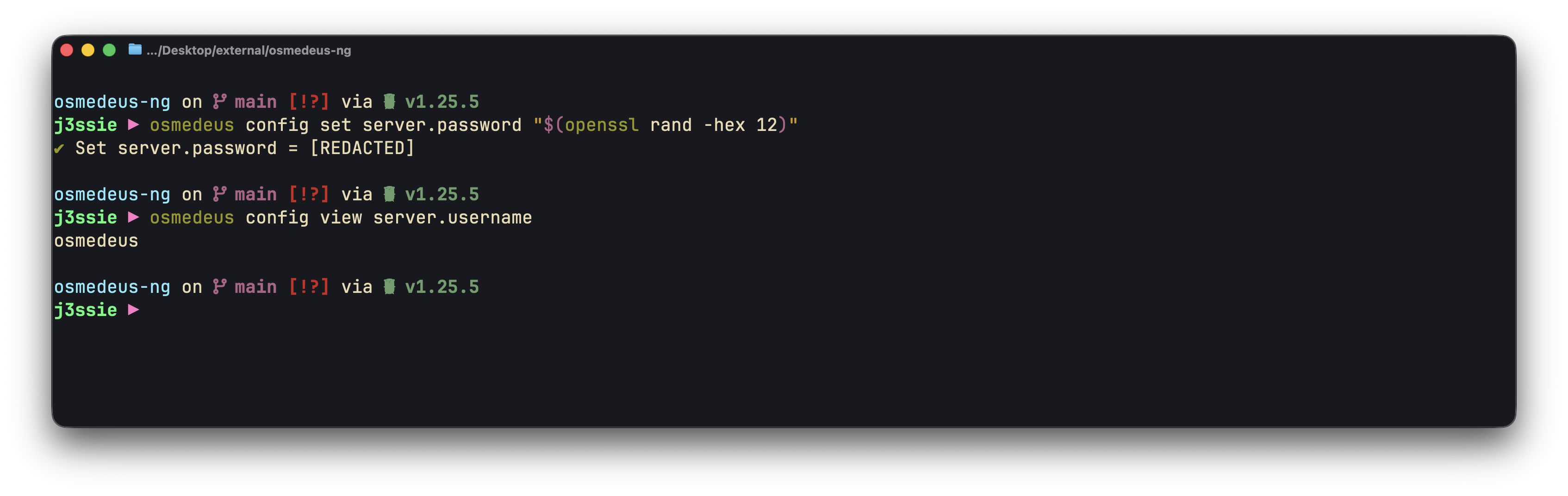
Osmedeus CLI Config
global_vars.[keyname] which will hold the global variables that can be used in the workflows.
Some example keys can be GITHUB_API_KEY, SHODAN_API_KEY, PASSIVETOTAL_API_KEY, etc.
Show Full YAML Config with comments
Show Full YAML Config with comments
# Osmedeus Configuration File
# This file contains all available configuration options for osmedeus.
# Copy this file to ~/osmedeus-base/osm-settings.yaml and customize as needed.

# =============================================================================
# Base Folder
# =============================================================================
# Root directory for all osmedeus data (workflows, binaries, data, etc.)
# Environment variables like $HOME are automatically expanded
base_folder: $HOME/osmedeus-base

# =============================================================================
# Environment Paths
# =============================================================================
# Directory paths for various osmedeus components
# Use {{base_folder}} to reference the base_folder value above
environments:
  # Path to binary executables (tools like nmap, ffuf, etc.)
  external_binaries_path: "{{base_folder}}/external-binaries"

  # Data directory for storing assets, wordlists, etc.
  external_data: "{{base_folder}}/external-data"

  # External configuration files (nuclei templates, etc.)
  external_configs: "{{base_folder}}/external-configs"

  # Output directory for scan workspaces
  # Each target gets its own subdirectory here
  workspaces: $HOME/workspaces-osmedeus

  # Directory containing workflow YAML files
  # Subdirectories: flows/, modules/
  workflows: "{{base_folder}}/workflows"

  # Directory for workspace snapshots (zip archives)
  # Used by the snapshot-download API endpoint
  snapshot: "{{base_folder}}/snapshot"

  # Directory for markdown report templates
  # Used by render_markdown_report() function
  markdown_report_templates: "{{base_folder}}/markdown-report-templates"

  # Directory for external agent configurations
  # Used for LLM Agent commands, skills, and related configurations
  external_agent_configs: "{{base_folder}}/external-agent-configs"

# =============================================================================
# Database Configuration
# =============================================================================
# Osmedeus supports SQLite (default) and PostgreSQL
database:
  # Database engine: "sqlite" or "postgresql"
  db_engine: sqlite

  # SQLite: Path to the database file
  # Ignored when using PostgreSQL
  db_path: "{{base_folder}}/database-osm.sqlite"

  # PostgreSQL connection settings
  # Only used when db_engine is "postgresql"
  host: localhost
  port: 5432
  username: osmedeus
  password: osmedeus
  db_name: osmedeus

  # Connection timeout in seconds
  connection_timeout: 60

  # PostgreSQL SSL mode: disable, require, verify-ca, verify-full
  ssl_mode: disable

# =============================================================================
# Server Configuration
# =============================================================================
# REST API server settings for the web interface
server:
  # Host to bind the server to
  # Use "0.0.0.0" to listen on all interfaces
  # Use "127.0.0.1" to listen only on localhost
  host: "0.0.0.0"

  # Port number for the API server
  port: 8002

  # Path to serve static UI files
  # Default: {{base_folder}}/ui/ - if this directory exists, it will be served at /ui
  # Set to empty string to disable UI serving
  ui_path: "{{base_folder}}/ui/"

  # Random prefix for workspace static files (auto-generated 16 chars if empty)
  # Used as URL path segment for direct access to workspaces folder
  workspace_prefix_key: ""

  # Authentication credentials (map of username:password)
  # Supports multiple users
  simple_user_map_key:
    osmedeus: osmedeus-admin

  # JWT (JSON Web Token) settings
  jwt:
    # Secret key for signing JWT tokens
    # IMPORTANT: Use a strong, unique secret in production!
    secret_signing_key: change-this-secret-in-production

    # Token expiration time in minutes
    expiration_minutes: 180

  # License type shown in HTTP Server header and /server-info endpoint
  license: "open-source"

# =============================================================================
# Scan Tactic Configuration
# =============================================================================
# Thread counts for different scan intensity levels
# Higher values = faster but more aggressive scans
# Lower values = slower but gentler on target systems
scan_tactic:
  # Aggressive/fast mode - maximum parallelism
  # Used with: osmedeus scan -t target --tactic aggressive
  aggressive: 40

  # Default/normal mode - balanced approach
  # Used when no tactic is specified
  default: 10

  # Gentle/thorough mode - minimal parallelism
  # Used with: osmedeus scan -t target --tactic gently
  gently: 5

# =============================================================================
# Redis Configuration (Optional)
# =============================================================================
# Redis is required for distributed scanning mode
# Leave host empty to disable Redis
redis:
  # Redis server hostname
  # Leave empty to disable distributed mode
  host: ""

  # Redis server port
  port: 6379

  # Redis authentication (if required)
  username: ""
  password: ""

  # Redis database number (0-15)
  db: 0

  # Connection timeout in seconds
  connection_timeout: 60

# =============================================================================
# Global Variables
# =============================================================================
# User-defined variables available in workflows via {{VARIABLE_NAME}}
# Variables can optionally be exported to environment variables
# Use _API_KEY suffix for secrets to indicate sensitive values
#
# Format:
#   VARIABLE_NAME:
#     value: "the-value"
#     as_env: true  # Optional: export as env var (default: true)
#
# Example usage in workflows:
#   - bash: "echo {{GITHUB_API_KEY}}"
#   - bash: "shodan search $SHODAN_API_KEY"  # Uses env var
global_vars:
  # GitHub personal access token for API access
  GITHUB_API_KEY:
    value: ""
    as_env: true  # Exports as GITHUB_API_KEY

  # Shodan API key for passive reconnaissance
  SHODAN_API_KEY:
    value: ""
    as_env: true  # Exports as SHODAN_API_KEY

  # Censys API key for certificate/host search
  CENSYS_API_KEY:
    value: ""
    as_env: true  # Exports as CENSYS_API_KEY

  # PassiveTotal API key for passive DNS/WHOIS
  PASSIVETOTAL_API_KEY:
    value: ""
    as_env: true  # Exports as PASSIVETOTAL_API_KEY

  # Add more API keys as needed (use _API_KEY suffix for secrets)

# =============================================================================
# Notification Configuration
# =============================================================================
# Send notifications when scans complete or find interesting results
notification:
  # Notification provider: "telegram" (future: slack, discord, webhook)
  provider: telegram

  # Master switch to enable/disable all notifications
  enabled: false

  # Telegram bot settings
  # Create a bot via @BotFather and get the token
  # Get your chat ID by messaging @userinfobot
  telegram:
    # Bot token from @BotFather
    bot_token: ""

    # Chat ID to send messages to (can be user or group)
    chat_id: 0

    # Enable Telegram notifications
    enabled: false

# =============================================================================
# Cloud Storage Configuration (Optional)
# =============================================================================
# S3-compatible storage for backing up scan results
# Supports AWS S3, MinIO, Google Cloud Storage, DigitalOcean Spaces, etc.
storage:
  # Storage provider: "s3", "minio", "gcs", "spaces", etc.
  provider: s3

  # Storage endpoint URL
  # AWS S3: Leave empty or use region-specific endpoint
  # MinIO: "http://localhost:9000"
  # DigitalOcean: "https://nyc3.digitaloceanspaces.com"
  endpoint: ""

  # Access credentials
  access_key_id: ""
  secret_access_key: ""

  # Bucket name for storing results
  bucket: ""

  # Cloud region (e.g., us-east-1, eu-west-1)
  region: us-east-1

  # Use SSL/TLS for connections
  use_ssl: true

  # Enable cloud storage uploads
  enabled: false

# =============================================================================
# LLM Configuration (Optional)
# =============================================================================
# Large Language Model settings for AI-powered features
# Supports providers like Ollama, OpenAI, Anthropic, etc.
# Multiple providers can be configured for automatic rotation on error/rate limit
llm_config:
  # List of LLM providers (rotates to next on error/rate limit)
  llm_providers:
    # Primary provider (used first)
    - provider: ollama
      base_url: "http://localhost:11434/v1/chat/completions"
      auth_token: ""
      model: "gpt-oss:120b-cloud"
    # Backup provider example (uncomment to enable rotation)
    # - provider: openai
    #   base_url: "https://api.openai.com/v1/chat/completions"
    #   auth_token: "sk-your-api-key"
    #   model: "gpt-4"

  # Enable LLM tool call features
  enabled_tool_call: false

  # Maximum number of tokens to generate
  max_tokens: 1000

  # Temperature for sampling
  temperature: 0.7

  # Top-k sampling
  top_k: 50

  # Top-p sampling
  top_p: 0.9

  # Number of completions to generate
  n: 1

  # Maximum number of retries for failed requests
  max_retries: 3

  # Timeout for API requests
  timeout: 120s

  # Enable streaming responses
  stream: false

  # Enable structured JSON output format
  structured_json_format: false

  # System prompt for the LLM
  system_prompt: ""

  # Custom headers for API requests
  custom_headers: ""
2. Use Configuration CLI
Osmedeus provides a CLI tool to manage the configuration file viaosmedeus config command.
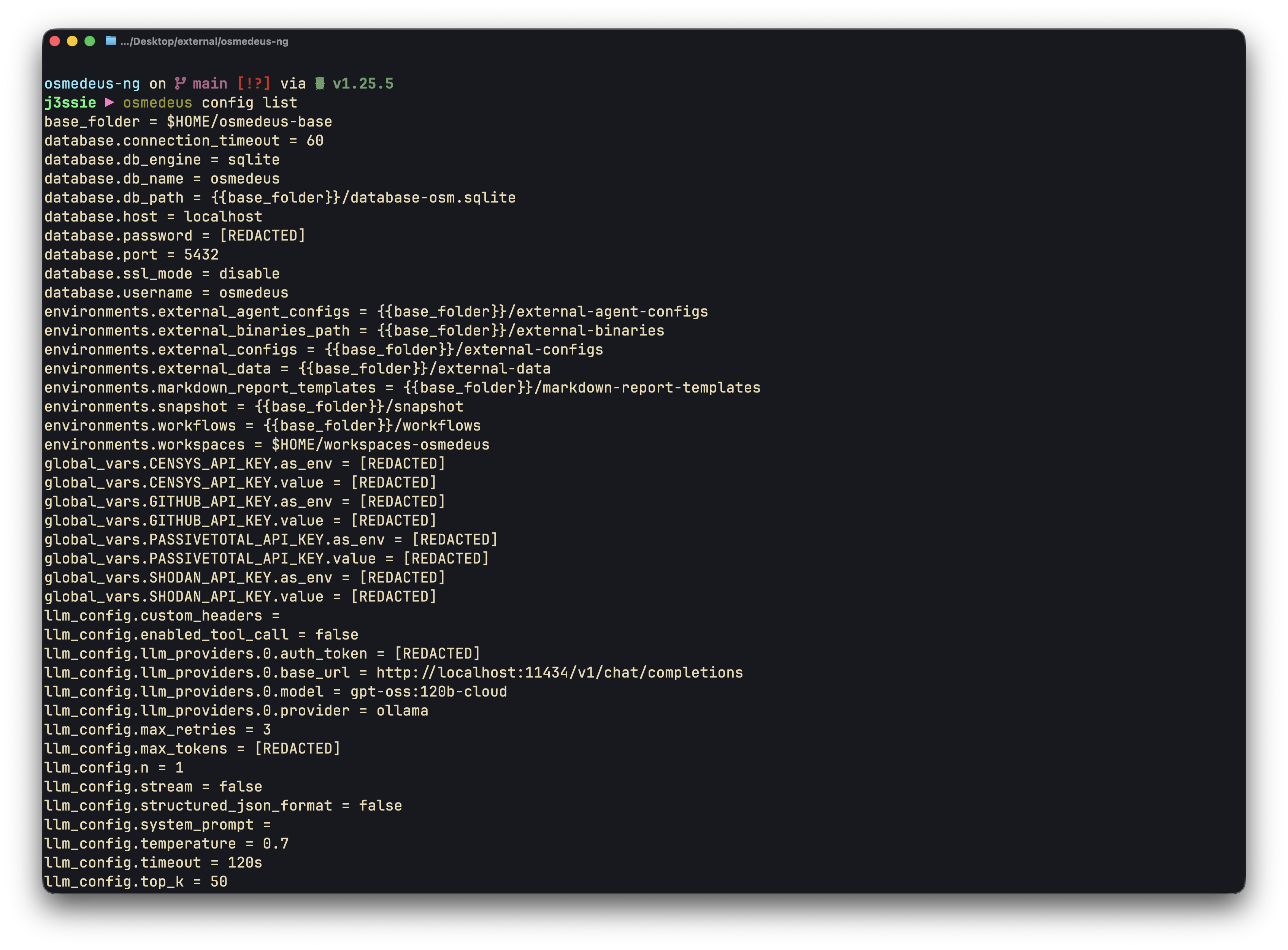
CLI config
Show Full Usage Examples
Show Full Usage Examples
base_folder = $HOME/osmedeus-base
database.connection_timeout = 60
database.db_engine = sqlite
database.db_name = osmedeus
database.db_path = {{base_folder}}/database-osm.sqlite
database.host = localhost
database.password = [REDACTED]
database.port = 5432
database.ssl_mode = disable
database.username = osmedeus
environments.external_agent_configs = {{base_folder}}/external-agent-configs
environments.external_binaries_path = {{base_folder}}/external-binaries
environments.external_configs = {{base_folder}}/external-configs
environments.external_data = {{base_folder}}/external-data
environments.markdown_report_templates = {{base_folder}}/markdown-report-templates
environments.snapshot = {{base_folder}}/snapshot
environments.workflows = {{base_folder}}/workflows
environments.workspaces = $HOME/workspaces-osmedeus
global_vars.CENSYS_API_KEY.as_env = [REDACTED]
global_vars.CENSYS_API_KEY.value = [REDACTED]
global_vars.GITHUB_API_KEY.as_env = [REDACTED]
global_vars.GITHUB_API_KEY.value = [REDACTED]
global_vars.PASSIVETOTAL_API_KEY.as_env = [REDACTED]
global_vars.PASSIVETOTAL_API_KEY.value = [REDACTED]
global_vars.SHODAN_API_KEY.as_env = [REDACTED]
global_vars.SHODAN_API_KEY.value = [REDACTED]
llm_config.custom_headers =
llm_config.enabled_tool_call = false
llm_config.llm_providers.0.auth_token = [REDACTED]
llm_config.llm_providers.0.base_url = http://localhost:11434/v1/chat/completions
llm_config.llm_providers.0.model = gpt-oss:120b-cloud
llm_config.llm_providers.0.provider = ollama
llm_config.max_retries = 3
llm_config.max_tokens = [REDACTED]
llm_config.n = 1
llm_config.stream = false
llm_config.structured_json_format = false
llm_config.system_prompt =
llm_config.temperature = 0.7
llm_config.timeout = 120s
llm_config.top_k = 50
llm_config.top_p = 0.9
notification.enabled = false
notification.provider = telegram
notification.telegram.bot_token = [REDACTED]
notification.telegram.chat_id = 0
notification.telegram.enabled = false
redis.connection_timeout = 60
redis.db = 0
redis.host =
redis.password = [REDACTED]
redis.port = 6379
redis.username =
scan_tactic.aggressive = 40
scan_tactic.default = 10
scan_tactic.gently = 5
server.host = 0.0.0.0
server.jwt.expiration_minutes = 180
server.jwt.secret_signing_key = [REDACTED]
server.license = open-source
server.password = [REDACTED]
server.port = 8002
server.simple_user_map_key.osmedeus = [REDACTED]
server.ui_path = {{base_folder}}/ui/
server.username = osmedeus
server.workspace_prefix_key = [REDACTED]
storage.access_key_id = [REDACTED]
storage.bucket =
storage.enabled = false
storage.endpoint =
storage.provider = s3
storage.region = us-east-1
storage.secret_access_key = [REDACTED]
storage.use_ssl = true