
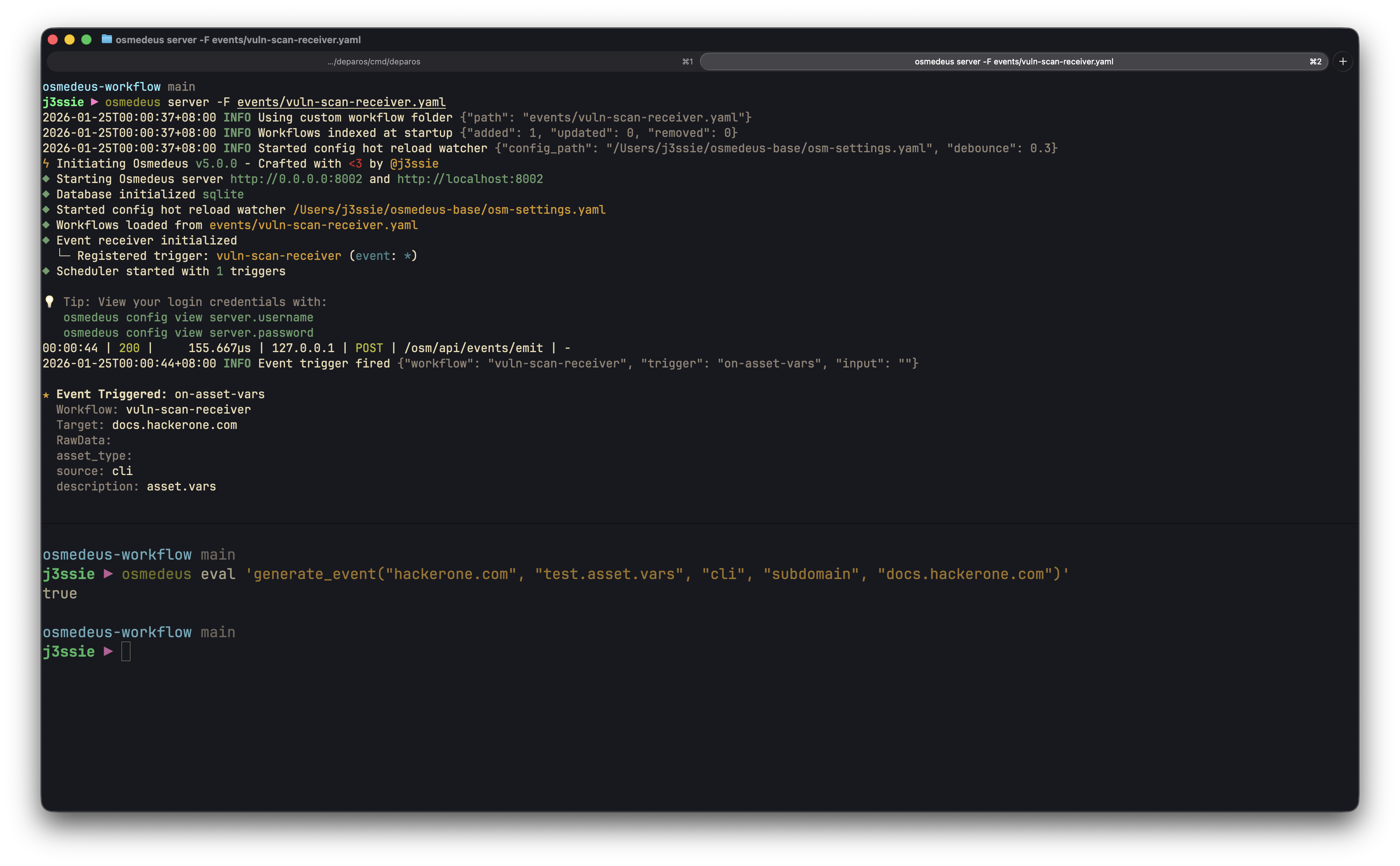
Build reactive automation pipelines that respond to discoveries, chain workflows together, and integrate with external systems.

Overview

Event-driven triggers enable workflows to execute automatically in response to events:
  • React to discoveries: Scan new subdomains as they’re found
  • Chain workflows: Connect reconnaissance → probing → scanning
  • External integration: Receive webhooks from GitHub, CI/CD, or custom tools
  • Real-time automation: Process findings as they occur

Event Architecture

Event Structure

Events carry structured data through the system:
type Event struct {
    Topic        string    // Category: "assets.new", "vulnerabilities.new"
    ID           string    // Unique event identifier (UUID)
    Name         string    // Event name: "vulnerability.discovered"
    Source       string    // Origin: "nuclei", "httpx", "amass"
    Data         string    // JSON payload
    DataType     string    // Type: "subdomain", "url", "finding"
    Workspace    string    // Workspace identifier
    RunID        string    // Run ID that generated this event
    WorkflowName string    // Workflow that generated this event
    Timestamp    time.Time // When the event occurred
}

Event Flow

┌──────────────────┐     ┌──────────────────┐     ┌──────────────────┐
│   Event Source   │     │   Event Queue    │     │   Scheduler      │
│                  │────▶│   (1000 buffer)  │────▶│   (Filter +      │
│  - Workflows     │     │                  │     │    Dispatch)     │
│  - Functions     │     │  Backpressure:   │     │                  │
│  - Webhooks      │     │  5s timeout      │     │                  │
└──────────────────┘     └──────────────────┘     └────────┬─────────┘

                        ┌─────────────────────────────────┼─────────────────────────────────┐
                        │                                 │                                 │
                        ▼                                 ▼                                 ▼
               ┌────────────────┐              ┌────────────────┐              ┌────────────────┐
               │  Workflow A    │              │  Workflow B    │              │  Workflow C    │
               │  (topic match) │              │  (filtered)    │              │  (all events)  │
               └────────────────┘              └────────────────┘              └────────────────┘

Backpressure Handling

The event system protects against overload:
ParameterValueDescription
Queue Size1000Maximum events buffered
Timeout5 secondsWait time when queue is full
BehaviorDropEvents dropped if queue remains full
Monitor queue health via metrics (see Monitoring Events).

Emitting Events

From Workflow Functions

Use the generate_event function to emit events from workflows:
name: subdomain-discovery
kind: module

steps:
  - name: enumerate
    type: bash
    command: amass enum -d {{target}} -o {{Output}}/subdomains.txt

  - name: emit-discoveries
    type: function
    function: |
      generate_event_from_file("{{Workspace}}", "assets.new", "amass", "subdomain", "{{Output}}/subdomains.txt")

generate_event(workspace, topic, source, data_type, data)

Emit a single structured event.
// Simple string data
generate_event("{{Workspace}}", "assets.new", "httpx", "url", "https://api.example.com")

// Complex object data
generate_event("{{Workspace}}", "vulnerabilities.new", "nuclei", "finding", {
  url: "https://example.com/admin",
  severity: "critical",
  template: "CVE-2024-1234",
  matched: "/admin"
})
Parameters:
  • workspace - Workspace identifier for the event
  • topic - Event topic/category (e.g., “assets.new”)
  • source - Event source (e.g., “nuclei”, “httpx”)
  • data_type - Type of data (e.g., “subdomain”, “url”, “finding”)
  • data - Event payload (string or object)
Returns: boolean - true if event was sent successfully

generate_event_from_file(workspace, topic, source, data_type, path)

Emit an event for each non-empty line in a file.
generate_event_from_file("{{Workspace}}", "assets.new", "subfinder", "subdomain", "{{Output}}/subdomains.txt")
// Returns: 42 (number of events generated)
Parameters:
  • workspace - Workspace identifier for the events
  • topic - Event topic/category
  • source - Event source
  • data_type - Type of data
  • path - File path containing data (one item per line)
Returns: integer - count of events successfully generated

Webhook Functions

Send events to external webhook endpoints configured in settings:
- name: notify-finding
  type: function
  function: |
    notify_webhook("Critical vulnerability found on {{target}}")

notify_webhook(message)

Send a plain text message to all configured webhooks.
notify_webhook("Scan completed for example.com with 15 findings")

send_webhook_event(eventType, data)

Send a structured event to all configured webhooks.
send_webhook_event("scan_complete", {
  target: "example.com",
  findings: 15,
  duration: "2h30m"
})

From External Systems (Webhooks)

Receive webhooks via the API to trigger workflows:
curl -X POST http://localhost:8080/osm/api/events/emit \
  -H "Authorization: Bearer $TOKEN" \
  -H "Content-Type: application/json" \
  -d '{
    "topic": "external.webhook",
    "source": "github",
    "data_type": "push",
    "data": "{\"repository\": \"myorg/myapp\", \"branch\": \"main\"}"
  }'

Event Triggers

Trigger Configuration

Configure event triggers in workflow YAML:
name: probe-new-assets
kind: module

trigger:
  - name: on-subdomain-discovered
    on: event
    event:
      topic: "assets.new"
      filters:
        - "event.source == 'amass'"
        - "event.data_type == 'subdomain'"
      dedupe_key: "{{event.data.value}}"
      dedupe_window: "5m"
    input:
      type: event_data
      field: "value"
      name: target
    enabled: true

params:
  - name: target
    required: true

steps:
  - name: probe
    type: bash
    command: httpx -u {{target}} -o {{Output}}/httpx.json -json

EventConfig Fields

FieldTypeDescription
topicstringEvent topic to match (exact match, empty = all)
filters[]stringJavaScript expressions (all must pass)
dedupe_keystringTemplate for deduplication key
dedupe_windowstringTime window for deduplication (e.g., “5m”)

TriggerInput Options

TypeDescriptionFields
event_dataExtract from event payloadfield - JSON path to extract
functionTransform with functionfunction - JS expression (e.g., jq)
paramStatic parametername - parameter name
fileRead from filepath - file path
# Extract field from event data
input:
  type: event_data
  field: "url"
  name: target

# Transform with jq function
input:
  type: function
  function: 'jq("{{event.data}}", ".target.url")'
  name: target

# Use static parameter
input:
  type: param
  name: default_target

JavaScript Filters

Filters are JavaScript expressions evaluated against each event. All filters must return true for the event to trigger the workflow.

Available Event Fields

event.topic      // "assets.new"
event.id         // "uuid-string"
event.name       // "subdomain.discovered"
event.source     // "amass"
event.data_type  // "subdomain"
event.data       // Parsed JSON object or raw string
event.workspace  // "myworkspace"

Filter Examples

filters:
  # Match specific source
  - "event.source == 'nuclei'"

  # Match severity from parsed data
  - "event.data.severity == 'critical'"

  # Match by data type
  - "event.data_type == 'vulnerability'"

  # Combine conditions (implicit AND)
  - "event.source == 'nuclei'"
  - "event.data.severity == 'high' || event.data.severity == 'critical'"

Common Filter Patterns

# Only process from specific tools
filters:
  - "event.source == 'subfinder' || event.source == 'amass'"

# Filter by severity
filters:
  - "['critical', 'high'].includes(event.data.severity)"

# Match URL patterns
filters:
  - "event.data.url && event.data.url.includes('/api/')"

# Workspace-specific
filters:
  - "event.workspace == 'production'"

Deduplication

Prevent duplicate workflow triggers using time-windowed deduplication:
trigger:
  - name: on-unique-url
    on: event
    event:
      topic: "crawler.url"
      dedupe_key: "{{event.data.url}}"      # Unique key template
      dedupe_window: "5m"                    # Time window
    input:
      type: event_data
      field: "value"
      name: target
Dedupe key supports template variables:
  • {{event.source}}-{{event.data.url}} - Composite key
  • {{event.data.hash}} - Simple field

Event Topics Reference

Built-in Topics

TopicDescriptionTypical Source
run.startedWorkflow run beganEngine
run.completedWorkflow run finishedEngine
run.failedWorkflow run failedEngine
step.completedIndividual step finishedEngine
step.failedIndividual step failedEngine
asset.discoveredNew asset discoveredRecon tools
asset.updatedAsset information updatedScanners
webhook.receivedExternal webhook receivedAPI
schedule.triggeredScheduled workflow triggeredScheduler

Custom Topics

Define your own topics for domain-specific events:
// Custom discovery events
generate_event("{{Workspace}}", "discovery.api-endpoint", "custom-scanner", "endpoint", {...})

// Custom notification events
generate_event("{{Workspace}}", "notification.slack", "workflow", "message", {...})

Building Event Pipelines

Chaining Workflows

Create pipelines where each workflow triggers the next:
┌─────────────────┐     ┌─────────────────┐     ┌─────────────────┐
│ Subdomain Enum  │────▶│  HTTP Probing   │────▶│ Vuln Scanning   │
│                 │     │                 │     │                 │
│ emit: assets.new│     │ emit:           │     │ emit:           │
│ (subdomains)    │     │ assets.new      │     │ vulnerabilities │
│                 │     │ (live hosts)    │     │ .new            │
└─────────────────┘     └─────────────────┘     └─────────────────┘

Stage 1: Subdomain Enumeration

name: subdomain-enum
kind: module

steps:
  - name: enumerate
    type: bash
    command: |
      subfinder -d {{target}} -o {{Output}}/subdomains.txt
      amass enum -d {{target}} >> {{Output}}/subdomains.txt
      sort -u {{Output}}/subdomains.txt -o {{Output}}/subdomains.txt

  - name: emit-subdomains
    type: function
    function: |
      generate_event_from_file("{{Workspace}}", "assets.new", "recon", "subdomain", "{{Output}}/subdomains.txt")

Stage 2: HTTP Probing (Triggered by Stage 1)

name: http-probe
kind: module

trigger:
  - name: on-subdomain
    on: event
    event:
      topic: "assets.new"
      filters:
        - "event.data_type == 'subdomain'"
    input:
      type: event_data
      field: "value"
      name: target
    enabled: true

params:
  - name: target
    required: true

steps:
  - name: probe
    type: bash
    command: httpx -u {{target}} -o {{Output}}/probe.json -json

  - name: emit-if-live
    type: function
    pre_condition: 'fileLength("{{Output}}/probe.json") > 0'
    function: |
      generate_event("{{Workspace}}", "assets.new", "httpx", "url", readFile("{{Output}}/probe.json"))

Stage 3: Vulnerability Scanning (Triggered by Stage 2)

name: vuln-scan
kind: module

trigger:
  - name: on-live-host
    on: event
    event:
      topic: "assets.new"
      filters:
        - "event.source == 'httpx'"
        - "event.data_type == 'url'"
    input:
      type: function
      function: 'jq("{{event.data}}", ".url")'
      name: target
    enabled: true

params:
  - name: target
    required: true

steps:
  - name: scan
    type: bash
    command: nuclei -u {{target}} -o {{Output}}/vulns.json -json

  - name: emit-findings
    type: function
    pre_condition: 'fileLength("{{Output}}/vulns.json") > 0'
    function: |
      generate_event_from_file("{{Workspace}}", "vulnerabilities.new", "nuclei", "finding", "{{Output}}/vulns.json")

Error Handling Pattern

Handle failures gracefully with error events:
steps:
  - name: scan
    type: bash
    command: nuclei -u {{target}}
    on_error:
      - action: run
        type: function
        function: |
          generate_event("{{Workspace}}", "errors.scan-failed", "nuclei", "error", {
            target: "{{target}}",
            step: "scan",
            error: "Nuclei scan failed"
          })

Real-World Examples

Asset Discovery Pipeline

Complete subdomain discovery to live host probing:
name: asset-discovery-pipeline
kind: module
description: Discover subdomains and probe for live hosts

params:
  - name: target
    required: true
    description: Root domain to enumerate

steps:
  - name: passive-enum
    type: bash
    command: |
      subfinder -d {{target}} -o {{Output}}/subfinder.txt
      amass enum -passive -d {{target}} -o {{Output}}/amass.txt

  - name: merge-results
    type: function
    functions:
      - 'exec_cmd("cat {{Output}}/subfinder.txt {{Output}}/amass.txt | sort -u > {{Output}}/all-subs.txt")'

  - name: probe-live
    type: bash
    command: httpx -l {{Output}}/all-subs.txt -o {{Output}}/live-hosts.txt

  - name: emit-discoveries
    type: function
    function: |
      generate_event_from_file("{{Workspace}}", "assets.new", "pipeline", "live-host", "{{Output}}/live-hosts.txt")
      log_info("Emitted " + fileLength("{{Output}}/live-hosts.txt") + " live hosts")

Vulnerability Notification

Automatically notify on critical findings:
name: vuln-notifier
kind: module

trigger:
  - name: on-critical-vuln
    on: event
    event:
      topic: "vulnerabilities.new"
      filters:
        - "event.source == 'nuclei'"
        - "event.data.severity == 'critical' || event.data.severity == 'high'"
    input:
      type: event_data
      field: "template"
      name: template_id
    enabled: true

params:
  - name: template_id
    required: true

steps:
  - name: notify
    type: function
    function: |
      notify_webhook("ALERT: Critical vulnerability " + "{{template_id}}" + " detected!")
      notify_telegram("Critical finding: {{template_id}}")

External Integration: GitHub Webhooks

Trigger scans on repository pushes:
name: github-triggered-scan
kind: module

trigger:
  - name: on-github-push
    on: event
    event:
      topic: "webhook.received"
      filters:
        - "event.source == 'github'"
        - "event.data.ref == 'refs/heads/main'"
    input:
      type: function
      function: 'jq("{{event.data}}", ".repository.html_url")'
      name: repo_url
    enabled: true

params:
  - name: repo_url
    required: true

steps:
  - name: clone-and-scan
    type: bash
    command: |
      git clone {{repo_url}} /tmp/repo
      trufflehog filesystem /tmp/repo --json > {{Output}}/secrets.json

Monitoring Events

Event Logs API

Query event history via the REST API:
# List recent events
curl "http://localhost:8080/osm/api/event-logs" \
  -H "Authorization: Bearer $TOKEN"

# Filter by topic
curl "http://localhost:8080/osm/api/event-logs?topic=assets.new" \
  -H "Authorization: Bearer $TOKEN"

# Filter by run
curl "http://localhost:8080/osm/api/event-logs?run_id=run-abc123" \
  -H "Authorization: Bearer $TOKEN"

# Filter by workspace
curl "http://localhost:8080/osm/api/event-logs?workspace=production" \
  -H "Authorization: Bearer $TOKEN"

# Filter by processed status
curl "http://localhost:8080/osm/api/event-logs?processed=false" \
  -H "Authorization: Bearer $TOKEN"

CLI Event Logs

Query event history using the database CLI:
# List recent events (default columns: topic, source, processed, data_type, workspace, data)
osmedeus db list --table event_logs

# List all available columns
osmedeus db list --table event_logs --list-columns

# Filter by specific columns
osmedeus db list --table event_logs --columns topic,source,data_type,data

# Show all columns including hidden ones (id, timestamps)
osmedeus db list --table event_logs --all

# Filter by topic
osmedeus db list --table event_logs --where topic=assets.new

# Filter by processed status
osmedeus db list --table event_logs --where processed=false

# Search events across all columns
osmedeus db list --table event_logs --search "nuclei"

# Output as JSON for scripting
osmedeus db list --table event_logs --json

# Pagination
osmedeus db list --table event_logs --offset 50 --limit 100

# Interactive TUI mode (default without --table)
osmedeus db list

Queue Metrics

The scheduler tracks event processing metrics:
MetricDescription
events_enqueuedTotal events successfully queued
events_droppedEvents dropped due to full queue
queue_current_sizeCurrent events waiting
Access via health endpoint:
curl http://localhost:8080/osm/api/health

Event Receiver Status

Check the status of event-triggered workflows:
# Get event receiver status
curl "http://localhost:8080/osm/api/event-receiver/status" \
  -H "Authorization: Bearer $TOKEN"

# List registered event-triggered workflows
curl "http://localhost:8080/osm/api/event-receiver/workflows" \
  -H "Authorization: Bearer $TOKEN"

Bulk Event Processing

Process multiple targets discovered via events using the func eval bulk processing capabilities.

Processing Targets from File

# Process each target in a file (target variable available in script)
osmedeus func eval -e 'log_info("Processing: " + target)' -T targets.txt

# With concurrency for parallel processing
osmedeus func eval -e 'httpGet("https://" + target)' -T targets.txt -c 10

# With additional parameters
osmedeus func eval -e 'log_info(target + " in " + workspace)' -T targets.txt --params workspace=production

Using Function Files

Store reusable processing logic in files:
// check-host.js
var result = httpGet("https://" + target);
if (result.status == 200) {
  generate_event("myworkspace", "assets.live", "check", "url", target);
  log_info("Live: " + target);
}
# Execute function file against targets
osmedeus func eval --function-file check-host.js -T discovered-hosts.txt -c 5

Function Call Syntax

Multiple ways to invoke functions:
# Expression with -e flag
osmedeus func eval -e 'log_info("hello")'

# Positional argument
osmedeus func eval 'log_info("hello")'

# Function name with arguments
osmedeus func eval log_info "hello world"

# Using -f flag for function name
osmedeus func eval -f log_info "hello world"

# Read from stdin
echo 'log_info("hello")' | osmedeus func eval --stdin

Integration with Event Pipeline

Combine event log queries with bulk function evaluation:
# 1. Export discovered assets to file
osmedeus db list --table event_logs --where data_type=subdomain --json | \
  jq -r '.[].data' > /tmp/subdomains.txt

# 2. Process with bulk function evaluation
osmedeus func eval -e 'httpGet("https://" + target)' -T /tmp/subdomains.txt -c 10

# 3. Generate events for results
osmedeus func eval --function-file process-subdomain.js -T /tmp/subdomains.txt -c 5

Testing Event Functions

Test event generation before deploying workflows:
# Test single event generation
osmedeus func eval 'generate_event("test-workspace", "test.topic", "cli", "test", "hello")'

# Test with target variable
osmedeus func eval -e 'generate_event("ws", "assets.new", "test", "url", target)' -t example.com

# List available event functions
osmedeus func list event

Best Practices

  1. Use specific topics - Prefer assets.subdomain over generic assets.new for precise filtering
  2. Filter early - Apply filters to reduce processing overhead and prevent unnecessary workflow triggers
  3. Handle backpressure gracefully - Design workflows to tolerate dropped events during high load
  4. Log event errors - Use on_error handlers to track and emit failure events for debugging
  5. Test triggers disabled first - Set enabled: false initially, validate filters, then enable
  6. Use idempotent handlers - Workflows may receive duplicate events; design steps to handle this
  7. Batch file emissions - Use generate_event_from_file for bulk discoveries instead of individual events
  8. Use deduplication - Configure dedupe_key and dedupe_window to prevent duplicate processing
  9. Include workspace - Always pass the workspace parameter to maintain proper event isolation

Troubleshooting

Events Not Triggering

  1. Check topic match: Event topic must exactly match trigger configuration
    # Verify event topics in database
    osmedeus db list --table event_logs --columns topic,source,data_type --limit 10
    
  2. Verify trigger is enabled: enabled: true in workflow YAML
  3. Test filter expressions: Simplify filters to isolate issues
    # Start with no filters
    filters: []
    
    # Then add back one at a time
    filters:
      - "event.source == 'nuclei'"
    
  4. Check scheduler is running: Events only process when server is active
  5. Check event receiver status:
    curl "http://localhost:8080/osm/api/event-receiver/status"
    

Events Dropped

  1. Check queue metrics: High events_dropped indicates overload
  2. Reduce event volume: Batch discoveries, filter at source
  3. Increase queue size: Configure via scheduler settings if needed
  4. Scale with workers: Distribute processing across workers

Filter Not Matching

  1. Verify event data structure: Check actual event payload
    osmedeus db list --table event_logs --where topic=assets.new --json --limit 1
    
  2. Test JS expression: Filters use JavaScript syntax
    // Correct
    event.data.severity == 'critical'
    
    // Wrong (using Go syntax)
    event.data.severity = "critical"
    
  3. Check data types: String vs number comparisons
    // If status_code is number
    event.data.status_code == 200
    
    // If status_code is string
    event.data.status_code == '200'
    

Testing Event Functions

Use the CLI to test event functions interactively:
# Test generate_event
osmedeus func eval 'generate_event("test", "test.topic", "cli", "test", "data")'

# Verify event was created
osmedeus db list --table event_logs --where topic=test.topic --limit 1