
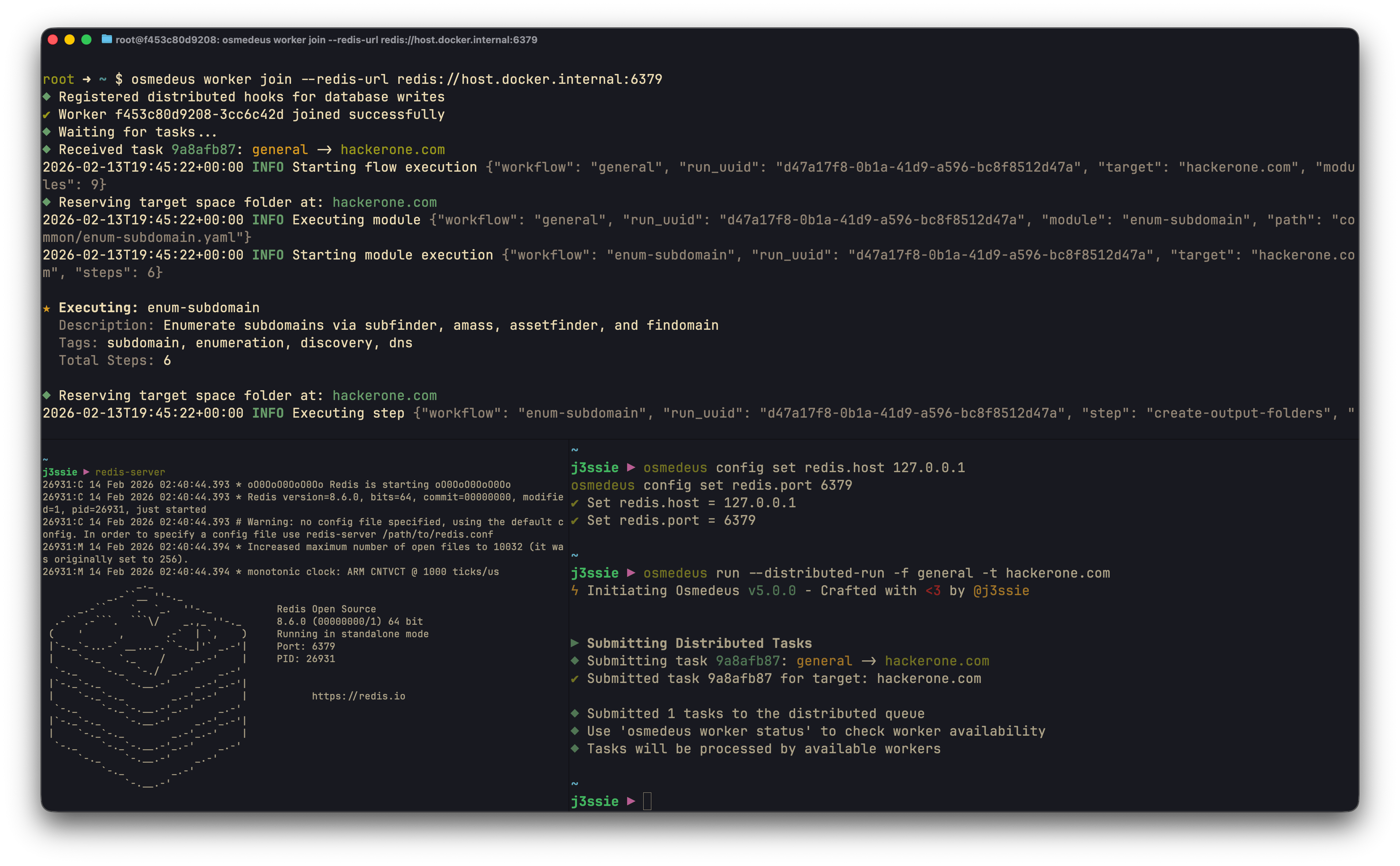
Distributed Execution
Scale scanning across multiple machines using Redis coordination.

Architecture

+-----------------+     +-----------------+
|     Master      |     |     Redis       |
|   (API Server)  |---->|   (Task Queue)  |
+-----------------+     +--------+--------+
                                 |
        +------------------------+------------------------+
        |                        |                        |
        v                        v                        v
+---------------+       +---------------+       +---------------+
|   Worker 1    |       |   Worker 2    |       |   Worker N    |
+---------------+       +---------------+       +---------------+

Components

Master Node

  • API server for submitting tasks
  • Task distribution coordinator
  • Result aggregation
  • Worker health monitoring

Workers

  • Execute assigned tasks
  • Report progress and results
  • Auto-reconnect on failure
  • Heartbeat to master
  • Worker ID format: wosm-<uuid8> (e.g. wosm-a1b2c3d4)
  • Default alias: wosm-<public-ip> or wosm-<local-ip> when no --alias is provided

Redis

  • Task queue storage
  • Worker registration
  • Result storage
  • Pub/Sub for events

Setup

0. Start Redis if you don’t have one

# Docker
docker run -d -p 6379:6379 redis:7-alpine

# With persistence
docker run -d -p 6379:6379 \
  -v redis-data:/data \
  redis:7-alpine redis-server --appendonly yes

# then test connection at localhost:6379

1. Start Master Node

## Configure Redis connection
osmedeus config set redis.host 127.0.0.1
osmedeus config set redis.port 6379

osmedeus server --master
Or with custom Redis:
osmedeus server --master --redis-url redis://redis-host:6379
You can also run the worker node without the master mode with REST server API, provided they can connect to the same Redis instance. However, the results won’t be aggregated in the master API and you have to run the scan manually via CLI.

2. Start Workers Node

osmedeus worker join --redis-url redis://host.docker.internal:6379
With public IP detection (used for default alias and SSH routing):
osmedeus worker join --redis-url redis://host.docker.internal:6379 --get-public-ip
With a custom alias:
osmedeus worker join --redis-url redis://host.docker.internal:6379 --alias my-worker
Or if master is on localhost:
## Configure Redis connection
osmedeus config set redis.host 127.0.0.1
osmedeus config set redis.port 6379

osmedeus worker join

3. Submit Tasks & Listing Workers

# Via CLI
osmedeus run --distributed-run -f general -t hackerone.com

# Via API
curl -X POST http://master:8002/osm/api/runs \
  -H "Authorization: Bearer $TOKEN" \
  -H "Content-Type: application/json" \
  -d '{"flow": "general", "target": "example.com", "distributed": true}'


# List workers (use --json for json output)
osmedeus worker ls

4. Running Utility Scripts on Master/Worker Nodes (Optional)

# run this on the master node to execute the command on all worker nodes
osmedeus eval "run_on_worker('all', 'bash', 'touch /tmp/on-worker')" --redis-url redis://host.docker.internal:6379

## run this on the worker node to execute the command on the master node
osmedeus worker --redis-url redis://host.docker.internal:6379 eval "run_on_master('bash', 'touch /tmp/on-master')"

Task Distribution

Task Lifecycle

1. Client submits task to master
2. Master queues task in Redis
3. Available worker claims task
4. Worker executes workflow
5. Worker reports progress/results
6. Master aggregates results
7. Results available via API

Load Balancing

Tasks are distributed using a pull model:
  • Workers poll for available tasks
  • First available worker claims task
  • No central scheduling required

Task Priority

(Future feature) Tasks can have priority levels:
  • High: Security-critical scans
  • Normal: Regular assessments
  • Low: Background enumeration

Monitoring

Worker Status

# CLI
osmedeus worker status

# API
curl http://master:8002/osm/api/workers \
  -H "Authorization: Bearer $TOKEN"

Task Status

# List tasks
curl http://master:8002/osm/api/tasks \
  -H "Authorization: Bearer $TOKEN"

# Get task details
curl http://master:8002/osm/api/tasks/task-123 \
  -H "Authorization: Bearer $TOKEN"

Remote Monitoring

Use the client command to monitor distributed runs from any machine:
# Set connection details
export OSM_REMOTE_URL=http://master:8080
export OSM_REMOTE_AUTH_KEY=your-api-key

# Monitor runs
osmedeus client fetch -t runs --status running --refresh 5s

# Check step results for a specific run
osmedeus client fetch -t step_results --workspace example_com

# View vulnerabilities
osmedeus client fetch -t vulnerabilities --severity critical

Docker Compose Setup

services:
  redis:
    image: redis:7-alpine
    container_name: osm-e2e-redis
    ports:
      - "6399:6379"
    command: redis-server --appendonly yes --maxmemory 256mb --maxmemory-policy allkeys-lru
    healthcheck:
      test: ["CMD", "redis-cli", "ping"]
      interval: 5s
      timeout: 3s
      retries: 10
    networks:
      - osm-e2e-network

  master:
    build:
      context: ../..
      dockerfile: build/docker/Dockerfile
    image: osmedeus:e2e
    container_name: osm-e2e-master
    ports:
      - "8002:8002"
    volumes:
      - workspaces:/root/workspaces-osmedeus
    depends_on:
      redis:
        condition: service_healthy
    command: ["serve", "--master", "--redis-url", "redis://redis:6379", "-A"]
    healthcheck:
      test: ["CMD", "curl", "-f", "http://localhost:8002/health"]
      interval: 10s
      timeout: 5s
      start_period: 10s
      retries: 5
    networks:
      - osm-e2e-network

  worker:
    image: osmedeus:e2e
    container_name: osm-e2e-worker
    volumes:
      - workspaces:/root/workspaces-osmedeus
    depends_on:
      redis:
        condition: service_healthy
      master:
        condition: service_healthy
    command: ["worker", "join", "--redis-url", "redis://redis:6379"]
    networks:
      - osm-e2e-network

volumes:
  workspaces:
    driver: local

networks:
  osm-e2e-network:
    driver: bridge
Run:
# Distributed E2E stack: Redis + master + worker
# Usage:

make distributed-e2e-up      # Build image + start stack + wait for health
make distributed-e2e-run     # Submit scan + tail worker logs
make distributed-e2e-down    # Tear down everything