
Notification Configuration
## Telegram Setup
osmedeus config set notification.enabled true
osmedeus config set notification.telegram.enabled true
osmedeus config set notification.provider telegram
osmedeus config set notification.telegram.bot_token "12345:your-token"
osmedeus config set notification.telegram.chat_id "-1001234567890"
osmedeus eval 'notify_telegram("**hola** osmedeus from cli")'
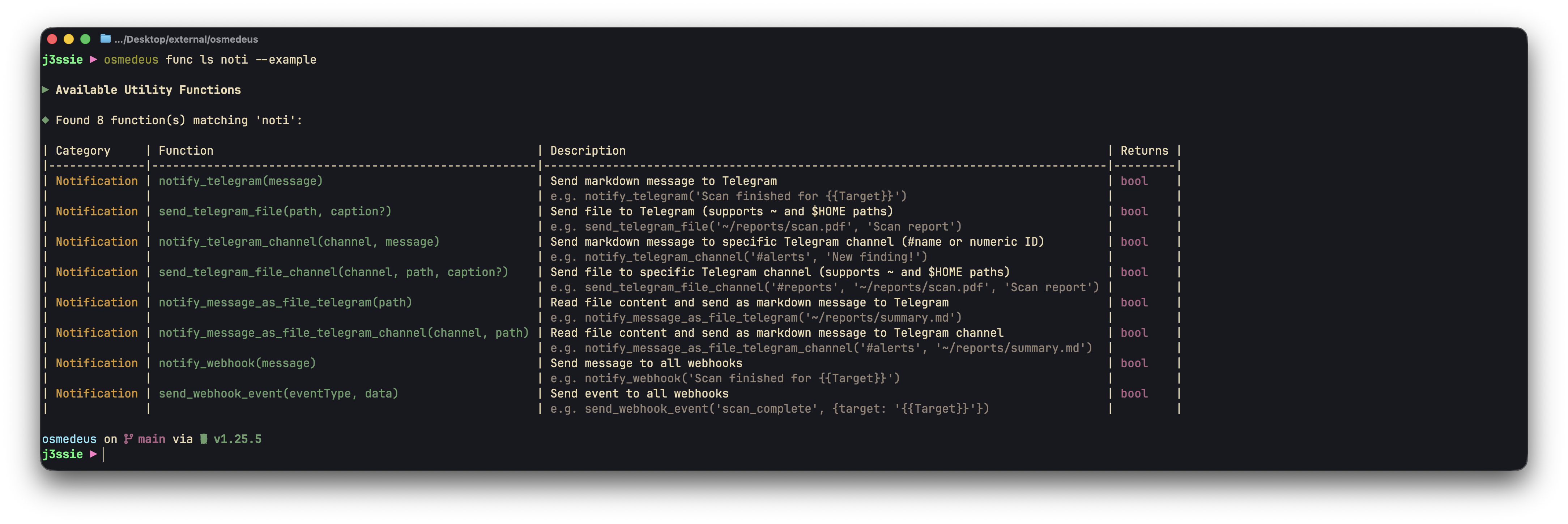
Notification Functions
osmedeus func ls noti to list all available notification functions.
How to get your telegram token and channel ID
Here are a quick guide on how to get your telegram token and channel IDSearch for @BotFather and create your bot then grab the token
# get channel ID
curl "https://api.telegram.org/bot$TELEGRAM_TOKEN/getUpdates" | jq
# send a test message
curl -X POST "https://api.telegram.org/bot$TELEGRAM_TOKEN/sendMessage" -d chat_id=-<channel-id> -d text="Hello, this is a broadcast to the channel"
CDN Configuration
Useosmedeus func ls cdn to list all available CDN functions. Below are some of the functions I usually use:
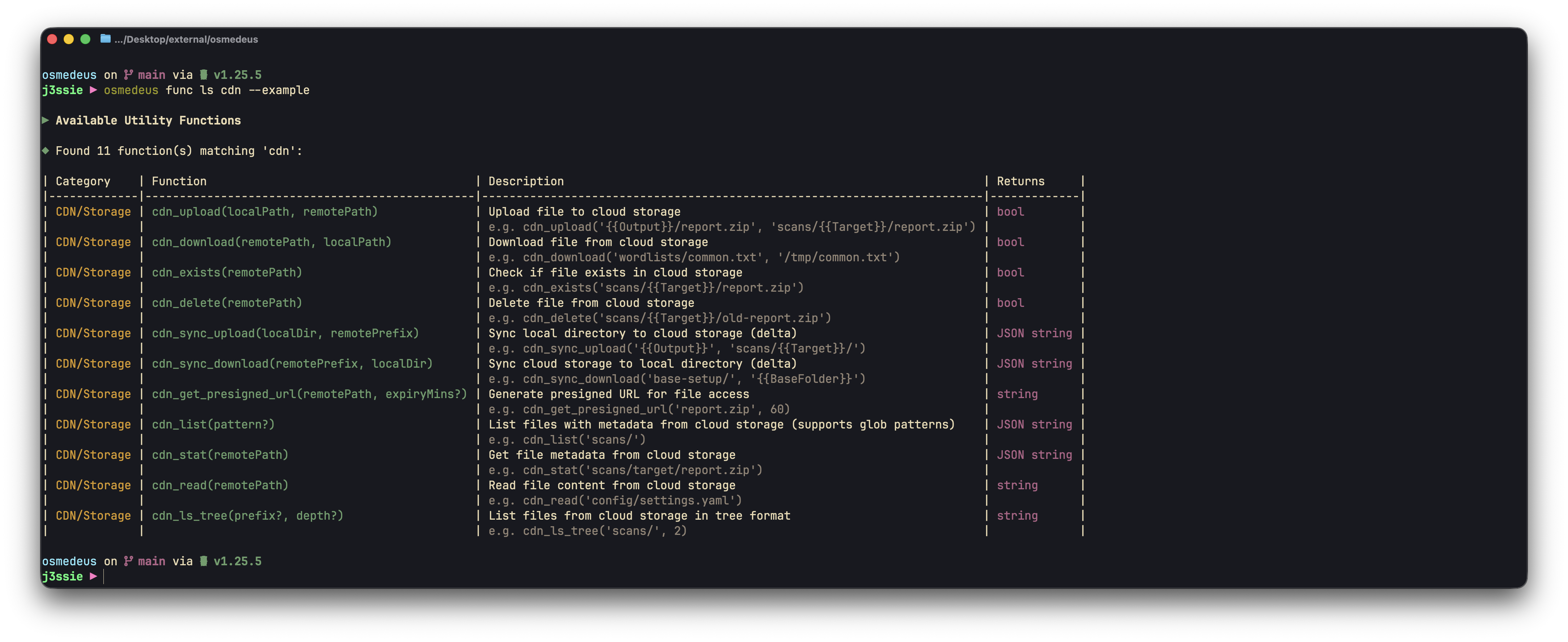
CDN Functions
osmedeus eval 'cdn_ls_tree()'

# download and upload result
osmedeus eval cdn_download("workspace_result.jsonl", "workspace_result.jsonl")
osmedeus eval cdn_upload("workspace_result.jsonl", "workspace_result.jsonl")

# sync folder to remote
osmedeus eval 'cdn_sync_upload("local", "remote")'

osmedeus eval 'cdn_ls_tree("targets/")'
Cloudflare R2
## CDN Setup for R2
osmedeus config set storage.provider 'r2'
osmedeus config set storage.access_key_id '<r2-key-id>'
osmedeus config set storage.bucket '<r2-bucket-name>'
osmedeus config set storage.secret_access_key '<r2-access-key>'
osmedeus config set storage.endpoint '<endpoint>.r2.cloudflarestorage.com'
osmedeus config set storage.presign_expiry '2h'
osmedeus config set storage.use_ssl 'true'
osmedeus config set storage.enabled 'true'
osmedeus eval 'cdn_ls_tree()'
Google Cloud Storage
## CDN Setup for GCS
osmedeus config set storage.provider 'gcs'
osmedeus config set storage.access_key_id '<gcs-key-id>'
osmedeus config set storage.secret_access_key '<gcs-access-key>'
osmedeus config set storage.bucket '<gcs-bucket-name>'
osmedeus config set storage.endpoint 'storage.googleapis.com'
osmedeus config set storage.region 'us-east-1'
osmedeus config set storage.use_ssl 'true'
osmedeus config set storage.presign_expiry '1h'
osmedeus config set storage.enabled 'true'
osmedeus eval 'cdn_ls_tree()'
Full Notification and CDN Configuration
Show Full Notification and CDN Configuration
Show Full Notification and CDN Configuration
# =============================================================================
# Notification Configuration
# =============================================================================
# Send notifications when scans complete or find interesting results
notification:
  # Notification provider: "telegram" (future: slack, discord, webhook)
  provider: telegram

  # Master switch to enable/disable all notifications
  enabled: false

  # Telegram bot settings
  # Create a bot via @BotFather and get the token
  # Get your chat ID by messaging @userinfobot
  telegram:
    # Bot token from @BotFather
    bot_token: ""

    # Chat ID to send messages to (can be user or group)
    chat_id: 0

    # Enable Telegram notifications
    enabled: false

    # Channel map for sending to specific channels/groups by name
    # Use notify_telegram_channel("#name", "message") or send_telegram_file_channel("#name", "/path/to/file")
    # You can also use numeric chat IDs directly: notify_telegram_channel("-1001234567890", "message")
    telegram_channel_map:
      # alerts: -1001234567890
      # reports: -1009876543210

  # Webhook settings
  # Configure multiple webhook endpoints for notifications
  # Webhooks are triggered on workflow events (completed, failed, etc.)
  webhooks:
    # Example webhook configuration
    - url: "https://example.com/webhook"
      # Enable/disable this webhook
      enabled: false
      # Custom HTTP headers (e.g., for authentication)
      headers:
        Authorization: "Bearer your-token-here"
        Content-Type: "application/json"
      # Request timeout in seconds (default: 30)
      timeout: 30
      # Number of retry attempts on failure (default: 3)
      retry_count: 3
      # Skip TLS certificate verification (default: false)
      # Set to true for self-signed certificates
      skip_tls_verify: false
      # Event filter - only trigger for these events (empty = all events)
      # Available events: workflow_completed, workflow_failed, workflow_cancelled
      events:
        - workflow_completed
        - workflow_failed

    # Second webhook example (e.g., Slack incoming webhook)
    # - url: "https://hooks.slack.com/services/xxx/yyy/zzz"
    #   enabled: false
    #   headers: {}
    #   events:
    #     - workflow_completed

# =============================================================================
# Cloud Storage Configuration (Optional)
# =============================================================================
# S3-compatible storage for backing up scan results
# Supports AWS S3, MinIO, Cloudflare R2, Google Cloud Storage, DigitalOcean Spaces, Oracle OCI
storage:
  # Storage provider: "s3", "minio", "r2", "gcs", "spaces", "oci"
  # The provider determines endpoint resolution and default settings
  provider: s3

  # Storage endpoint URL (auto-resolved for most providers)
  # Leave empty to auto-resolve based on provider and region/account_id
  # Explicit examples:
  #   AWS S3: "s3.us-east-1.amazonaws.com"
  #   MinIO: "localhost:9000"
  #   R2: Will auto-resolve from account_id
  #   GCS: "storage.googleapis.com"
  #   Spaces: Will auto-resolve from region (e.g., "nyc3.digitaloceanspaces.com")
  #   OCI: Will auto-resolve from account_id (namespace) and region
  endpoint: ""

  # Access credentials
  access_key_id: ""
  secret_access_key: ""

  # Bucket name for storing results
  bucket: ""

  # Cloud region (e.g., us-east-1, eu-west-1)
  # Required for: s3, spaces, oci
  region: us-east-1

  # Account ID or Namespace (provider-specific)
  # R2: Your Cloudflare account ID
  # OCI: Your Object Storage namespace
  account_id: ""

  # Use SSL/TLS for connections (default: true for cloud providers)
  use_ssl: true

  # Force path-style URLs (auto-configured per provider)
  # Set true for MinIO, R2, OCI; false for S3, GCS, Spaces
  path_style: false

  # Default presigned URL expiry (e.g., "1h", "30m", "24h")
  # Used by cdnGetPresignedURL when no expiry is specified
  presign_expiry: "1h"

  # Enable cloud storage uploads
  enabled: false