> ## Documentation Index
> Fetch the complete documentation index at: https://docs.osmedeus.org/llms.txt
> Use this file to discover all available pages before exploring further.
# Basic Configuration
> Osmedeus configuration management and settings
Osmedeus configuration is managed through YAML file which store in `~/osmedeus-base/osm-settings.yaml` by default.
You can modify the configuration file directly or use the Configuration CLI.
## 1. Edit the YAML file directly
 See the full YAML config with comments below to understand what each field means.
For increase the quality of the scan, you mostly need to modify the field `global_vars.[keyname]` which will hold the global variables that can be used in the workflows.
Some example keys can be `GITHUB_API_KEY, SHODAN_API_KEY, PASSIVETOTAL_API_KEY, etc.`
```yaml theme={null}
# Osmedeus Configuration File
# This file contains all available configuration options for osmedeus.
# Copy this file to ~/osmedeus-base/osm-settings.yaml and customize as needed.
# =============================================================================
# Base Folder
# =============================================================================
# Root directory for all osmedeus data (workflows, binaries, data, etc.)
# Environment variables like $HOME are automatically expanded
base_folder: $HOME/osmedeus-base
# =============================================================================
# Environment Paths
# =============================================================================
# Directory paths for various osmedeus components
# Use {{base_folder}} to reference the base_folder value above
environments:
# Path to binary executables (tools like nmap, ffuf, etc.)
external_binaries_path: "{{base_folder}}/external-binaries"
# Data directory for storing assets, wordlists, etc.
external_data: "{{base_folder}}/external-data"
# External configuration files (nuclei templates, etc.)
external_configs: "{{base_folder}}/external-configs"
# Output directory for scan workspaces
# Each target gets its own subdirectory here
workspaces: $HOME/workspaces-osmedeus
# Directory containing workflow YAML files
# Subdirectories: flows/, modules/
workflows: "{{base_folder}}/workflows"
# Directory for workspace snapshots (zip archives)
# Used by the snapshot-download API endpoint
snapshot: "{{base_folder}}/snapshot"
# Directory for markdown report templates
# Used by render_markdown_report() function
markdown_report_templates: "{{base_folder}}/markdown-report-templates"
# Directory for external agent configurations
# Used for LLM Agent commands, skills, and related configurations
external_agent_configs: "{{base_folder}}/external-agent-configs"
# =============================================================================
# Database Configuration
# =============================================================================
# Osmedeus supports SQLite (default) and PostgreSQL
database:
# Database engine: "sqlite" or "postgresql"
db_engine: sqlite
# SQLite: Path to the database file
# Ignored when using PostgreSQL
db_path: "{{base_folder}}/database-osm.sqlite"
# PostgreSQL connection settings
# Only used when db_engine is "postgresql"
host: localhost
port: 5432
username: osmedeus
password: osmedeus
db_name: osmedeus
# Connection timeout in seconds
connection_timeout: 60
# PostgreSQL SSL mode: disable, require, verify-ca, verify-full
ssl_mode: disable
# =============================================================================
# Server Configuration
# =============================================================================
# REST API server settings for the web interface
server:
# Host to bind the server to
# Use "0.0.0.0" to listen on all interfaces
# Use "127.0.0.1" to listen only on localhost
host: "0.0.0.0"
# Port number for the API server
port: 8002
# Path to serve static UI files
# Default: {{base_folder}}/ui/ - if this directory exists, it will be served at /ui
# Set to empty string to disable UI serving
ui_path: "{{base_folder}}/ui/"
# Random prefix for workspace static files (auto-generated 16 chars if empty)
# Used as URL path segment for direct access to workspaces folder
workspace_prefix_key: ""
# Authentication credentials (map of username:password)
# Supports multiple users
simple_user_map_key:
osmedeus: osmedeus-admin
# JWT (JSON Web Token) settings
jwt:
# Secret key for signing JWT tokens
# IMPORTANT: Use a strong, unique secret in production!
secret_signing_key: change-this-secret-in-production
# Token expiration time in minutes
expiration_minutes: 180
# License type shown in HTTP Server header and /server-info endpoint
license: "open-source"
# =============================================================================
# Scan Tactic Configuration
# =============================================================================
# Thread counts for different scan intensity levels
# Higher values = faster but more aggressive scans
# Lower values = slower but gentler on target systems
scan_tactic:
# Aggressive/fast mode - maximum parallelism
# Used with: osmedeus scan -t target --tactic aggressive
aggressive: 40
# Default/normal mode - balanced approach
# Used when no tactic is specified
default: 10
# Gentle/thorough mode - minimal parallelism
# Used with: osmedeus scan -t target --tactic gently
gently: 5
# =============================================================================
# Redis Configuration (Optional)
# =============================================================================
# Redis is required for distributed scanning mode
# Leave host empty to disable Redis
redis:
# Redis server hostname
# Leave empty to disable distributed mode
host: ""
# Redis server port
port: 6379
# Redis authentication (if required)
username: ""
password: ""
# Redis database number (0-15)
db: 0
# Connection timeout in seconds
connection_timeout: 60
# =============================================================================
# Global Variables
# =============================================================================
# User-defined variables available in workflows via {{VARIABLE_NAME}}
# Variables can optionally be exported to environment variables
# Use _API_KEY suffix for secrets to indicate sensitive values
#
# Format:
# VARIABLE_NAME:
# value: "the-value"
# as_env: true # Optional: export as env var (default: true)
#
# Example usage in workflows:
# - bash: "echo {{GITHUB_API_KEY}}"
# - bash: "shodan search $SHODAN_API_KEY" # Uses env var
global_vars:
# GitHub personal access token for API access
GITHUB_API_KEY:
value: ""
as_env: true # Exports as GITHUB_API_KEY
# Shodan API key for passive reconnaissance
SHODAN_API_KEY:
value: ""
as_env: true # Exports as SHODAN_API_KEY
# Censys API key for certificate/host search
CENSYS_API_KEY:
value: ""
as_env: true # Exports as CENSYS_API_KEY
# PassiveTotal API key for passive DNS/WHOIS
PASSIVETOTAL_API_KEY:
value: ""
as_env: true # Exports as PASSIVETOTAL_API_KEY
# Add more API keys as needed (use _API_KEY suffix for secrets)
# =============================================================================
# Notification Configuration
# =============================================================================
# Send notifications when scans complete or find interesting results
notification:
# Notification provider: "telegram" (future: slack, discord, webhook)
provider: telegram
# Master switch to enable/disable all notifications
enabled: false
# Telegram bot settings
# Create a bot via @BotFather and get the token
# Get your chat ID by messaging @userinfobot
telegram:
# Bot token from @BotFather
bot_token: ""
# Chat ID to send messages to (can be user or group)
chat_id: 0
# Enable Telegram notifications
enabled: false
# =============================================================================
# Cloud Storage Configuration (Optional)
# =============================================================================
# S3-compatible storage for backing up scan results
# Supports AWS S3, MinIO, Google Cloud Storage, DigitalOcean Spaces, etc.
storage:
# Storage provider: "s3", "minio", "gcs", "spaces", etc.
provider: s3
# Storage endpoint URL
# AWS S3: Leave empty or use region-specific endpoint
# MinIO: "http://localhost:9000"
# DigitalOcean: "https://nyc3.digitaloceanspaces.com"
endpoint: ""
# Access credentials
access_key_id: ""
secret_access_key: ""
# Bucket name for storing results
bucket: ""
# Cloud region (e.g., us-east-1, eu-west-1)
region: us-east-1
# Use SSL/TLS for connections
use_ssl: true
# Enable cloud storage uploads
enabled: false
# =============================================================================
# LLM Configuration (Optional)
# =============================================================================
# Large Language Model settings for AI-powered features
# Supports providers like Ollama, OpenAI, Anthropic, etc.
# Multiple providers can be configured for automatic rotation on error/rate limit
llm_config:
# List of LLM providers (rotates to next on error/rate limit)
llm_providers:
# Primary provider (used first)
- provider: ollama
base_url: "http://localhost:11434/v1/chat/completions"
auth_token: ""
model: "gpt-oss:120b-cloud"
# Backup provider example (uncomment to enable rotation)
# - provider: openai
# base_url: "https://api.openai.com/v1/chat/completions"
# auth_token: "sk-your-api-key"
# model: "gpt-4"
# Enable LLM tool call features
enabled_tool_call: false
# Maximum number of tokens to generate
max_tokens: 1000
# Temperature for sampling
temperature: 0.7
# Top-k sampling
top_k: 50
# Top-p sampling
top_p: 0.9
# Number of completions to generate
n: 1
# Maximum number of retries for failed requests
max_retries: 3
# Timeout for API requests
timeout: 120s
# Enable streaming responses
stream: false
# Enable structured JSON output format
structured_json_format: false
# System prompt for the LLM
system_prompt: ""
# Custom headers for API requests
custom_headers: ""
```
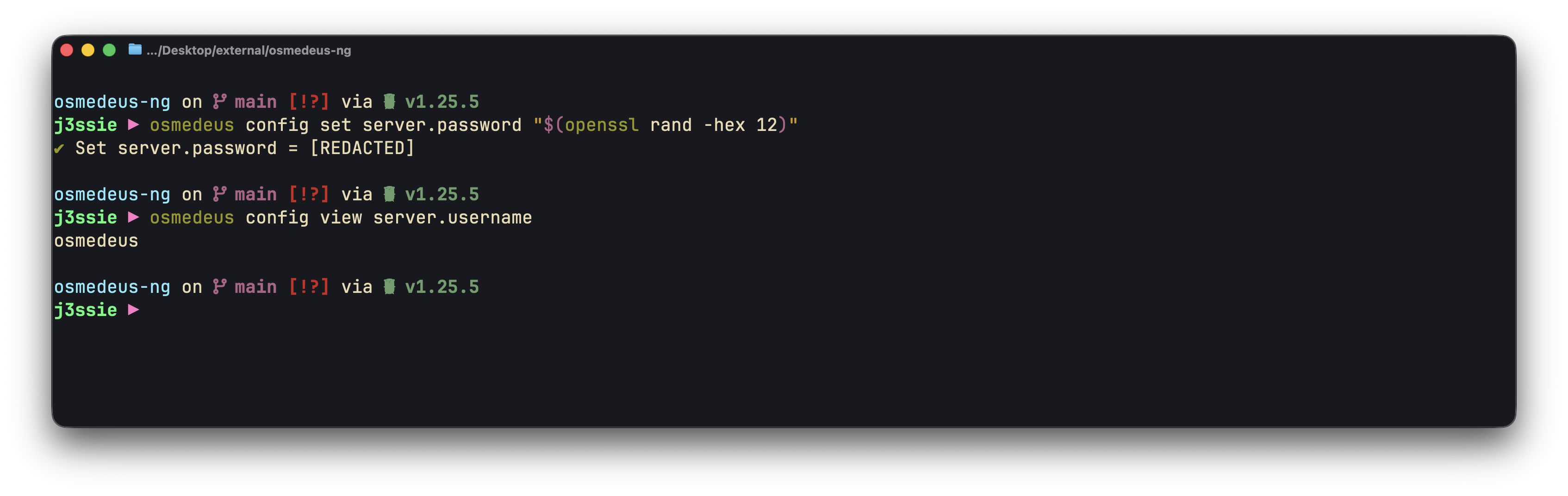
## 2. Use Configuration CLI
Osmedeus provides a CLI tool to manage the configuration file via `osmedeus config` command.
See the full YAML config with comments below to understand what each field means.
For increase the quality of the scan, you mostly need to modify the field `global_vars.[keyname]` which will hold the global variables that can be used in the workflows.
Some example keys can be `GITHUB_API_KEY, SHODAN_API_KEY, PASSIVETOTAL_API_KEY, etc.`
```yaml theme={null}
# Osmedeus Configuration File
# This file contains all available configuration options for osmedeus.
# Copy this file to ~/osmedeus-base/osm-settings.yaml and customize as needed.
# =============================================================================
# Base Folder
# =============================================================================
# Root directory for all osmedeus data (workflows, binaries, data, etc.)
# Environment variables like $HOME are automatically expanded
base_folder: $HOME/osmedeus-base
# =============================================================================
# Environment Paths
# =============================================================================
# Directory paths for various osmedeus components
# Use {{base_folder}} to reference the base_folder value above
environments:
# Path to binary executables (tools like nmap, ffuf, etc.)
external_binaries_path: "{{base_folder}}/external-binaries"
# Data directory for storing assets, wordlists, etc.
external_data: "{{base_folder}}/external-data"
# External configuration files (nuclei templates, etc.)
external_configs: "{{base_folder}}/external-configs"
# Output directory for scan workspaces
# Each target gets its own subdirectory here
workspaces: $HOME/workspaces-osmedeus
# Directory containing workflow YAML files
# Subdirectories: flows/, modules/
workflows: "{{base_folder}}/workflows"
# Directory for workspace snapshots (zip archives)
# Used by the snapshot-download API endpoint
snapshot: "{{base_folder}}/snapshot"
# Directory for markdown report templates
# Used by render_markdown_report() function
markdown_report_templates: "{{base_folder}}/markdown-report-templates"
# Directory for external agent configurations
# Used for LLM Agent commands, skills, and related configurations
external_agent_configs: "{{base_folder}}/external-agent-configs"
# =============================================================================
# Database Configuration
# =============================================================================
# Osmedeus supports SQLite (default) and PostgreSQL
database:
# Database engine: "sqlite" or "postgresql"
db_engine: sqlite
# SQLite: Path to the database file
# Ignored when using PostgreSQL
db_path: "{{base_folder}}/database-osm.sqlite"
# PostgreSQL connection settings
# Only used when db_engine is "postgresql"
host: localhost
port: 5432
username: osmedeus
password: osmedeus
db_name: osmedeus
# Connection timeout in seconds
connection_timeout: 60
# PostgreSQL SSL mode: disable, require, verify-ca, verify-full
ssl_mode: disable
# =============================================================================
# Server Configuration
# =============================================================================
# REST API server settings for the web interface
server:
# Host to bind the server to
# Use "0.0.0.0" to listen on all interfaces
# Use "127.0.0.1" to listen only on localhost
host: "0.0.0.0"
# Port number for the API server
port: 8002
# Path to serve static UI files
# Default: {{base_folder}}/ui/ - if this directory exists, it will be served at /ui
# Set to empty string to disable UI serving
ui_path: "{{base_folder}}/ui/"
# Random prefix for workspace static files (auto-generated 16 chars if empty)
# Used as URL path segment for direct access to workspaces folder
workspace_prefix_key: ""
# Authentication credentials (map of username:password)
# Supports multiple users
simple_user_map_key:
osmedeus: osmedeus-admin
# JWT (JSON Web Token) settings
jwt:
# Secret key for signing JWT tokens
# IMPORTANT: Use a strong, unique secret in production!
secret_signing_key: change-this-secret-in-production
# Token expiration time in minutes
expiration_minutes: 180
# License type shown in HTTP Server header and /server-info endpoint
license: "open-source"
# =============================================================================
# Scan Tactic Configuration
# =============================================================================
# Thread counts for different scan intensity levels
# Higher values = faster but more aggressive scans
# Lower values = slower but gentler on target systems
scan_tactic:
# Aggressive/fast mode - maximum parallelism
# Used with: osmedeus scan -t target --tactic aggressive
aggressive: 40
# Default/normal mode - balanced approach
# Used when no tactic is specified
default: 10
# Gentle/thorough mode - minimal parallelism
# Used with: osmedeus scan -t target --tactic gently
gently: 5
# =============================================================================
# Redis Configuration (Optional)
# =============================================================================
# Redis is required for distributed scanning mode
# Leave host empty to disable Redis
redis:
# Redis server hostname
# Leave empty to disable distributed mode
host: ""
# Redis server port
port: 6379
# Redis authentication (if required)
username: ""
password: ""
# Redis database number (0-15)
db: 0
# Connection timeout in seconds
connection_timeout: 60
# =============================================================================
# Global Variables
# =============================================================================
# User-defined variables available in workflows via {{VARIABLE_NAME}}
# Variables can optionally be exported to environment variables
# Use _API_KEY suffix for secrets to indicate sensitive values
#
# Format:
# VARIABLE_NAME:
# value: "the-value"
# as_env: true # Optional: export as env var (default: true)
#
# Example usage in workflows:
# - bash: "echo {{GITHUB_API_KEY}}"
# - bash: "shodan search $SHODAN_API_KEY" # Uses env var
global_vars:
# GitHub personal access token for API access
GITHUB_API_KEY:
value: ""
as_env: true # Exports as GITHUB_API_KEY
# Shodan API key for passive reconnaissance
SHODAN_API_KEY:
value: ""
as_env: true # Exports as SHODAN_API_KEY
# Censys API key for certificate/host search
CENSYS_API_KEY:
value: ""
as_env: true # Exports as CENSYS_API_KEY
# PassiveTotal API key for passive DNS/WHOIS
PASSIVETOTAL_API_KEY:
value: ""
as_env: true # Exports as PASSIVETOTAL_API_KEY
# Add more API keys as needed (use _API_KEY suffix for secrets)
# =============================================================================
# Notification Configuration
# =============================================================================
# Send notifications when scans complete or find interesting results
notification:
# Notification provider: "telegram" (future: slack, discord, webhook)
provider: telegram
# Master switch to enable/disable all notifications
enabled: false
# Telegram bot settings
# Create a bot via @BotFather and get the token
# Get your chat ID by messaging @userinfobot
telegram:
# Bot token from @BotFather
bot_token: ""
# Chat ID to send messages to (can be user or group)
chat_id: 0
# Enable Telegram notifications
enabled: false
# =============================================================================
# Cloud Storage Configuration (Optional)
# =============================================================================
# S3-compatible storage for backing up scan results
# Supports AWS S3, MinIO, Google Cloud Storage, DigitalOcean Spaces, etc.
storage:
# Storage provider: "s3", "minio", "gcs", "spaces", etc.
provider: s3
# Storage endpoint URL
# AWS S3: Leave empty or use region-specific endpoint
# MinIO: "http://localhost:9000"
# DigitalOcean: "https://nyc3.digitaloceanspaces.com"
endpoint: ""
# Access credentials
access_key_id: ""
secret_access_key: ""
# Bucket name for storing results
bucket: ""
# Cloud region (e.g., us-east-1, eu-west-1)
region: us-east-1
# Use SSL/TLS for connections
use_ssl: true
# Enable cloud storage uploads
enabled: false
# =============================================================================
# LLM Configuration (Optional)
# =============================================================================
# Large Language Model settings for AI-powered features
# Supports providers like Ollama, OpenAI, Anthropic, etc.
# Multiple providers can be configured for automatic rotation on error/rate limit
llm_config:
# List of LLM providers (rotates to next on error/rate limit)
llm_providers:
# Primary provider (used first)
- provider: ollama
base_url: "http://localhost:11434/v1/chat/completions"
auth_token: ""
model: "gpt-oss:120b-cloud"
# Backup provider example (uncomment to enable rotation)
# - provider: openai
# base_url: "https://api.openai.com/v1/chat/completions"
# auth_token: "sk-your-api-key"
# model: "gpt-4"
# Enable LLM tool call features
enabled_tool_call: false
# Maximum number of tokens to generate
max_tokens: 1000
# Temperature for sampling
temperature: 0.7
# Top-k sampling
top_k: 50
# Top-p sampling
top_p: 0.9
# Number of completions to generate
n: 1
# Maximum number of retries for failed requests
max_retries: 3
# Timeout for API requests
timeout: 120s
# Enable streaming responses
stream: false
# Enable structured JSON output format
structured_json_format: false
# System prompt for the LLM
system_prompt: ""
# Custom headers for API requests
custom_headers: ""
```
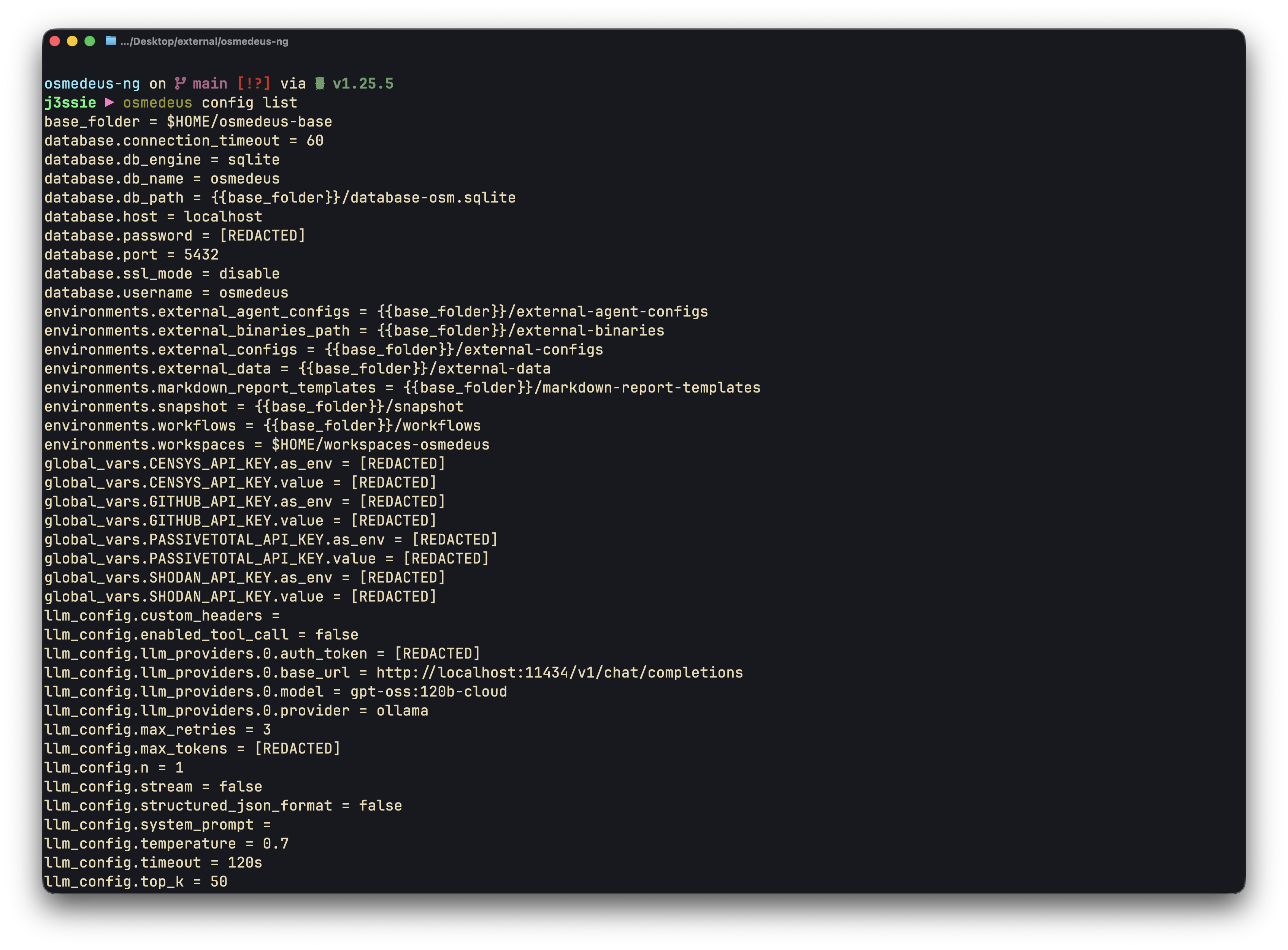
## 2. Use Configuration CLI
Osmedeus provides a CLI tool to manage the configuration file via `osmedeus config` command.
 ```bash theme={null}
base_folder = $HOME/osmedeus-base
database.connection_timeout = 60
database.db_engine = sqlite
database.db_name = osmedeus
database.db_path = {{base_folder}}/database-osm.sqlite
database.host = localhost
database.password = [REDACTED]
database.port = 5432
database.ssl_mode = disable
database.username = osmedeus
environments.external_agent_configs = {{base_folder}}/external-agent-configs
environments.external_binaries_path = {{base_folder}}/external-binaries
environments.external_configs = {{base_folder}}/external-configs
environments.external_data = {{base_folder}}/external-data
environments.markdown_report_templates = {{base_folder}}/markdown-report-templates
environments.snapshot = {{base_folder}}/snapshot
environments.workflows = {{base_folder}}/workflows
environments.workspaces = $HOME/workspaces-osmedeus
global_vars.CENSYS_API_KEY.as_env = [REDACTED]
global_vars.CENSYS_API_KEY.value = [REDACTED]
global_vars.GITHUB_API_KEY.as_env = [REDACTED]
global_vars.GITHUB_API_KEY.value = [REDACTED]
global_vars.PASSIVETOTAL_API_KEY.as_env = [REDACTED]
global_vars.PASSIVETOTAL_API_KEY.value = [REDACTED]
global_vars.SHODAN_API_KEY.as_env = [REDACTED]
global_vars.SHODAN_API_KEY.value = [REDACTED]
llm_config.custom_headers =
llm_config.enabled_tool_call = false
llm_config.llm_providers.0.auth_token = [REDACTED]
llm_config.llm_providers.0.base_url = http://localhost:11434/v1/chat/completions
llm_config.llm_providers.0.model = gpt-oss:120b-cloud
llm_config.llm_providers.0.provider = ollama
llm_config.max_retries = 3
llm_config.max_tokens = [REDACTED]
llm_config.n = 1
llm_config.stream = false
llm_config.structured_json_format = false
llm_config.system_prompt =
llm_config.temperature = 0.7
llm_config.timeout = 120s
llm_config.top_k = 50
llm_config.top_p = 0.9
notification.enabled = false
notification.provider = telegram
notification.telegram.bot_token = [REDACTED]
notification.telegram.chat_id = 0
notification.telegram.enabled = false
redis.connection_timeout = 60
redis.db = 0
redis.host =
redis.password = [REDACTED]
redis.port = 6379
redis.username =
scan_tactic.aggressive = 40
scan_tactic.default = 10
scan_tactic.gently = 5
server.host = 0.0.0.0
server.jwt.expiration_minutes = 180
server.jwt.secret_signing_key = [REDACTED]
server.license = open-source
server.password = [REDACTED]
server.port = 8002
server.simple_user_map_key.osmedeus = [REDACTED]
server.ui_path = {{base_folder}}/ui/
server.username = osmedeus
server.workspace_prefix_key = [REDACTED]
storage.access_key_id = [REDACTED]
storage.bucket =
storage.enabled = false
storage.endpoint =
storage.provider = s3
storage.region = us-east-1
storage.secret_access_key = [REDACTED]
storage.use_ssl = true
```
```bash theme={null}
base_folder = $HOME/osmedeus-base
database.connection_timeout = 60
database.db_engine = sqlite
database.db_name = osmedeus
database.db_path = {{base_folder}}/database-osm.sqlite
database.host = localhost
database.password = [REDACTED]
database.port = 5432
database.ssl_mode = disable
database.username = osmedeus
environments.external_agent_configs = {{base_folder}}/external-agent-configs
environments.external_binaries_path = {{base_folder}}/external-binaries
environments.external_configs = {{base_folder}}/external-configs
environments.external_data = {{base_folder}}/external-data
environments.markdown_report_templates = {{base_folder}}/markdown-report-templates
environments.snapshot = {{base_folder}}/snapshot
environments.workflows = {{base_folder}}/workflows
environments.workspaces = $HOME/workspaces-osmedeus
global_vars.CENSYS_API_KEY.as_env = [REDACTED]
global_vars.CENSYS_API_KEY.value = [REDACTED]
global_vars.GITHUB_API_KEY.as_env = [REDACTED]
global_vars.GITHUB_API_KEY.value = [REDACTED]
global_vars.PASSIVETOTAL_API_KEY.as_env = [REDACTED]
global_vars.PASSIVETOTAL_API_KEY.value = [REDACTED]
global_vars.SHODAN_API_KEY.as_env = [REDACTED]
global_vars.SHODAN_API_KEY.value = [REDACTED]
llm_config.custom_headers =
llm_config.enabled_tool_call = false
llm_config.llm_providers.0.auth_token = [REDACTED]
llm_config.llm_providers.0.base_url = http://localhost:11434/v1/chat/completions
llm_config.llm_providers.0.model = gpt-oss:120b-cloud
llm_config.llm_providers.0.provider = ollama
llm_config.max_retries = 3
llm_config.max_tokens = [REDACTED]
llm_config.n = 1
llm_config.stream = false
llm_config.structured_json_format = false
llm_config.system_prompt =
llm_config.temperature = 0.7
llm_config.timeout = 120s
llm_config.top_k = 50
llm_config.top_p = 0.9
notification.enabled = false
notification.provider = telegram
notification.telegram.bot_token = [REDACTED]
notification.telegram.chat_id = 0
notification.telegram.enabled = false
redis.connection_timeout = 60
redis.db = 0
redis.host =
redis.password = [REDACTED]
redis.port = 6379
redis.username =
scan_tactic.aggressive = 40
scan_tactic.default = 10
scan_tactic.gently = 5
server.host = 0.0.0.0
server.jwt.expiration_minutes = 180
server.jwt.secret_signing_key = [REDACTED]
server.license = open-source
server.password = [REDACTED]
server.port = 8002
server.simple_user_map_key.osmedeus = [REDACTED]
server.ui_path = {{base_folder}}/ui/
server.username = osmedeus
server.workspace_prefix_key = [REDACTED]
storage.access_key_id = [REDACTED]
storage.bucket =
storage.enabled = false
storage.endpoint =
storage.provider = s3
storage.region = us-east-1
storage.secret_access_key = [REDACTED]
storage.use_ssl = true
```