> ## Documentation Index
> Fetch the complete documentation index at: https://docs.osmedeus.org/llms.txt
> Use this file to discover all available pages before exploring further.
# Cloud Usage Guide
> Provision cloud infrastructure and run security workflows or arbitrary commands on cloud VMs
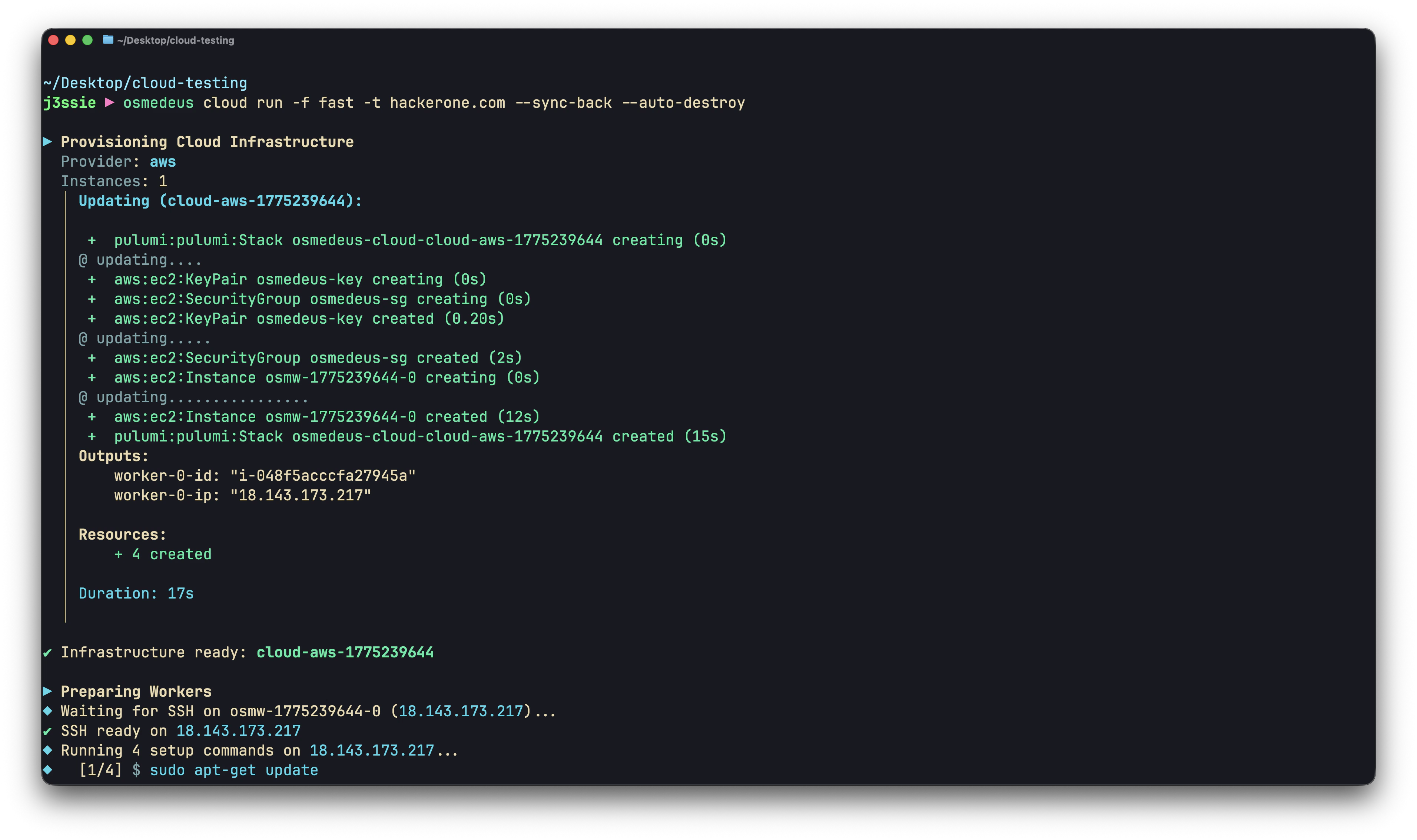
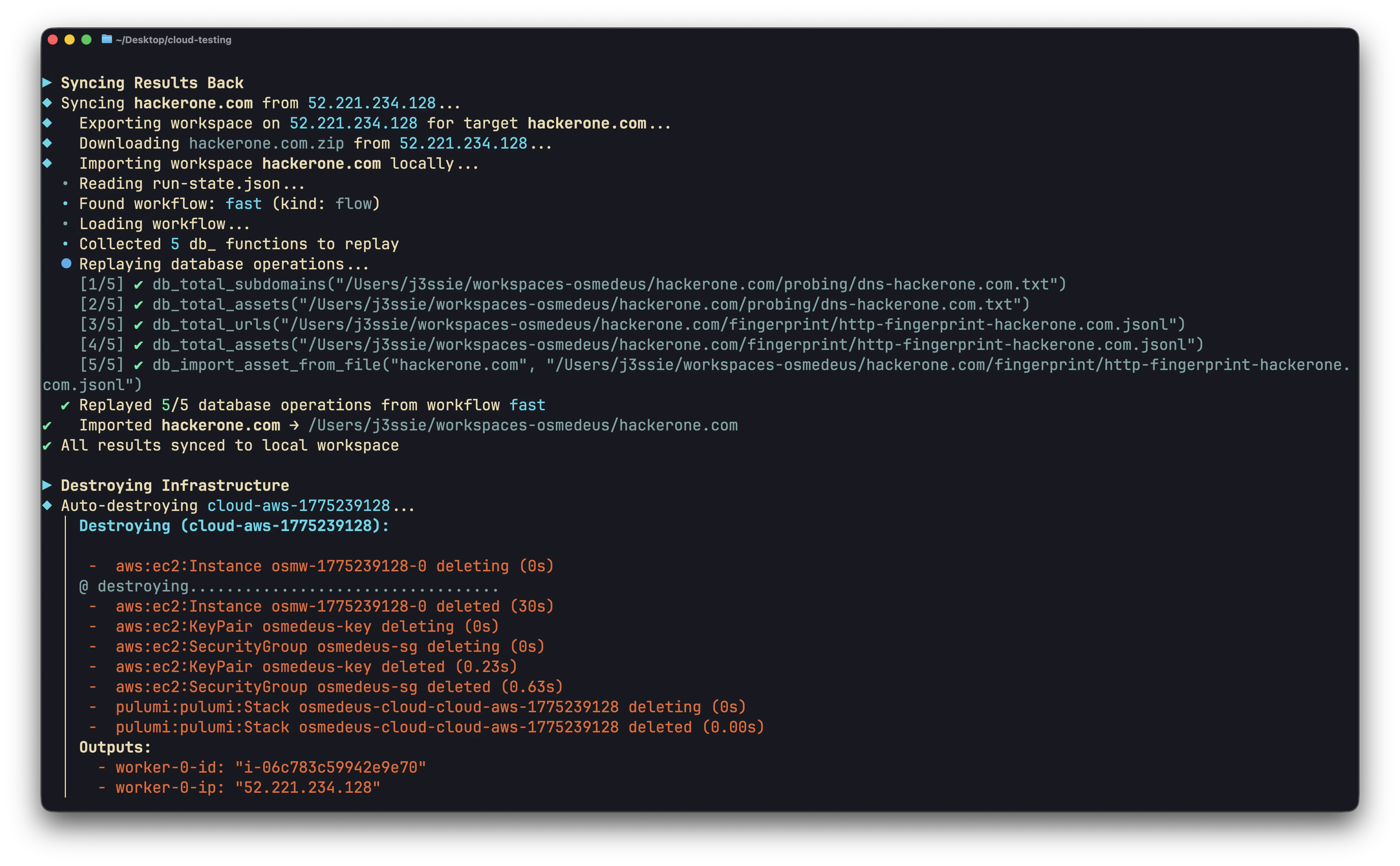 Osmedeus Cloud provisions virtual machines across cloud providers and runs security workflows or arbitrary commands on them. This guide covers the architecture, configuration, and operational patterns.
## How It Works
```
Local Machine Cloud Provider
┌──────────────┐ ┌──────────────────┐
│ osmedeus │ 1. Provision │ Worker VM 1 │
│ cloud run │ ──────────────────► │ ┌────────────┐ │
│ │ 2. SSH setup │ │ osmedeus │ │
│ │ ──────────────────► │ │ + tools │ │
│ │ 3. Stream output │ └────────────┘ │
│ │ ◄────────────────── │ │
│ │ ├──────────────────┤
│ │ (same for each) │ Worker VM 2 │
│ │ ◄──────────────────► │ ... │
│ │ ├──────────────────┤
│ │ 4. Sync results │ Worker VM N │
│ │ ◄────────────────── │ ... │
│ │ 5. Destroy └──────────────────┘
└──────────────┘
```
**Lifecycle:**
1. **Provision** -- Create VMs via Pulumi (or reuse existing ones)
2. **Setup** -- SSH into each worker, run setup commands (install osmedeus, tools, etc.)
3. **Execute** -- Run workflow or custom commands, stream output back in real time
4. **Sync** -- Download results to local machine (optional)
5. **Destroy** -- Tear down infrastructure (optional, can be automatic)
## Supported Providers
| Provider | Config Key | Instance Types |
| ------------ | -------------- | -------------------------------------- |
| AWS | `aws` | t3.medium, t3.large, t3.xlarge |
| DigitalOcean | `digitalocean` | s-2vcpu-4gb, s-4vcpu-8gb, s-8vcpu-16gb |
| GCP | `gcp` | n1-standard-2, n1-standard-4 |
| Hetzner | `hetzner` | cx22, cx32, cx42 |
| Linode | `linode` | g6-standard-2, g6-standard-4 |
| Azure | `azure` | Standard\_B2s, Standard\_D2s\_v3 |
## Configuration
Cloud config lives in `~/.osmedeus/cloud/cloud-settings.yaml`. Manage it with:
```bash theme={null}
# Set a value
osmedeus cloud config set
# View current config
osmedeus cloud config list
# Reset to defaults
osmedeus cloud config clean
```
### Required Configuration
Every provider needs four things: **cloud enabled**, **credentials**, **SSH keys**, and **setup commands**.
```bash theme={null}
# 0. Enable cloud feature
osmedeus config set cloud.enabled true
# 1. Provider credentials (example: AWS)
osmedeus cloud config set providers.aws.access_key_id ${AWS_ACCESS_KEY_ID}
osmedeus cloud config set providers.aws.secret_access_key ${AWS_SECRET_ACCESS_KEY}
osmedeus cloud config set providers.aws.region ap-southeast-1
# 2. SSH keys (used to connect to workers)
osmedeus cloud config set ssh.private_key_path ~/.ssh/id_rsa
osmedeus cloud config set ssh.public_key_path ~/.ssh/id_rsa.pub
# 3. Clean the setup scripts first, then add setup commands (run on each worker before scanning)
osmedeus cloud config set setup.commands.clear ""
osmedeus cloud config set setup.commands.add "curl -fsSL https://www.osmedeus.org/install.sh | bash"
osmedeus cloud config set setup.commands.add "osmedeus install base --preset"
# 4. Set default provider
osmedeus cloud config set defaults.provider aws
```
### Optional Configuration
```bash theme={null}
# Instance type
osmedeus cloud config set providers.aws.instance_type t3.large
# Use spot/preemptible instances (70-80% cheaper)
osmedeus cloud config set providers.aws.use_spot true
# Cost limits
osmedeus cloud config set limits.max_hourly_spend 1.00
osmedeus cloud config set limits.max_total_spend 10.00
osmedeus cloud config set limits.max_instances 10
# Default timeout
osmedeus cloud config set defaults.timeout 2h
# SSH user (default: root for most providers, ubuntu for AWS)
osmedeus cloud config set ssh.user root
```
### Post-Setup Commands
Post-setup commands run per-worker after the main setup, with template variables expanded:
```bash theme={null}
osmedeus cloud config set setup.post_commands.add "echo 'Worker {{index}} ready at {{public_ip}}'"
```
Available variables: `{{public_ip}}`, `{{private_ip}}`, `{{worker_name}}`, `{{worker_id}}`, `{{infra_id}}`, `{{provider}}`, `{{ssh_user}}`, `{{index}}`
## Two Execution Modes
### Workflow Mode (default)
Runs an osmedeus flow or module on remote workers:
```bash theme={null}
# Run a flow
osmedeus cloud run -f fast -t example.com
# Run a module
osmedeus cloud run -m enum-subdomain -t example.com
```
### Custom Command Mode
Runs arbitrary shell commands on remote workers -- no osmedeus workflow required:
```bash theme={null}
osmedeus cloud run --custom-cmd "nmap -sV {{Target}} -oA /tmp/osm-custom/nmap" -t example.com
```
`--custom-cmd` is mutually exclusive with `-f`/`-m`. See [Custom Command Mode](#custom-command-mode-details) below.
## Infrastructure Management
### Provisioning
```bash theme={null}
# Provision with cloud run (creates + runs + optional destroy)
osmedeus cloud run -f fast -t example.com --instances 3
# Provision separately (no scan)
osmedeus cloud create --provider aws -n 3
```
### Listing
```bash theme={null}
osmedeus cloud list
```
### Reusing Existing Infrastructure
```bash theme={null}
# Auto-discover from saved state
osmedeus cloud run -f fast -t example.com --reuse
# Specify IPs directly
osmedeus cloud run -f fast -t example.com --reuse-with "1.2.3.4,5.6.7.8"
```
### Destroying
```bash theme={null}
# Destroy specific infrastructure
osmedeus cloud destroy
# Destroy all
osmedeus cloud destroy all --force
```
## Target Distribution
When scanning multiple targets across multiple workers, osmedeus splits the target list into chunks:
```bash theme={null}
# 100 targets across 5 workers = 20 targets each
osmedeus cloud run -f fast -T targets.txt --instances 5
# Control chunk size: 10 targets per worker
osmedeus cloud run -f fast -T targets.txt --instances 10 --chunk-size 10
# Control chunk count: split into exactly 3 chunks
osmedeus cloud run -f fast -T targets.txt --instances 5 --chunk-count 3
```
Each worker receives its chunk as a file at `/tmp/osm-targets-{i}.txt` on the remote machine.
## Custom Command Mode Details
Run any commands on cloud instances without using osmedeus workflows. Commands run in `/tmp/osm-custom/` on the remote.
### Flags
| Flag | Description |
| ------------------- | --------------------------------------------------------------- |
| `--custom-cmd` | Command to run (repeatable, sequential per worker) |
| `--custom-post-cmd` | Runs after all custom-cmds succeed (repeatable) |
| `--sync-path` | Remote path to download after execution (repeatable) |
| `--sync-dest` | Local base directory for downloads (default: `./osm-sync-back`) |
### Template Variables
All commands and sync paths support these variables:
| Variable | Description | Example |
| ----------------- | ------------------------------------------- | ----------------------------------------- |
| `{{Target}}` | Target string, or chunk file path with `-T` | `example.com` or `/tmp/osm-targets-0.txt` |
| `{{public_ip}}` | Worker's public IP | `203.0.113.10` |
| `{{private_ip}}` | Worker's private IP | `10.0.0.5` |
| `{{worker_name}}` | Resource name | `osmw-1775159841-0` |
| `{{worker_id}}` | Cloud resource ID | `i-0437adf5...` |
| `{{infra_id}}` | Infrastructure ID | `cloud-aws-1775159841` |
| `{{provider}}` | Provider name | `aws` |
| `{{ssh_user}}` | SSH username | `ubuntu` |
| `{{index}}` | Worker index | `0`, `1`, `2` |
### Execution Rules
* Custom-cmds run **sequentially** on each worker, but **in parallel** across workers
* If any `--custom-cmd` fails (non-zero exit), remaining commands and all `--custom-post-cmd` are skipped for that worker
* Post-cmd failures are logged but do not affect other workers
### Sync-Back
Downloaded files are placed at: `/-/`
For example, `--sync-path /tmp/osm-custom/results.txt` from worker `osmw-0` at `1.2.3.4`:
```
./osm-sync-back/osmw-0-1.2.3.4/tmp/osm-custom/results.txt
```
### Examples
```bash theme={null}
# Simple: run nmap on a cloud instance
osmedeus cloud run \
--custom-cmd "nmap -sV {{Target}} -oA /tmp/osm-custom/nmap-result" \
--sync-path "/tmp/osm-custom/" \
-t example.com --auto-destroy
# Multi-step pipeline with post-processing
osmedeus cloud run \
--custom-cmd "subfinder -d {{Target}} -o /tmp/osm-custom/subs.txt" \
--custom-cmd "cat /tmp/osm-custom/subs.txt | httpx -o /tmp/osm-custom/live.txt" \
--custom-post-cmd "wc -l /tmp/osm-custom/live.txt" \
--sync-path "/tmp/osm-custom/subs.txt" \
--sync-path "/tmp/osm-custom/live.txt" \
-t example.com
# Distribute target list across 5 workers
osmedeus cloud run \
--custom-cmd "cat {{Target}} | nuclei -o /tmp/osm-custom/nuclei.txt" \
--sync-path "/tmp/osm-custom/nuclei.txt" \
--sync-dest "./nuclei-results" \
-T targets.txt --instances 5 --auto-destroy
```
## Syncing Results
### Workflow Mode: `--sync-back`
Exports osmedeus workspaces (including database state) from remote workers and imports them locally:
```bash theme={null}
osmedeus cloud run -f fast -t example.com --sync-back
```
### Custom Mode: `--sync-path`
Downloads specific files or directories via SFTP:
```bash theme={null}
osmedeus cloud run --custom-cmd "..." --sync-path "/tmp/osm-custom/" -t example.com
```
## Cost Management
### Pre-Provisioning Estimates
Costs are estimated before provisioning. Set limits to prevent overspending:
```bash theme={null}
osmedeus cloud config set limits.max_hourly_spend 1.00
osmedeus cloud config set limits.max_total_spend 10.00
osmedeus cloud config set limits.max_instances 10
```
### Spot/Preemptible Instances
Save 70-80% on instance costs:
```bash theme={null}
# AWS spot instances
osmedeus cloud config set providers.aws.use_spot true
# GCP preemptible instances
osmedeus cloud config set providers.gcp.use_preemptible true
```
### Cost Reference
| Provider | Instance | vCPU | RAM | Hourly |
| ------------ | ------------- | ---- | ------ | --------- |
| Hetzner | cx22 | 2 | 4 GB | \~\$0.007 |
| Linode | g6-standard-2 | 2 | 4 GB | \$0.018 |
| DigitalOcean | s-2vcpu-4gb | 2 | 4 GB | \$0.02232 |
| AWS | t3.medium | 2 | 4 GB | \$0.0416 |
| GCP | n1-standard-2 | 2 | 7.5 GB | \$0.095 |
| Azure | Standard\_B2s | 2 | 4 GB | \$0.042 |
**Example:** 5 DigitalOcean s-2vcpu-4gb instances for 2 hours = 5 x $0.02232 x 2 = **$0.22\*\*
## Worker Setup
Workers are set up via SSH after provisioning. The setup flow:
1. **Cloud-init** (automatic): Installs SSH keys, basic packages
2. **Setup commands** (`setup.commands`): Install osmedeus, tools, base data
3. **Post-setup commands** (`setup.post_commands`): Per-worker configuration with template variables
### Ansible Alternative
For complex setups, use Ansible instead of SSH commands:
```bash theme={null}
osmedeus cloud config set setup.ansible.enabled true
osmedeus cloud config set setup.ansible.playbook_path /path/to/playbook.yaml
osmedeus cloud run -f fast -t example.com --ansible
```
### Setup on Existing Machines
```bash theme={null}
osmedeus cloud setup --reuse-with "1.2.3.4,5.6.7.8"
```
## Troubleshooting
### Workers Not Connecting
```bash theme={null}
# Verbose setup to see SSH output
osmedeus cloud run -f fast -t example.com --verbose-setup
# Debug mode for full logging
osmedeus cloud run -f fast -t example.com --debug
```
### Infrastructure Stuck
```bash theme={null}
# List all infrastructure
osmedeus cloud list
# Force destroy everything
osmedeus cloud destroy all --force
```
### Cost Exceeded
If cost limits are hit, provisioning is blocked. Adjust limits:
```bash theme={null}
osmedeus cloud config set limits.max_hourly_spend 5.00
```
## Best Practices
1. **Always set cost limits** before running large-scale scans
2. **Use `--auto-destroy`** to avoid forgotten instances accruing charges
3. **Use spot instances** for non-critical scans (70-80% savings)
4. **Use `--reuse`** to avoid re-provisioning for iterative work
5. **Start small** -- test with 1 instance before scaling up
6. **Use custom snapshots** with tools pre-installed to cut setup time from 5min to 30s
7. **Check `cloud list`** regularly to verify no orphaned infrastructure
Osmedeus Cloud provisions virtual machines across cloud providers and runs security workflows or arbitrary commands on them. This guide covers the architecture, configuration, and operational patterns.
## How It Works
```
Local Machine Cloud Provider
┌──────────────┐ ┌──────────────────┐
│ osmedeus │ 1. Provision │ Worker VM 1 │
│ cloud run │ ──────────────────► │ ┌────────────┐ │
│ │ 2. SSH setup │ │ osmedeus │ │
│ │ ──────────────────► │ │ + tools │ │
│ │ 3. Stream output │ └────────────┘ │
│ │ ◄────────────────── │ │
│ │ ├──────────────────┤
│ │ (same for each) │ Worker VM 2 │
│ │ ◄──────────────────► │ ... │
│ │ ├──────────────────┤
│ │ 4. Sync results │ Worker VM N │
│ │ ◄────────────────── │ ... │
│ │ 5. Destroy └──────────────────┘
└──────────────┘
```
**Lifecycle:**
1. **Provision** -- Create VMs via Pulumi (or reuse existing ones)
2. **Setup** -- SSH into each worker, run setup commands (install osmedeus, tools, etc.)
3. **Execute** -- Run workflow or custom commands, stream output back in real time
4. **Sync** -- Download results to local machine (optional)
5. **Destroy** -- Tear down infrastructure (optional, can be automatic)
## Supported Providers
| Provider | Config Key | Instance Types |
| ------------ | -------------- | -------------------------------------- |
| AWS | `aws` | t3.medium, t3.large, t3.xlarge |
| DigitalOcean | `digitalocean` | s-2vcpu-4gb, s-4vcpu-8gb, s-8vcpu-16gb |
| GCP | `gcp` | n1-standard-2, n1-standard-4 |
| Hetzner | `hetzner` | cx22, cx32, cx42 |
| Linode | `linode` | g6-standard-2, g6-standard-4 |
| Azure | `azure` | Standard\_B2s, Standard\_D2s\_v3 |
## Configuration
Cloud config lives in `~/.osmedeus/cloud/cloud-settings.yaml`. Manage it with:
```bash theme={null}
# Set a value
osmedeus cloud config set
# View current config
osmedeus cloud config list
# Reset to defaults
osmedeus cloud config clean
```
### Required Configuration
Every provider needs four things: **cloud enabled**, **credentials**, **SSH keys**, and **setup commands**.
```bash theme={null}
# 0. Enable cloud feature
osmedeus config set cloud.enabled true
# 1. Provider credentials (example: AWS)
osmedeus cloud config set providers.aws.access_key_id ${AWS_ACCESS_KEY_ID}
osmedeus cloud config set providers.aws.secret_access_key ${AWS_SECRET_ACCESS_KEY}
osmedeus cloud config set providers.aws.region ap-southeast-1
# 2. SSH keys (used to connect to workers)
osmedeus cloud config set ssh.private_key_path ~/.ssh/id_rsa
osmedeus cloud config set ssh.public_key_path ~/.ssh/id_rsa.pub
# 3. Clean the setup scripts first, then add setup commands (run on each worker before scanning)
osmedeus cloud config set setup.commands.clear ""
osmedeus cloud config set setup.commands.add "curl -fsSL https://www.osmedeus.org/install.sh | bash"
osmedeus cloud config set setup.commands.add "osmedeus install base --preset"
# 4. Set default provider
osmedeus cloud config set defaults.provider aws
```
### Optional Configuration
```bash theme={null}
# Instance type
osmedeus cloud config set providers.aws.instance_type t3.large
# Use spot/preemptible instances (70-80% cheaper)
osmedeus cloud config set providers.aws.use_spot true
# Cost limits
osmedeus cloud config set limits.max_hourly_spend 1.00
osmedeus cloud config set limits.max_total_spend 10.00
osmedeus cloud config set limits.max_instances 10
# Default timeout
osmedeus cloud config set defaults.timeout 2h
# SSH user (default: root for most providers, ubuntu for AWS)
osmedeus cloud config set ssh.user root
```
### Post-Setup Commands
Post-setup commands run per-worker after the main setup, with template variables expanded:
```bash theme={null}
osmedeus cloud config set setup.post_commands.add "echo 'Worker {{index}} ready at {{public_ip}}'"
```
Available variables: `{{public_ip}}`, `{{private_ip}}`, `{{worker_name}}`, `{{worker_id}}`, `{{infra_id}}`, `{{provider}}`, `{{ssh_user}}`, `{{index}}`
## Two Execution Modes
### Workflow Mode (default)
Runs an osmedeus flow or module on remote workers:
```bash theme={null}
# Run a flow
osmedeus cloud run -f fast -t example.com
# Run a module
osmedeus cloud run -m enum-subdomain -t example.com
```
### Custom Command Mode
Runs arbitrary shell commands on remote workers -- no osmedeus workflow required:
```bash theme={null}
osmedeus cloud run --custom-cmd "nmap -sV {{Target}} -oA /tmp/osm-custom/nmap" -t example.com
```
`--custom-cmd` is mutually exclusive with `-f`/`-m`. See [Custom Command Mode](#custom-command-mode-details) below.
## Infrastructure Management
### Provisioning
```bash theme={null}
# Provision with cloud run (creates + runs + optional destroy)
osmedeus cloud run -f fast -t example.com --instances 3
# Provision separately (no scan)
osmedeus cloud create --provider aws -n 3
```
### Listing
```bash theme={null}
osmedeus cloud list
```
### Reusing Existing Infrastructure
```bash theme={null}
# Auto-discover from saved state
osmedeus cloud run -f fast -t example.com --reuse
# Specify IPs directly
osmedeus cloud run -f fast -t example.com --reuse-with "1.2.3.4,5.6.7.8"
```
### Destroying
```bash theme={null}
# Destroy specific infrastructure
osmedeus cloud destroy
# Destroy all
osmedeus cloud destroy all --force
```
## Target Distribution
When scanning multiple targets across multiple workers, osmedeus splits the target list into chunks:
```bash theme={null}
# 100 targets across 5 workers = 20 targets each
osmedeus cloud run -f fast -T targets.txt --instances 5
# Control chunk size: 10 targets per worker
osmedeus cloud run -f fast -T targets.txt --instances 10 --chunk-size 10
# Control chunk count: split into exactly 3 chunks
osmedeus cloud run -f fast -T targets.txt --instances 5 --chunk-count 3
```
Each worker receives its chunk as a file at `/tmp/osm-targets-{i}.txt` on the remote machine.
## Custom Command Mode Details
Run any commands on cloud instances without using osmedeus workflows. Commands run in `/tmp/osm-custom/` on the remote.
### Flags
| Flag | Description |
| ------------------- | --------------------------------------------------------------- |
| `--custom-cmd` | Command to run (repeatable, sequential per worker) |
| `--custom-post-cmd` | Runs after all custom-cmds succeed (repeatable) |
| `--sync-path` | Remote path to download after execution (repeatable) |
| `--sync-dest` | Local base directory for downloads (default: `./osm-sync-back`) |
### Template Variables
All commands and sync paths support these variables:
| Variable | Description | Example |
| ----------------- | ------------------------------------------- | ----------------------------------------- |
| `{{Target}}` | Target string, or chunk file path with `-T` | `example.com` or `/tmp/osm-targets-0.txt` |
| `{{public_ip}}` | Worker's public IP | `203.0.113.10` |
| `{{private_ip}}` | Worker's private IP | `10.0.0.5` |
| `{{worker_name}}` | Resource name | `osmw-1775159841-0` |
| `{{worker_id}}` | Cloud resource ID | `i-0437adf5...` |
| `{{infra_id}}` | Infrastructure ID | `cloud-aws-1775159841` |
| `{{provider}}` | Provider name | `aws` |
| `{{ssh_user}}` | SSH username | `ubuntu` |
| `{{index}}` | Worker index | `0`, `1`, `2` |
### Execution Rules
* Custom-cmds run **sequentially** on each worker, but **in parallel** across workers
* If any `--custom-cmd` fails (non-zero exit), remaining commands and all `--custom-post-cmd` are skipped for that worker
* Post-cmd failures are logged but do not affect other workers
### Sync-Back
Downloaded files are placed at: `/-/`
For example, `--sync-path /tmp/osm-custom/results.txt` from worker `osmw-0` at `1.2.3.4`:
```
./osm-sync-back/osmw-0-1.2.3.4/tmp/osm-custom/results.txt
```
### Examples
```bash theme={null}
# Simple: run nmap on a cloud instance
osmedeus cloud run \
--custom-cmd "nmap -sV {{Target}} -oA /tmp/osm-custom/nmap-result" \
--sync-path "/tmp/osm-custom/" \
-t example.com --auto-destroy
# Multi-step pipeline with post-processing
osmedeus cloud run \
--custom-cmd "subfinder -d {{Target}} -o /tmp/osm-custom/subs.txt" \
--custom-cmd "cat /tmp/osm-custom/subs.txt | httpx -o /tmp/osm-custom/live.txt" \
--custom-post-cmd "wc -l /tmp/osm-custom/live.txt" \
--sync-path "/tmp/osm-custom/subs.txt" \
--sync-path "/tmp/osm-custom/live.txt" \
-t example.com
# Distribute target list across 5 workers
osmedeus cloud run \
--custom-cmd "cat {{Target}} | nuclei -o /tmp/osm-custom/nuclei.txt" \
--sync-path "/tmp/osm-custom/nuclei.txt" \
--sync-dest "./nuclei-results" \
-T targets.txt --instances 5 --auto-destroy
```
## Syncing Results
### Workflow Mode: `--sync-back`
Exports osmedeus workspaces (including database state) from remote workers and imports them locally:
```bash theme={null}
osmedeus cloud run -f fast -t example.com --sync-back
```
### Custom Mode: `--sync-path`
Downloads specific files or directories via SFTP:
```bash theme={null}
osmedeus cloud run --custom-cmd "..." --sync-path "/tmp/osm-custom/" -t example.com
```
## Cost Management
### Pre-Provisioning Estimates
Costs are estimated before provisioning. Set limits to prevent overspending:
```bash theme={null}
osmedeus cloud config set limits.max_hourly_spend 1.00
osmedeus cloud config set limits.max_total_spend 10.00
osmedeus cloud config set limits.max_instances 10
```
### Spot/Preemptible Instances
Save 70-80% on instance costs:
```bash theme={null}
# AWS spot instances
osmedeus cloud config set providers.aws.use_spot true
# GCP preemptible instances
osmedeus cloud config set providers.gcp.use_preemptible true
```
### Cost Reference
| Provider | Instance | vCPU | RAM | Hourly |
| ------------ | ------------- | ---- | ------ | --------- |
| Hetzner | cx22 | 2 | 4 GB | \~\$0.007 |
| Linode | g6-standard-2 | 2 | 4 GB | \$0.018 |
| DigitalOcean | s-2vcpu-4gb | 2 | 4 GB | \$0.02232 |
| AWS | t3.medium | 2 | 4 GB | \$0.0416 |
| GCP | n1-standard-2 | 2 | 7.5 GB | \$0.095 |
| Azure | Standard\_B2s | 2 | 4 GB | \$0.042 |
**Example:** 5 DigitalOcean s-2vcpu-4gb instances for 2 hours = 5 x $0.02232 x 2 = **$0.22\*\*
## Worker Setup
Workers are set up via SSH after provisioning. The setup flow:
1. **Cloud-init** (automatic): Installs SSH keys, basic packages
2. **Setup commands** (`setup.commands`): Install osmedeus, tools, base data
3. **Post-setup commands** (`setup.post_commands`): Per-worker configuration with template variables
### Ansible Alternative
For complex setups, use Ansible instead of SSH commands:
```bash theme={null}
osmedeus cloud config set setup.ansible.enabled true
osmedeus cloud config set setup.ansible.playbook_path /path/to/playbook.yaml
osmedeus cloud run -f fast -t example.com --ansible
```
### Setup on Existing Machines
```bash theme={null}
osmedeus cloud setup --reuse-with "1.2.3.4,5.6.7.8"
```
## Troubleshooting
### Workers Not Connecting
```bash theme={null}
# Verbose setup to see SSH output
osmedeus cloud run -f fast -t example.com --verbose-setup
# Debug mode for full logging
osmedeus cloud run -f fast -t example.com --debug
```
### Infrastructure Stuck
```bash theme={null}
# List all infrastructure
osmedeus cloud list
# Force destroy everything
osmedeus cloud destroy all --force
```
### Cost Exceeded
If cost limits are hit, provisioning is blocked. Adjust limits:
```bash theme={null}
osmedeus cloud config set limits.max_hourly_spend 5.00
```
## Best Practices
1. **Always set cost limits** before running large-scale scans
2. **Use `--auto-destroy`** to avoid forgotten instances accruing charges
3. **Use spot instances** for non-critical scans (70-80% savings)
4. **Use `--reuse`** to avoid re-provisioning for iterative work
5. **Start small** -- test with 1 instance before scaling up
6. **Use custom snapshots** with tools pre-installed to cut setup time from 5min to 30s
7. **Check `cloud list`** regularly to verify no orphaned infrastructure