> ## Documentation Index
> Fetch the complete documentation index at: https://docs.osmedeus.org/llms.txt
> Use this file to discover all available pages before exploring further.
# AWS Provider Guide
> Step-by-step guide for running osmedeus cloud on AWS EC2 instances
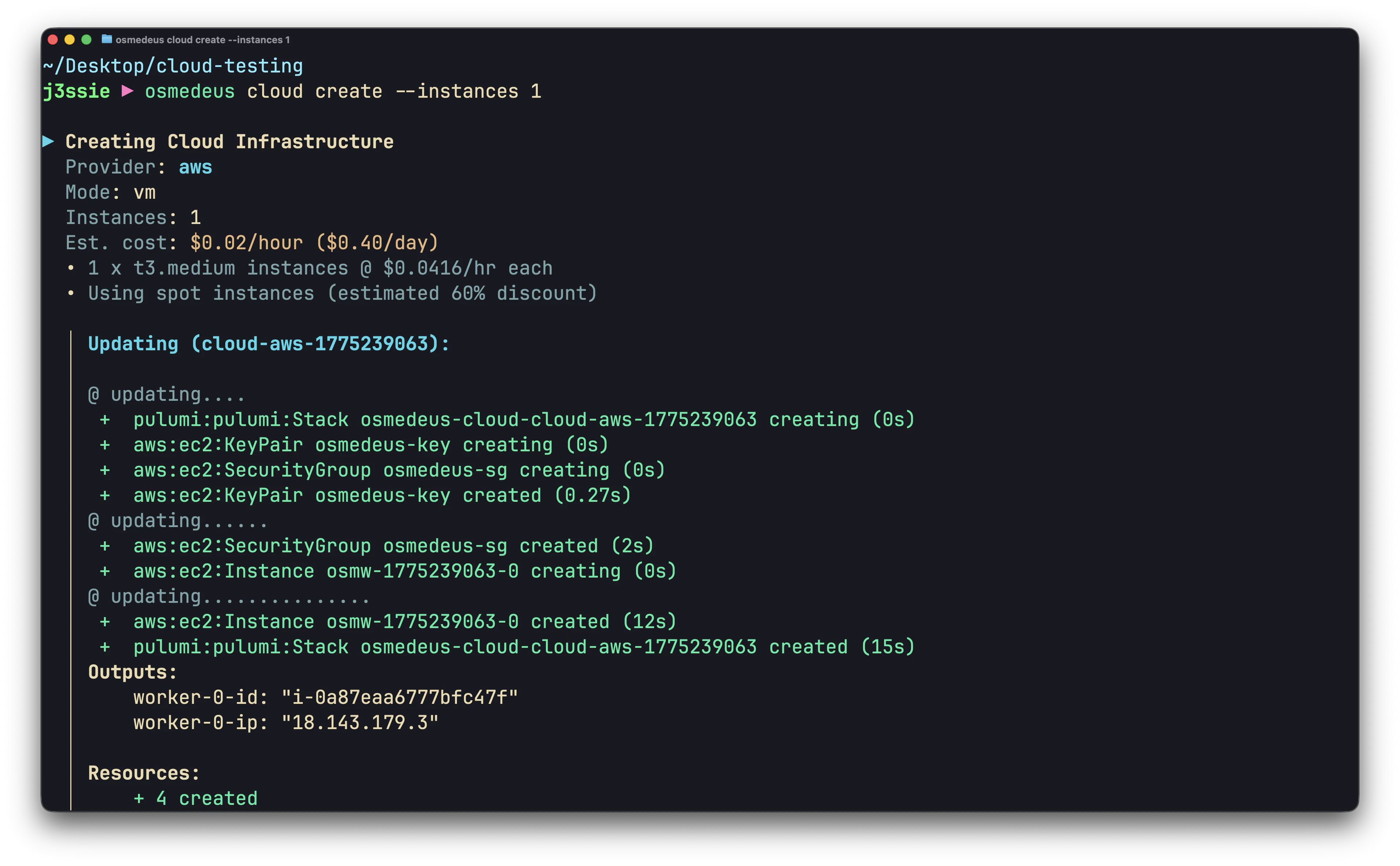
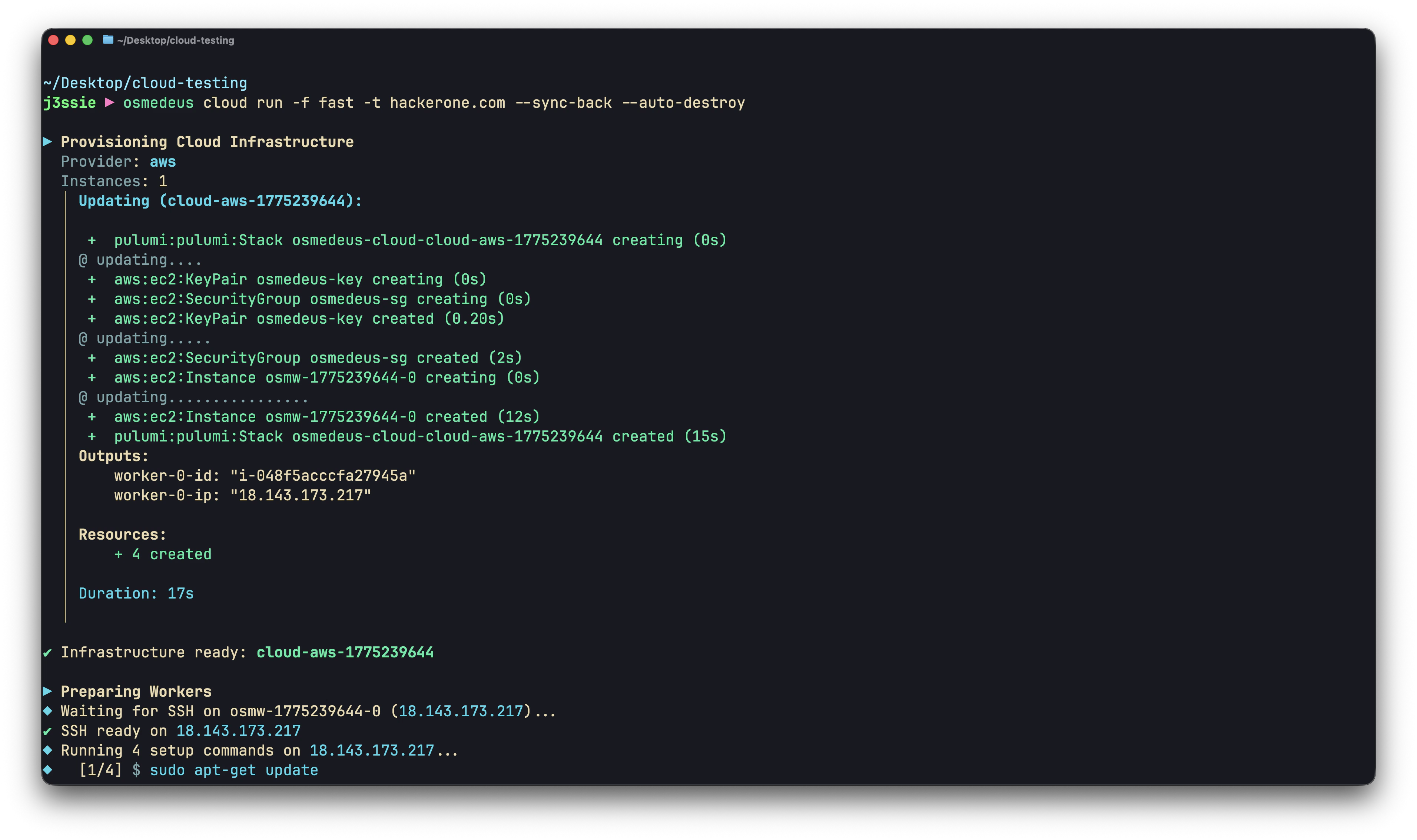 Step-by-step guide for running osmedeus cloud on AWS EC2 instances.
## Prerequisites
* An AWS account
* An IAM user or role with EC2 permissions
* An SSH key pair (local `~/.ssh/id_rsa` and `~/.ssh/id_rsa.pub`)
### Required IAM Permissions
The IAM user needs these permissions (or use the `AmazonEC2FullAccess` managed policy):
```
ec2:RunInstances
ec2:TerminateInstances
ec2:DescribeInstances
ec2:DescribeImages
ec2:CreateSecurityGroup
ec2:AuthorizeSecurityGroupIngress
ec2:DeleteSecurityGroup
ec2:DescribeSecurityGroups
ec2:ImportKeyPair
ec2:DeleteKeyPair
ec2:DescribeKeyPairs
ec2:CreateTags
```
### Get Your Credentials
1. Go to **IAM Console** > **Users** > select your user
2. **Security credentials** tab > **Create access key**
3. Save the **Access key ID** and **Secret access key**
Or use environment variables if already configured for AWS CLI:
```bash theme={null}
export AWS_ACCESS_KEY_ID=
export AWS_SECRET_ACCESS_KEY=
```
## Configuration
### Minimal Setup
```bash theme={null}
# Enable cloud feature
osmedeus config set cloud.enabled true
# Credentials
osmedeus cloud config set providers.aws.access_key_id ${AWS_ACCESS_KEY_ID}
osmedeus cloud config set providers.aws.secret_access_key ${AWS_SECRET_ACCESS_KEY}
osmedeus cloud config set providers.aws.region ap-southeast-1
osmedeus cloud config set defaults.provider aws
# SSH
osmedeus cloud config set ssh.private_key_path ~/.ssh/id_rsa
osmedeus cloud config set ssh.public_key_path ~/.ssh/id_rsa.pub
osmedeus cloud config set ssh.user ubuntu
# Clean the setup scripts first
osmedeus cloud config set setup.commands.clear ""
# Worker setup
osmedeus cloud config set setup.commands.add "sudo apt-get update"
osmedeus cloud config set setup.commands.add "sudo apt-get install -y -qq curl git tmux unzip jq rsync"
osmedeus cloud config set setup.commands.add "curl -fsSL https://www.osmedeus.org/install.sh | bash"
osmedeus cloud config set setup.commands.add "osmedeus health"
```
### Instance Types
| Instance | vCPU | RAM | \$/hr (on-demand) | \$/hr (spot, \~70% off) | Best For |
| ---------- | ---- | ----- | ----------------- | ----------------------- | ------------------------------- |
| t3.medium | 2 | 4 GB | \$0.0416 | \~\$0.012 | Light scans, single targets |
| t3.large | 2 | 8 GB | \$0.0832 | \~\$0.025 | General scanning |
| t3.xlarge | 4 | 16 GB | \$0.1664 | \~\$0.050 | Heavy scans, large target lists |
| t3.2xlarge | 8 | 32 GB | \$0.3328 | \~\$0.100 | Parallel pipelines |
```bash theme={null}
# Set instance type
osmedeus cloud config set providers.aws.instance_type t3.large
```
### Spot Instances
Spot instances cost 60-80% less than on-demand. They can be interrupted but are fine for security scanning (stateless, can retry).
```bash theme={null}
osmedeus cloud config set providers.aws.use_spot true
```
### Regions
Pick a region close to your targets or with the lowest pricing:
| Region | Location | Code |
| ------------------------ | --------- | ---------------- |
| US East (N. Virginia) | US | `us-east-1` |
| US West (Oregon) | US | `us-west-2` |
| EU (Frankfurt) | Europe | `eu-central-1` |
| EU (Ireland) | Europe | `eu-west-1` |
| Asia Pacific (Singapore) | Asia | `ap-southeast-1` |
| Asia Pacific (Tokyo) | Asia | `ap-northeast-1` |
| Asia Pacific (Mumbai) | Asia | `ap-south-1` |
| Asia Pacific (Sydney) | Australia | `ap-southeast-2` |
```bash theme={null}
osmedeus cloud config set providers.aws.region us-east-1
```
### Custom AMI
Use a custom AMI with tools pre-installed for faster startup:
```bash theme={null}
# Find the default Ubuntu AMI for your region
# aws ec2 describe-images --owners 099720109477 --filters "Name=name,Values=ubuntu/images/hvm-ssd/ubuntu-*-amd64-*" --query 'sort_by(Images, &CreationDate)[-1].ImageId'
# Or use your own pre-built AMI
osmedeus cloud config set providers.aws.ami ami-0123456789abcdef0
```
### Cost Limits
```bash theme={null}
osmedeus cloud config set limits.max_hourly_spend 1.00
osmedeus cloud config set limits.max_total_spend 10.00
osmedeus cloud config set limits.max_instances 10
```
## Examples
### Quick Domain Recon
```bash theme={null}
osmedeus cloud run -f fast -t example.com --auto-destroy
```
Cost: \~\$0.04 (1 x t3.medium x 1 hour)
### Large-Scale Subdomain Enumeration
```bash theme={null}
# targets.txt: one domain per line
osmedeus cloud run -f general -T targets.txt --instances 5 --sync-back --auto-destroy
```
Cost: \~\$0.42 (5 x t3.medium x 2 hours)
### Custom Nmap Scan
```bash theme={null}
osmedeus cloud run \
--custom-cmd "nmap -sV -sC {{Target}} -oA /tmp/osm-custom/nmap" \
--sync-path "/tmp/osm-custom/" \
-t example.com --auto-destroy
```
### Distributed Nuclei Scanning
```bash theme={null}
osmedeus cloud run \
--custom-cmd "cat {{Target}} | nuclei -o /tmp/osm-custom/results.txt" \
--sync-path "/tmp/osm-custom/results.txt" \
--sync-dest "./nuclei-aws" \
-T urls.txt --instances 10 --auto-destroy
```
Cost: \~\$0.42 (10 x t3.medium x 1 hour)
### Spot Instance Pipeline
```bash theme={null}
# Configure spot
osmedeus cloud config set providers.aws.use_spot true
osmedeus cloud config set providers.aws.instance_type t3.large
# Run a heavy scan for cheap
osmedeus cloud run \
--custom-cmd "subfinder -d {{Target}} -all -o /tmp/osm-custom/subs.txt" \
--custom-cmd "cat /tmp/osm-custom/subs.txt | httpx -td -o /tmp/osm-custom/live.txt" \
--custom-cmd "cat /tmp/osm-custom/live.txt | nuclei -o /tmp/osm-custom/nuclei.txt" \
--sync-path "/tmp/osm-custom/" \
-t example.com --auto-destroy
```
Cost: \~\$0.025 (1 x t3.large spot x 1 hour)
### Persistent Recon Campaign
```bash theme={null}
# Create instances once (saves setup time on subsequent runs)
osmedeus cloud create --provider aws -n 3
# Run scans throughout the day
osmedeus cloud run -f fast -t target1.com --reuse
osmedeus cloud run -f fast -t target2.com --reuse
osmedeus cloud run --custom-cmd "nuclei -u target3.com -o /tmp/osm-custom/nuclei.txt" \
--sync-path "/tmp/osm-custom/" -t target3.com --reuse
# Destroy at end of day
osmedeus cloud destroy all --force
```
### Multi-Region Scanning
```bash theme={null}
# Scan US targets from US region
osmedeus cloud config set providers.aws.region us-east-1
osmedeus cloud run -f fast -t us-company.com --auto-destroy
# Scan APAC targets from Singapore
osmedeus cloud config set providers.aws.region ap-southeast-1
osmedeus cloud run -f fast -t apac-company.com --auto-destroy
```
## Troubleshooting
### "UnauthorizedOperation" Error
Your IAM user lacks required permissions. Attach `AmazonEC2FullAccess` policy or the minimal permissions listed above.
### Instances Not Starting
```bash theme={null}
# Check with debug output
osmedeus cloud run -f fast -t example.com --debug
# Common causes:
# - Region doesn't have the instance type available
# - vCPU limit reached (request limit increase in AWS console)
# - Spot capacity unavailable (try on-demand or different region)
```
### SSH Connection Timeout
```bash theme={null}
# Verify security group allows SSH (port 22)
# Check with verbose setup
osmedeus cloud run -f fast -t example.com --verbose-setup
```
### Spot Instance Interrupted
Spot instances can be reclaimed by AWS. The scan will fail for that worker. Mitigation:
* Use `--auto-destroy` to clean up
* Re-run the failed targets
* Use on-demand instances for critical scans
### Cleaning Up
```bash theme={null}
# List all infrastructure
osmedeus cloud list
# Destroy specific
osmedeus cloud destroy
# Nuclear option
osmedeus cloud destroy all --force
# If osmedeus state is out of sync, check AWS console directly:
# EC2 Console > Instances > filter by tag "osmedeus"
```
## Cost Optimization
1. **Use spot instances** for all non-critical scans (`use_spot: true`)
2. **Right-size instances**: t3.medium is enough for most single-target scans
3. **Always use `--auto-destroy`** to prevent forgotten instances
4. **Set cost limits** to catch runaway spending
5. **Use custom AMIs** to reduce setup time (less instance-hours)
6. **Pick the cheapest region** if target geo-location doesn't matter (us-east-1 is usually cheapest)
Step-by-step guide for running osmedeus cloud on AWS EC2 instances.
## Prerequisites
* An AWS account
* An IAM user or role with EC2 permissions
* An SSH key pair (local `~/.ssh/id_rsa` and `~/.ssh/id_rsa.pub`)
### Required IAM Permissions
The IAM user needs these permissions (or use the `AmazonEC2FullAccess` managed policy):
```
ec2:RunInstances
ec2:TerminateInstances
ec2:DescribeInstances
ec2:DescribeImages
ec2:CreateSecurityGroup
ec2:AuthorizeSecurityGroupIngress
ec2:DeleteSecurityGroup
ec2:DescribeSecurityGroups
ec2:ImportKeyPair
ec2:DeleteKeyPair
ec2:DescribeKeyPairs
ec2:CreateTags
```
### Get Your Credentials
1. Go to **IAM Console** > **Users** > select your user
2. **Security credentials** tab > **Create access key**
3. Save the **Access key ID** and **Secret access key**
Or use environment variables if already configured for AWS CLI:
```bash theme={null}
export AWS_ACCESS_KEY_ID=
export AWS_SECRET_ACCESS_KEY=
```
## Configuration
### Minimal Setup
```bash theme={null}
# Enable cloud feature
osmedeus config set cloud.enabled true
# Credentials
osmedeus cloud config set providers.aws.access_key_id ${AWS_ACCESS_KEY_ID}
osmedeus cloud config set providers.aws.secret_access_key ${AWS_SECRET_ACCESS_KEY}
osmedeus cloud config set providers.aws.region ap-southeast-1
osmedeus cloud config set defaults.provider aws
# SSH
osmedeus cloud config set ssh.private_key_path ~/.ssh/id_rsa
osmedeus cloud config set ssh.public_key_path ~/.ssh/id_rsa.pub
osmedeus cloud config set ssh.user ubuntu
# Clean the setup scripts first
osmedeus cloud config set setup.commands.clear ""
# Worker setup
osmedeus cloud config set setup.commands.add "sudo apt-get update"
osmedeus cloud config set setup.commands.add "sudo apt-get install -y -qq curl git tmux unzip jq rsync"
osmedeus cloud config set setup.commands.add "curl -fsSL https://www.osmedeus.org/install.sh | bash"
osmedeus cloud config set setup.commands.add "osmedeus health"
```
### Instance Types
| Instance | vCPU | RAM | \$/hr (on-demand) | \$/hr (spot, \~70% off) | Best For |
| ---------- | ---- | ----- | ----------------- | ----------------------- | ------------------------------- |
| t3.medium | 2 | 4 GB | \$0.0416 | \~\$0.012 | Light scans, single targets |
| t3.large | 2 | 8 GB | \$0.0832 | \~\$0.025 | General scanning |
| t3.xlarge | 4 | 16 GB | \$0.1664 | \~\$0.050 | Heavy scans, large target lists |
| t3.2xlarge | 8 | 32 GB | \$0.3328 | \~\$0.100 | Parallel pipelines |
```bash theme={null}
# Set instance type
osmedeus cloud config set providers.aws.instance_type t3.large
```
### Spot Instances
Spot instances cost 60-80% less than on-demand. They can be interrupted but are fine for security scanning (stateless, can retry).
```bash theme={null}
osmedeus cloud config set providers.aws.use_spot true
```
### Regions
Pick a region close to your targets or with the lowest pricing:
| Region | Location | Code |
| ------------------------ | --------- | ---------------- |
| US East (N. Virginia) | US | `us-east-1` |
| US West (Oregon) | US | `us-west-2` |
| EU (Frankfurt) | Europe | `eu-central-1` |
| EU (Ireland) | Europe | `eu-west-1` |
| Asia Pacific (Singapore) | Asia | `ap-southeast-1` |
| Asia Pacific (Tokyo) | Asia | `ap-northeast-1` |
| Asia Pacific (Mumbai) | Asia | `ap-south-1` |
| Asia Pacific (Sydney) | Australia | `ap-southeast-2` |
```bash theme={null}
osmedeus cloud config set providers.aws.region us-east-1
```
### Custom AMI
Use a custom AMI with tools pre-installed for faster startup:
```bash theme={null}
# Find the default Ubuntu AMI for your region
# aws ec2 describe-images --owners 099720109477 --filters "Name=name,Values=ubuntu/images/hvm-ssd/ubuntu-*-amd64-*" --query 'sort_by(Images, &CreationDate)[-1].ImageId'
# Or use your own pre-built AMI
osmedeus cloud config set providers.aws.ami ami-0123456789abcdef0
```
### Cost Limits
```bash theme={null}
osmedeus cloud config set limits.max_hourly_spend 1.00
osmedeus cloud config set limits.max_total_spend 10.00
osmedeus cloud config set limits.max_instances 10
```
## Examples
### Quick Domain Recon
```bash theme={null}
osmedeus cloud run -f fast -t example.com --auto-destroy
```
Cost: \~\$0.04 (1 x t3.medium x 1 hour)
### Large-Scale Subdomain Enumeration
```bash theme={null}
# targets.txt: one domain per line
osmedeus cloud run -f general -T targets.txt --instances 5 --sync-back --auto-destroy
```
Cost: \~\$0.42 (5 x t3.medium x 2 hours)
### Custom Nmap Scan
```bash theme={null}
osmedeus cloud run \
--custom-cmd "nmap -sV -sC {{Target}} -oA /tmp/osm-custom/nmap" \
--sync-path "/tmp/osm-custom/" \
-t example.com --auto-destroy
```
### Distributed Nuclei Scanning
```bash theme={null}
osmedeus cloud run \
--custom-cmd "cat {{Target}} | nuclei -o /tmp/osm-custom/results.txt" \
--sync-path "/tmp/osm-custom/results.txt" \
--sync-dest "./nuclei-aws" \
-T urls.txt --instances 10 --auto-destroy
```
Cost: \~\$0.42 (10 x t3.medium x 1 hour)
### Spot Instance Pipeline
```bash theme={null}
# Configure spot
osmedeus cloud config set providers.aws.use_spot true
osmedeus cloud config set providers.aws.instance_type t3.large
# Run a heavy scan for cheap
osmedeus cloud run \
--custom-cmd "subfinder -d {{Target}} -all -o /tmp/osm-custom/subs.txt" \
--custom-cmd "cat /tmp/osm-custom/subs.txt | httpx -td -o /tmp/osm-custom/live.txt" \
--custom-cmd "cat /tmp/osm-custom/live.txt | nuclei -o /tmp/osm-custom/nuclei.txt" \
--sync-path "/tmp/osm-custom/" \
-t example.com --auto-destroy
```
Cost: \~\$0.025 (1 x t3.large spot x 1 hour)
### Persistent Recon Campaign
```bash theme={null}
# Create instances once (saves setup time on subsequent runs)
osmedeus cloud create --provider aws -n 3
# Run scans throughout the day
osmedeus cloud run -f fast -t target1.com --reuse
osmedeus cloud run -f fast -t target2.com --reuse
osmedeus cloud run --custom-cmd "nuclei -u target3.com -o /tmp/osm-custom/nuclei.txt" \
--sync-path "/tmp/osm-custom/" -t target3.com --reuse
# Destroy at end of day
osmedeus cloud destroy all --force
```
### Multi-Region Scanning
```bash theme={null}
# Scan US targets from US region
osmedeus cloud config set providers.aws.region us-east-1
osmedeus cloud run -f fast -t us-company.com --auto-destroy
# Scan APAC targets from Singapore
osmedeus cloud config set providers.aws.region ap-southeast-1
osmedeus cloud run -f fast -t apac-company.com --auto-destroy
```
## Troubleshooting
### "UnauthorizedOperation" Error
Your IAM user lacks required permissions. Attach `AmazonEC2FullAccess` policy or the minimal permissions listed above.
### Instances Not Starting
```bash theme={null}
# Check with debug output
osmedeus cloud run -f fast -t example.com --debug
# Common causes:
# - Region doesn't have the instance type available
# - vCPU limit reached (request limit increase in AWS console)
# - Spot capacity unavailable (try on-demand or different region)
```
### SSH Connection Timeout
```bash theme={null}
# Verify security group allows SSH (port 22)
# Check with verbose setup
osmedeus cloud run -f fast -t example.com --verbose-setup
```
### Spot Instance Interrupted
Spot instances can be reclaimed by AWS. The scan will fail for that worker. Mitigation:
* Use `--auto-destroy` to clean up
* Re-run the failed targets
* Use on-demand instances for critical scans
### Cleaning Up
```bash theme={null}
# List all infrastructure
osmedeus cloud list
# Destroy specific
osmedeus cloud destroy
# Nuclear option
osmedeus cloud destroy all --force
# If osmedeus state is out of sync, check AWS console directly:
# EC2 Console > Instances > filter by tag "osmedeus"
```
## Cost Optimization
1. **Use spot instances** for all non-critical scans (`use_spot: true`)
2. **Right-size instances**: t3.medium is enough for most single-target scans
3. **Always use `--auto-destroy`** to prevent forgotten instances
4. **Set cost limits** to catch runaway spending
5. **Use custom AMIs** to reduce setup time (less instance-hours)
6. **Pick the cheapest region** if target geo-location doesn't matter (us-east-1 is usually cheapest)