> ## Documentation Index
> Fetch the complete documentation index at: https://docs.osmedeus.org/llms.txt
> Use this file to discover all available pages before exploring further.
# Notification and CDN Configuration
> This guide covers advanced configuration options including notification and CDN setup
The notification and CDN setup can be modify directly in the settings file. This page is to provide you a quick reference for the most common configurations through CLI and hot to verify your setup.
## Notification Configuration
```bash theme={null}
## Telegram Setup
osmedeus config set notification.enabled true
osmedeus config set notification.telegram.enabled true
osmedeus config set notification.provider telegram
osmedeus config set notification.telegram.bot_token "12345:your-token"
osmedeus config set notification.telegram.chat_id "-1001234567890"
```
verify your setup by sending a sample message with utility function `osmedeus eval 'notify_telegram("**hola** osmedeus from cli")'`
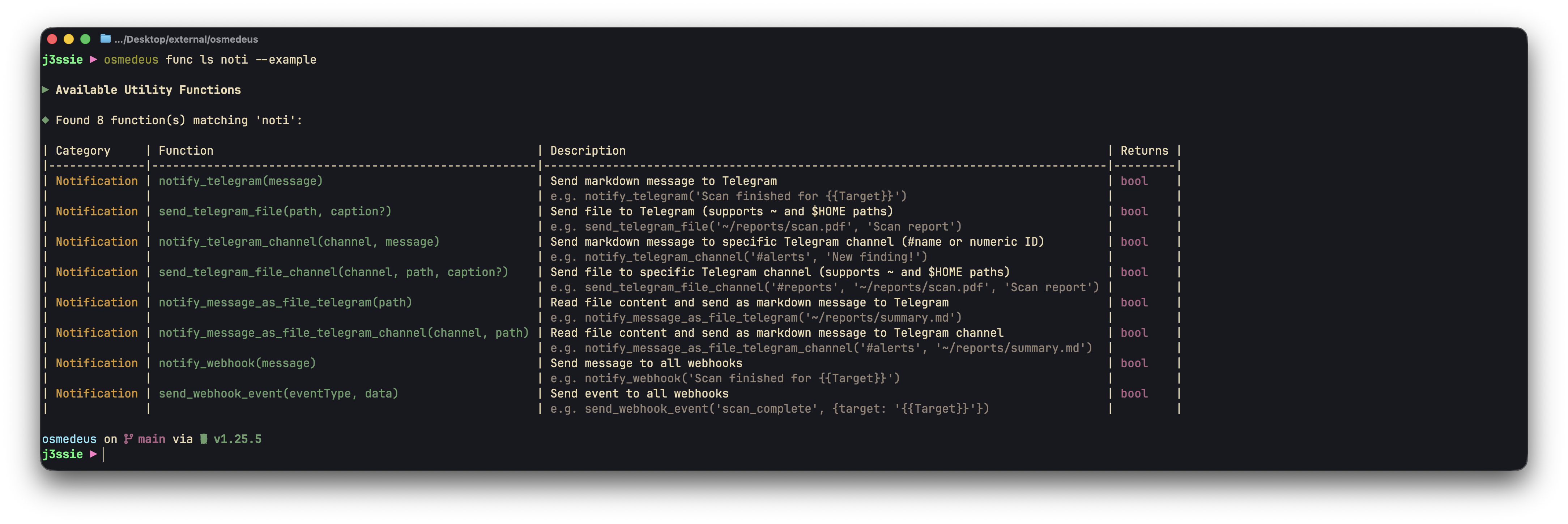 Use `osmedeus func ls noti` to list all available notification functions.
### How to get your telegram token and channel ID
Here are a quick guide on how to get your telegram token and channel ID
```bash theme={null}
Search for @BotFather and create your bot then grab the token
# get channel ID
curl "https://api.telegram.org/bot$TELEGRAM_TOKEN/getUpdates" | jq
# send a test message
curl -X POST "https://api.telegram.org/bot$TELEGRAM_TOKEN/sendMessage" -d chat_id=- -d text="Hello, this is a broadcast to the channel"
```
## CDN Configuration
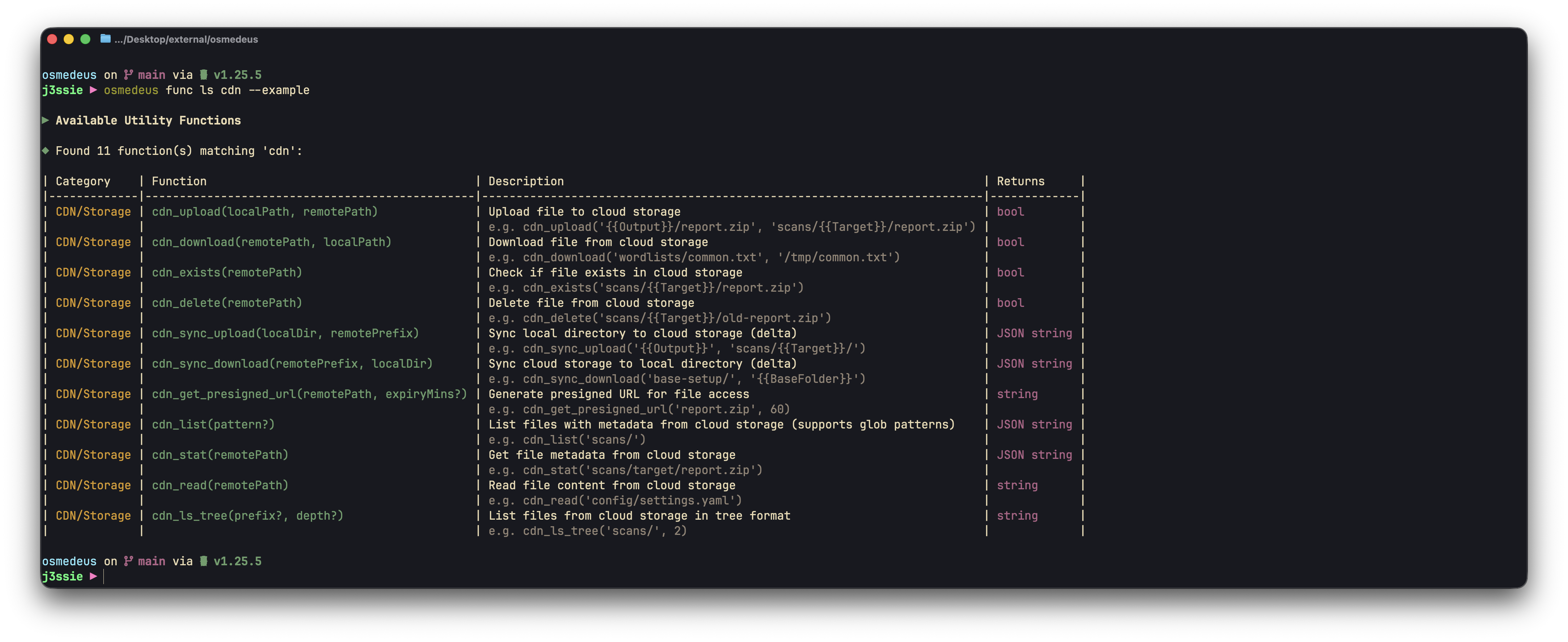
Use `osmedeus func ls cdn` to list all available CDN functions. Below are some of the functions I usually use:
Use `osmedeus func ls noti` to list all available notification functions.
### How to get your telegram token and channel ID
Here are a quick guide on how to get your telegram token and channel ID
```bash theme={null}
Search for @BotFather and create your bot then grab the token
# get channel ID
curl "https://api.telegram.org/bot$TELEGRAM_TOKEN/getUpdates" | jq
# send a test message
curl -X POST "https://api.telegram.org/bot$TELEGRAM_TOKEN/sendMessage" -d chat_id=- -d text="Hello, this is a broadcast to the channel"
```
## CDN Configuration
Use `osmedeus func ls cdn` to list all available CDN functions. Below are some of the functions I usually use:
 ```bash theme={null}
osmedeus eval 'cdn_ls_tree()'
# download and upload result
osmedeus eval cdn_download("workspace_result.jsonl", "workspace_result.jsonl")
osmedeus eval cdn_upload("workspace_result.jsonl", "workspace_result.jsonl")
# sync folder to remote
osmedeus eval 'cdn_sync_upload("local", "remote")'
osmedeus eval 'cdn_ls_tree("targets/")'
```
### Cloudflare R2
```bash theme={null}
## CDN Setup for R2
osmedeus config set storage.provider 'r2'
osmedeus config set storage.access_key_id ''
osmedeus config set storage.bucket ''
osmedeus config set storage.secret_access_key ''
osmedeus config set storage.endpoint '.r2.cloudflarestorage.com'
osmedeus config set storage.presign_expiry '2h'
osmedeus config set storage.use_ssl 'true'
osmedeus config set storage.enabled 'true'
```
verify your setup by sending a sample message with utility function `osmedeus eval 'cdn_ls_tree()'`
### Google Cloud Storage
```bash theme={null}
## CDN Setup for GCS
osmedeus config set storage.provider 'gcs'
osmedeus config set storage.access_key_id ''
osmedeus config set storage.secret_access_key ''
osmedeus config set storage.bucket ''
osmedeus config set storage.endpoint 'storage.googleapis.com'
osmedeus config set storage.region 'us-east-1'
osmedeus config set storage.use_ssl 'true'
osmedeus config set storage.presign_expiry '1h'
osmedeus config set storage.enabled 'true'
```
verify your setup by sending a sample message with utility function `osmedeus eval 'cdn_ls_tree()'`
## Full Notification and CDN Configuration
```yaml theme={null}
# =============================================================================
# Notification Configuration
# =============================================================================
# Send notifications when scans complete or find interesting results
notification:
# Notification provider: "telegram" (future: slack, discord, webhook)
provider: telegram
# Master switch to enable/disable all notifications
enabled: false
# Telegram bot settings
# Create a bot via @BotFather and get the token
# Get your chat ID by messaging @userinfobot
telegram:
# Bot token from @BotFather
bot_token: ""
# Chat ID to send messages to (can be user or group)
chat_id: 0
# Enable Telegram notifications
enabled: false
# Channel map for sending to specific channels/groups by name
# Use notify_telegram_channel("#name", "message") or send_telegram_file_channel("#name", "/path/to/file")
# You can also use numeric chat IDs directly: notify_telegram_channel("-1001234567890", "message")
telegram_channel_map:
# alerts: -1001234567890
# reports: -1009876543210
# Webhook settings
# Configure multiple webhook endpoints for notifications
# Webhooks are triggered on workflow events (completed, failed, etc.)
webhooks:
# Example webhook configuration
- url: "https://example.com/webhook"
# Enable/disable this webhook
enabled: false
# Custom HTTP headers (e.g., for authentication)
headers:
Authorization: "Bearer your-token-here"
Content-Type: "application/json"
# Request timeout in seconds (default: 30)
timeout: 30
# Number of retry attempts on failure (default: 3)
retry_count: 3
# Skip TLS certificate verification (default: false)
# Set to true for self-signed certificates
skip_tls_verify: false
# Event filter - only trigger for these events (empty = all events)
# Available events: workflow_completed, workflow_failed, workflow_cancelled
events:
- workflow_completed
- workflow_failed
# Second webhook example (e.g., Slack incoming webhook)
# - url: "https://hooks.slack.com/services/xxx/yyy/zzz"
# enabled: false
# headers: {}
# events:
# - workflow_completed
# =============================================================================
# Cloud Storage Configuration (Optional)
# =============================================================================
# S3-compatible storage for backing up scan results
# Supports AWS S3, MinIO, Cloudflare R2, Google Cloud Storage, DigitalOcean Spaces, Oracle OCI
storage:
# Storage provider: "s3", "minio", "r2", "gcs", "spaces", "oci"
# The provider determines endpoint resolution and default settings
provider: s3
# Storage endpoint URL (auto-resolved for most providers)
# Leave empty to auto-resolve based on provider and region/account_id
# Explicit examples:
# AWS S3: "s3.us-east-1.amazonaws.com"
# MinIO: "localhost:9000"
# R2: Will auto-resolve from account_id
# GCS: "storage.googleapis.com"
# Spaces: Will auto-resolve from region (e.g., "nyc3.digitaloceanspaces.com")
# OCI: Will auto-resolve from account_id (namespace) and region
endpoint: ""
# Access credentials
access_key_id: ""
secret_access_key: ""
# Bucket name for storing results
bucket: ""
# Cloud region (e.g., us-east-1, eu-west-1)
# Required for: s3, spaces, oci
region: us-east-1
# Account ID or Namespace (provider-specific)
# R2: Your Cloudflare account ID
# OCI: Your Object Storage namespace
account_id: ""
# Use SSL/TLS for connections (default: true for cloud providers)
use_ssl: true
# Force path-style URLs (auto-configured per provider)
# Set true for MinIO, R2, OCI; false for S3, GCS, Spaces
path_style: false
# Default presigned URL expiry (e.g., "1h", "30m", "24h")
# Used by cdnGetPresignedURL when no expiry is specified
presign_expiry: "1h"
# Enable cloud storage uploads
enabled: false
```
```bash theme={null}
osmedeus eval 'cdn_ls_tree()'
# download and upload result
osmedeus eval cdn_download("workspace_result.jsonl", "workspace_result.jsonl")
osmedeus eval cdn_upload("workspace_result.jsonl", "workspace_result.jsonl")
# sync folder to remote
osmedeus eval 'cdn_sync_upload("local", "remote")'
osmedeus eval 'cdn_ls_tree("targets/")'
```
### Cloudflare R2
```bash theme={null}
## CDN Setup for R2
osmedeus config set storage.provider 'r2'
osmedeus config set storage.access_key_id ''
osmedeus config set storage.bucket ''
osmedeus config set storage.secret_access_key ''
osmedeus config set storage.endpoint '.r2.cloudflarestorage.com'
osmedeus config set storage.presign_expiry '2h'
osmedeus config set storage.use_ssl 'true'
osmedeus config set storage.enabled 'true'
```
verify your setup by sending a sample message with utility function `osmedeus eval 'cdn_ls_tree()'`
### Google Cloud Storage
```bash theme={null}
## CDN Setup for GCS
osmedeus config set storage.provider 'gcs'
osmedeus config set storage.access_key_id ''
osmedeus config set storage.secret_access_key ''
osmedeus config set storage.bucket ''
osmedeus config set storage.endpoint 'storage.googleapis.com'
osmedeus config set storage.region 'us-east-1'
osmedeus config set storage.use_ssl 'true'
osmedeus config set storage.presign_expiry '1h'
osmedeus config set storage.enabled 'true'
```
verify your setup by sending a sample message with utility function `osmedeus eval 'cdn_ls_tree()'`
## Full Notification and CDN Configuration
```yaml theme={null}
# =============================================================================
# Notification Configuration
# =============================================================================
# Send notifications when scans complete or find interesting results
notification:
# Notification provider: "telegram" (future: slack, discord, webhook)
provider: telegram
# Master switch to enable/disable all notifications
enabled: false
# Telegram bot settings
# Create a bot via @BotFather and get the token
# Get your chat ID by messaging @userinfobot
telegram:
# Bot token from @BotFather
bot_token: ""
# Chat ID to send messages to (can be user or group)
chat_id: 0
# Enable Telegram notifications
enabled: false
# Channel map for sending to specific channels/groups by name
# Use notify_telegram_channel("#name", "message") or send_telegram_file_channel("#name", "/path/to/file")
# You can also use numeric chat IDs directly: notify_telegram_channel("-1001234567890", "message")
telegram_channel_map:
# alerts: -1001234567890
# reports: -1009876543210
# Webhook settings
# Configure multiple webhook endpoints for notifications
# Webhooks are triggered on workflow events (completed, failed, etc.)
webhooks:
# Example webhook configuration
- url: "https://example.com/webhook"
# Enable/disable this webhook
enabled: false
# Custom HTTP headers (e.g., for authentication)
headers:
Authorization: "Bearer your-token-here"
Content-Type: "application/json"
# Request timeout in seconds (default: 30)
timeout: 30
# Number of retry attempts on failure (default: 3)
retry_count: 3
# Skip TLS certificate verification (default: false)
# Set to true for self-signed certificates
skip_tls_verify: false
# Event filter - only trigger for these events (empty = all events)
# Available events: workflow_completed, workflow_failed, workflow_cancelled
events:
- workflow_completed
- workflow_failed
# Second webhook example (e.g., Slack incoming webhook)
# - url: "https://hooks.slack.com/services/xxx/yyy/zzz"
# enabled: false
# headers: {}
# events:
# - workflow_completed
# =============================================================================
# Cloud Storage Configuration (Optional)
# =============================================================================
# S3-compatible storage for backing up scan results
# Supports AWS S3, MinIO, Cloudflare R2, Google Cloud Storage, DigitalOcean Spaces, Oracle OCI
storage:
# Storage provider: "s3", "minio", "r2", "gcs", "spaces", "oci"
# The provider determines endpoint resolution and default settings
provider: s3
# Storage endpoint URL (auto-resolved for most providers)
# Leave empty to auto-resolve based on provider and region/account_id
# Explicit examples:
# AWS S3: "s3.us-east-1.amazonaws.com"
# MinIO: "localhost:9000"
# R2: Will auto-resolve from account_id
# GCS: "storage.googleapis.com"
# Spaces: Will auto-resolve from region (e.g., "nyc3.digitaloceanspaces.com")
# OCI: Will auto-resolve from account_id (namespace) and region
endpoint: ""
# Access credentials
access_key_id: ""
secret_access_key: ""
# Bucket name for storing results
bucket: ""
# Cloud region (e.g., us-east-1, eu-west-1)
# Required for: s3, spaces, oci
region: us-east-1
# Account ID or Namespace (provider-specific)
# R2: Your Cloudflare account ID
# OCI: Your Object Storage namespace
account_id: ""
# Use SSL/TLS for connections (default: true for cloud providers)
use_ssl: true
# Force path-style URLs (auto-configured per provider)
# Set true for MinIO, R2, OCI; false for S3, GCS, Spaces
path_style: false
# Default presigned URL expiry (e.g., "1h", "30m", "24h")
# Used by cdnGetPresignedURL when no expiry is specified
presign_expiry: "1h"
# Enable cloud storage uploads
enabled: false
```