> ## Documentation Index
> Fetch the complete documentation index at: https://docs.osmedeus.org/llms.txt
> Use this file to discover all available pages before exploring further.
# Event-Driven Triggers
> Build reactive automation pipelines with event-driven workflows
Build reactive automation pipelines that respond to discoveries, chain workflows together, and integrate with external systems.
## Overview
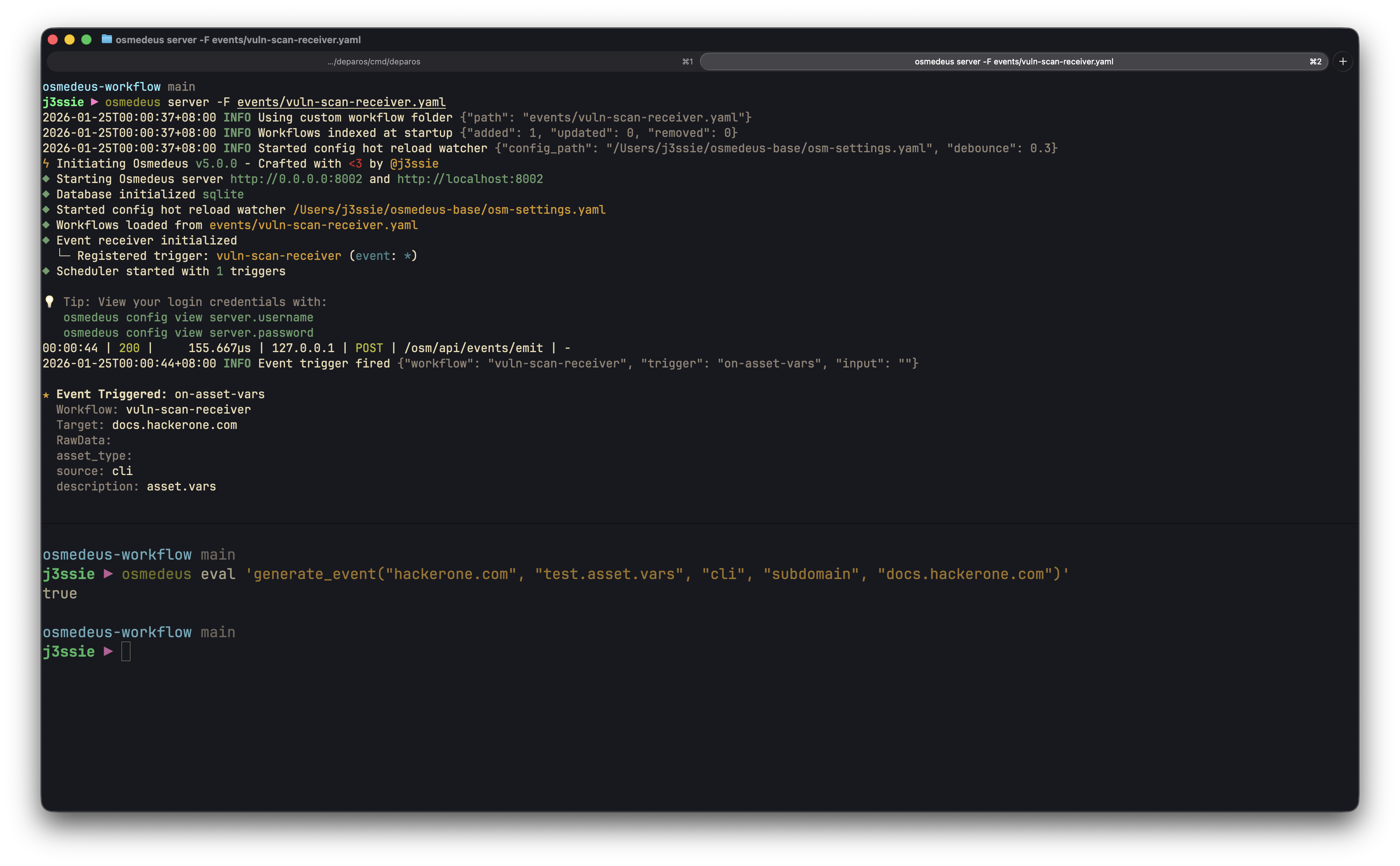 Event-driven triggers enable workflows to execute automatically in response to events:
* **React to discoveries**: Scan new subdomains as they're found
* **Chain workflows**: Connect reconnaissance → probing → scanning
* **External integration**: Receive webhooks from GitHub, CI/CD, or custom tools
* **Real-time automation**: Process findings as they occur
## Event Architecture
### Event Structure
Events carry structured data through the system:
```go theme={null}
type Event struct {
Topic string // Category: "assets.new", "vulnerabilities.new"
ID string // Unique event identifier (UUID)
Name string // Event name: "vulnerability.discovered"
Source string // Origin: "nuclei", "httpx", "amass"
Data string // JSON payload
DataType string // Type: "subdomain", "url", "finding"
Workspace string // Workspace identifier
RunID string // Run ID that generated this event
WorkflowName string // Workflow that generated this event
Timestamp time.Time // When the event occurred
}
```
### Event Flow
```
┌──────────────────┐ ┌──────────────────┐ ┌──────────────────┐
│ Event Source │ │ Event Queue │ │ Scheduler │
│ │────▶│ (1000 buffer) │────▶│ (Filter + │
│ - Workflows │ │ │ │ Dispatch) │
│ - Functions │ │ Backpressure: │ │ │
│ - Webhooks │ │ 5s timeout │ │ │
└──────────────────┘ └──────────────────┘ └────────┬─────────┘
│
┌─────────────────────────────────┼─────────────────────────────────┐
│ │ │
▼ ▼ ▼
┌────────────────┐ ┌────────────────┐ ┌────────────────┐
│ Workflow A │ │ Workflow B │ │ Workflow C │
│ (topic match) │ │ (filtered) │ │ (all events) │
└────────────────┘ └────────────────┘ └────────────────┘
```
### Backpressure Handling
The event system protects against overload:
| Parameter | Value | Description |
| ---------- | --------- | ------------------------------------ |
| Queue Size | 1000 | Maximum events buffered |
| Timeout | 5 seconds | Wait time when queue is full |
| Behavior | Drop | Events dropped if queue remains full |
Monitor queue health via metrics (see [Monitoring Events](#monitoring-events)).
## Emitting Events
### From Workflow Functions
Use the `generate_event` function to emit events from workflows:
```yaml theme={null}
name: subdomain-discovery
kind: module
steps:
- name: enumerate
type: bash
command: amass enum -d {{target}} -o {{Output}}/subdomains.txt
- name: emit-discoveries
type: function
function: |
generate_event_from_file("{{Workspace}}", "assets.new", "amass", "subdomain", "{{Output}}/subdomains.txt")
```
#### generate\_event(workspace, topic, source, data\_type, data)
Emit a single structured event.
```javascript theme={null}
// Simple string data
generate_event("{{Workspace}}", "assets.new", "httpx", "url", "https://api.example.com")
// Complex object data
generate_event("{{Workspace}}", "vulnerabilities.new", "nuclei", "finding", {
url: "https://example.com/admin",
severity: "critical",
template: "CVE-2024-1234",
matched: "/admin"
})
```
**Parameters:**
* `workspace` - Workspace identifier for the event
* `topic` - Event topic/category (e.g., "assets.new")
* `source` - Event source (e.g., "nuclei", "httpx")
* `data_type` - Type of data (e.g., "subdomain", "url", "finding")
* `data` - Event payload (string or object)
**Returns:** `boolean` - `true` if event was sent successfully
#### generate\_event\_from\_file(workspace, topic, source, data\_type, path)
Emit an event for each non-empty line in a file.
```javascript theme={null}
generate_event_from_file("{{Workspace}}", "assets.new", "subfinder", "subdomain", "{{Output}}/subdomains.txt")
// Returns: 42 (number of events generated)
```
**Parameters:**
* `workspace` - Workspace identifier for the events
* `topic` - Event topic/category
* `source` - Event source
* `data_type` - Type of data
* `path` - File path containing data (one item per line)
**Returns:** `integer` - count of events successfully generated
### Webhook Functions
Send events to external webhook endpoints configured in settings:
```yaml theme={null}
- name: notify-finding
type: function
function: |
notify_webhook("Critical vulnerability found on {{target}}")
```
#### notify\_webhook(message)
Send a plain text message to all configured webhooks.
```javascript theme={null}
notify_webhook("Scan completed for example.com with 15 findings")
```
#### send\_webhook\_event(eventType, data)
Send a structured event to all configured webhooks.
```javascript theme={null}
send_webhook_event("scan_complete", {
target: "example.com",
findings: 15,
duration: "2h30m"
})
```
### From External Systems (Webhooks)
Receive webhooks via the API to trigger workflows:
```bash theme={null}
curl -X POST http://localhost:8080/osm/api/events/emit \
-H "Authorization: Bearer $TOKEN" \
-H "Content-Type: application/json" \
-d '{
"topic": "external.webhook",
"source": "github",
"data_type": "push",
"data": "{\"repository\": \"myorg/myapp\", \"branch\": \"main\"}"
}'
```
## Event Triggers
### Trigger Configuration
Configure event triggers in workflow YAML:
```yaml theme={null}
name: probe-new-assets
kind: module
triggers:
- name: on-subdomain-discovered
on: event
event:
topic: "assets.new"
filters:
- "event.source == 'amass'"
- "event.data_type == 'subdomain'"
dedupe_key: "{{event.data.value}}"
dedupe_window: "5m"
input:
type: event_data
field: "value"
name: target
enabled: true
params:
- name: target
required: true
steps:
- name: probe
type: bash
command: httpx -u {{target}} -o {{Output}}/httpx.json -json
```
### EventConfig Fields
| Field | Type | Description |
| ------------------ | --------- | ------------------------------------------------------------------------- |
| `topic` | string | Event topic to match (supports glob patterns: `*`, `?`, `[`; empty = all) |
| `filters` | \[]string | JavaScript expressions (all must pass) |
| `filter_functions` | \[]string | JavaScript expressions with utility functions available (all must pass) |
| `dedupe_key` | string | Template for deduplication key |
| `dedupe_window` | string | Time window for deduplication (e.g., "5m") |
### TriggerInput Options
Trigger input supports two syntaxes: a legacy syntax and a new exports-style syntax.
#### New Exports-Style Syntax (Recommended)
Map multiple event fields to workflow variables using a concise syntax:
```yaml theme={null}
input:
# variable_name: expression
target: event_data.url
asset_type: event_data.type
source: event.source
description: trim(event_data.desc)
```
**Expression Types:**
* `event_data.` - Access parsed event data fields (e.g., `event_data.url`, `event_data.severity`)
* `event.` - Access event metadata (`event.topic`, `event.source`, `event.name`, `event.id`, `event.data_type`, `event.workspace`, `event.run_uuid`, `event.workflow_name`)
* `function(...)` - Transform values using utility functions (e.g., `trim(event_data.desc)`, `lower(event_data.name)`)
#### Legacy Syntax
The original input configuration (still supported for backward compatibility):
| Type | Description | Fields |
| ------------ | -------------------------- | ------------------------------------- |
| `event_data` | Extract from event payload | `field` - JSON path to extract |
| `function` | Transform with function | `function` - JS expression (e.g., jq) |
| `param` | Static parameter | `name` - parameter name |
| `file` | Read from file | `path` - file path |
```yaml theme={null}
# Extract field from event data
input:
type: event_data
field: "url"
name: target
# Transform with jq function
input:
type: function
function: 'jq("{{event.data}}", ".target.url")'
name: target
# Use static parameter
input:
type: param
name: default_target
```
### Topic Glob Patterns
Event topics support glob patterns for flexible matching:
```yaml theme={null}
event:
topic: "assets.*" # Matches assets.new, assets.updated, etc.
topic: "*.new" # Matches assets.new, vulns.new, etc.
topic: "scan.*.complete" # Matches scan.nuclei.complete, scan.httpx.complete
topic: "*" # Matches all topics
```
| Pattern | Description |
| ------- | ---------------------------------- |
| `*` | Matches any sequence of characters |
| `?` | Matches any single character |
| `[abc]` | Matches any character in the set |
### JavaScript Filters
Filters are JavaScript expressions evaluated against each event. All filters must return `true` for the event to trigger the workflow.
#### Available Event Fields
```javascript theme={null}
event.topic // "assets.new"
event.id // "uuid-string"
event.name // "subdomain.discovered"
event.source // "amass"
event.data_type // "subdomain"
event.data // Parsed JSON object or raw string
event.workspace // "myworkspace"
```
#### Filter Examples
```yaml theme={null}
filters:
# Match specific source
- "event.source == 'nuclei'"
# Match severity from parsed data
- "event.data.severity == 'critical'"
# Match by data type
- "event.data_type == 'vulnerability'"
# Combine conditions (implicit AND)
- "event.source == 'nuclei'"
- "event.data.severity == 'high' || event.data.severity == 'critical'"
```
#### Common Filter Patterns
```yaml theme={null}
# Only process from specific tools
filters:
- "event.source == 'subfinder' || event.source == 'amass'"
# Filter by severity
filters:
- "['critical', 'high'].includes(event.data.severity)"
# Match URL patterns
filters:
- "event.data.url && event.data.url.includes('/api/')"
# Workspace-specific
filters:
- "event.workspace == 'production'"
```
### Filter Functions
For more advanced filtering, use `filter_functions` which provides access to utility functions like `contains()`, `starts_with()`, `ends_with()`, `file_exists()`, and more:
```yaml theme={null}
triggers:
- name: on-api-endpoint
on: event
event:
topic: "assets.new"
# Simple filters (basic JS only)
filters:
- "event.source == 'httpx'"
# Filter functions with utility functions available
filter_functions:
- "contains(event.data.url, '/api/')"
- "!ends_with(event.data.url, '.js')"
input:
type: event_data
field: "url"
name: target
enabled: true
```
#### Available Filter Functions
| Function | Description | Example |
| -------------------------- | ---------------------------------- | -------------------------------------------------------- |
| `contains(str, substr)` | Check if string contains substring | `contains(event.data.url, '/api/')` |
| `starts_with(str, prefix)` | Check if string starts with prefix | `starts_with(event.data.severity, 'critical')` |
| `ends_with(str, suffix)` | Check if string ends with suffix | `ends_with(event.data.url, '.json')` |
| `file_exists(path)` | Check if file exists | `file_exists("{{event.data.output_path}}/results.json")` |
| `file_length(path)` | Get file line count | `file_length(event.data.results_file) > 0` |
| `is_empty(str)` | Check if string is empty | `!is_empty(event.data.target)` |
| `trim(str)` | Remove leading/trailing whitespace | Used in input expressions |
#### Combining Filters and Filter Functions
You can use both `filters` (basic JS) and `filter_functions` (with utilities) together. All expressions from both must pass:
```yaml theme={null}
event:
topic: "vulns.discovered"
# Basic JS expressions
filters:
- "event.source == 'nuclei'"
# Expressions with utility functions
filter_functions:
- "contains(event.data.template_id, 'CVE')"
- "starts_with(event.data.severity, 'critical') || starts_with(event.data.severity, 'high')"
```
### Event Envelope Template Variables
Event-triggered workflows have access to special template variables containing the full event data:
| Variable | Description |
| -------------------- | -------------------------------------- |
| `{{EventEnvelope}}` | Full JSON-encoded event envelope |
| `{{EventTopic}}` | Event topic (e.g., "assets.new") |
| `{{EventSource}}` | Event source (e.g., "nuclei", "httpx") |
| `{{EventDataType}}` | Data type (e.g., "subdomain", "url") |
| `{{EventTimestamp}}` | Event timestamp (RFC3339 format) |
| `{{EventData}}` | Raw event data payload |
**Example usage:**
```yaml theme={null}
name: event-processor
kind: module
triggers:
- name: on-event
on: event
event:
topic: "scan.complete"
input:
type: event_data
field: "target"
name: target
enabled: true
steps:
- name: log-event-details
type: function
functions:
- 'log_info("Topic: {{EventTopic}}")'
- 'log_info("Source: {{EventSource}}")'
- 'log_info("Full envelope: {{EventEnvelope}}")'
- name: save-envelope
type: bash
command: |
echo '{{EventEnvelope}}' > {{Output}}/event-envelope.json
```
### Deduplication
Prevent duplicate workflow triggers using time-windowed deduplication:
```yaml theme={null}
triggers:
- name: on-unique-url
on: event
event:
topic: "crawler.url"
dedupe_key: "{{event.data.url}}" # Unique key template
dedupe_window: "5m" # Time window
input:
type: event_data
field: "value"
name: target
```
Dedupe key supports template variables:
* `{{event.source}}-{{event.data.url}}` - Composite key
* `{{event.data.hash}}` - Simple field
## Event Topics Reference
### Built-in Topics
| Topic | Description | Typical Source |
| -------------------- | ---------------------------- | -------------- |
| `run.started` | Workflow run began | Engine |
| `run.completed` | Workflow run finished | Engine |
| `run.failed` | Workflow run failed | Engine |
| `step.completed` | Individual step finished | Engine |
| `step.failed` | Individual step failed | Engine |
| `asset.discovered` | New asset discovered | Recon tools |
| `asset.updated` | Asset information updated | Scanners |
| `webhook.received` | External webhook received | API |
| `schedule.triggered` | Scheduled workflow triggered | Scheduler |
### Custom Topics
Define your own topics for domain-specific events:
```javascript theme={null}
// Custom discovery events
generate_event("{{Workspace}}", "discovery.api-endpoint", "custom-scanner", "endpoint", {...})
// Custom notification events
generate_event("{{Workspace}}", "notification.slack", "workflow", "message", {...})
```
## Building Event Pipelines
### Chaining Workflows
Create pipelines where each workflow triggers the next:
```
┌─────────────────┐ ┌─────────────────┐ ┌─────────────────┐
│ Subdomain Enum │────▶│ HTTP Probing │────▶│ Vuln Scanning │
│ │ │ │ │ │
│ emit: assets.new│ │ emit: │ │ emit: │
│ (subdomains) │ │ assets.new │ │ vulnerabilities │
│ │ │ (live hosts) │ │ .new │
└─────────────────┘ └─────────────────┘ └─────────────────┘
```
#### Stage 1: Subdomain Enumeration
```yaml theme={null}
name: subdomain-enum
kind: module
steps:
- name: enumerate
type: bash
command: |
subfinder -d {{target}} -o {{Output}}/subdomains.txt
amass enum -d {{target}} >> {{Output}}/subdomains.txt
sort -u {{Output}}/subdomains.txt -o {{Output}}/subdomains.txt
- name: emit-subdomains
type: function
function: |
generate_event_from_file("{{Workspace}}", "assets.new", "recon", "subdomain", "{{Output}}/subdomains.txt")
```
#### Stage 2: HTTP Probing (Triggered by Stage 1)
```yaml theme={null}
name: http-probe
kind: module
triggers:
- name: on-subdomain
on: event
event:
topic: "assets.new"
filters:
- "event.data_type == 'subdomain'"
input:
type: event_data
field: "value"
name: target
enabled: true
params:
- name: target
required: true
steps:
- name: probe
type: bash
command: httpx -u {{target}} -o {{Output}}/probe.json -json
- name: emit-if-live
type: function
pre_condition: 'fileLength("{{Output}}/probe.json") > 0'
function: |
generate_event("{{Workspace}}", "assets.new", "httpx", "url", readFile("{{Output}}/probe.json"))
```
#### Stage 3: Vulnerability Scanning (Triggered by Stage 2)
```yaml theme={null}
name: vuln-scan
kind: module
triggers:
- name: on-live-host
on: event
event:
topic: "assets.new"
filters:
- "event.source == 'httpx'"
- "event.data_type == 'url'"
input:
type: function
function: 'jq("{{event.data}}", ".url")'
name: target
enabled: true
params:
- name: target
required: true
steps:
- name: scan
type: bash
command: nuclei -u {{target}} -o {{Output}}/vulns.json -json
- name: emit-findings
type: function
pre_condition: 'fileLength("{{Output}}/vulns.json") > 0'
function: |
generate_event_from_file("{{Workspace}}", "vulnerabilities.new", "nuclei", "finding", "{{Output}}/vulns.json")
```
### Error Handling Pattern
Handle failures gracefully with error events:
```yaml theme={null}
steps:
- name: scan
type: bash
command: nuclei -u {{target}}
on_error:
- action: run
type: function
function: |
generate_event("{{Workspace}}", "errors.scan-failed", "nuclei", "error", {
target: "{{target}}",
step: "scan",
error: "Nuclei scan failed"
})
```
## Real-World Examples
### Asset Discovery Pipeline
Complete subdomain discovery to live host probing:
```yaml theme={null}
name: asset-discovery-pipeline
kind: module
description: Discover subdomains and probe for live hosts
params:
- name: target
required: true
description: Root domain to enumerate
steps:
- name: passive-enum
type: bash
command: |
subfinder -d {{target}} -o {{Output}}/subfinder.txt
amass enum -passive -d {{target}} -o {{Output}}/amass.txt
- name: merge-results
type: function
functions:
- 'exec_cmd("cat {{Output}}/subfinder.txt {{Output}}/amass.txt | sort -u > {{Output}}/all-subs.txt")'
- name: probe-live
type: bash
command: httpx -l {{Output}}/all-subs.txt -o {{Output}}/live-hosts.txt
- name: emit-discoveries
type: function
function: |
generate_event_from_file("{{Workspace}}", "assets.new", "pipeline", "live-host", "{{Output}}/live-hosts.txt")
log_info("Emitted " + fileLength("{{Output}}/live-hosts.txt") + " live hosts")
```
### Vulnerability Notification
Automatically notify on critical findings:
```yaml theme={null}
name: vuln-notifier
kind: module
triggers:
- name: on-critical-vuln
on: event
event:
topic: "vulnerabilities.new"
filters:
- "event.source == 'nuclei'"
- "event.data.severity == 'critical' || event.data.severity == 'high'"
input:
type: event_data
field: "template"
name: template_id
enabled: true
params:
- name: template_id
required: true
steps:
- name: notify
type: function
function: |
notify_webhook("ALERT: Critical vulnerability " + "{{template_id}}" + " detected!")
notify_telegram("Critical finding: {{template_id}}")
```
### External Integration: GitHub Webhooks
Trigger scans on repository pushes:
```yaml theme={null}
name: github-triggered-scan
kind: module
triggers:
- name: on-github-push
on: event
event:
topic: "webhook.received"
filters:
- "event.source == 'github'"
- "event.data.ref == 'refs/heads/main'"
input:
type: function
function: 'jq("{{event.data}}", ".repository.html_url")'
name: repo_url
enabled: true
params:
- name: repo_url
required: true
steps:
- name: clone-and-scan
type: bash
command: |
git clone {{repo_url}} /tmp/repo
trufflehog filesystem /tmp/repo --json > {{Output}}/secrets.json
```
## Monitoring Events
### Event Logs API
Query event history via the REST API:
```bash theme={null}
# List recent events
curl "http://localhost:8080/osm/api/event-logs" \
-H "Authorization: Bearer $TOKEN"
# Filter by topic
curl "http://localhost:8080/osm/api/event-logs?topic=assets.new" \
-H "Authorization: Bearer $TOKEN"
# Filter by run
curl "http://localhost:8080/osm/api/event-logs?run_id=run-abc123" \
-H "Authorization: Bearer $TOKEN"
# Filter by workspace
curl "http://localhost:8080/osm/api/event-logs?workspace=production" \
-H "Authorization: Bearer $TOKEN"
# Filter by processed status
curl "http://localhost:8080/osm/api/event-logs?processed=false" \
-H "Authorization: Bearer $TOKEN"
```
### CLI Event Logs
Query event history using the database CLI:
```bash theme={null}
# List recent events (default columns: topic, source, processed, data_type, workspace, data)
osmedeus db list --table event_logs
# List all available columns
osmedeus db list --table event_logs --list-columns
# Filter by specific columns
osmedeus db list --table event_logs --columns topic,source,data_type,data
# Show all columns including hidden ones (id, timestamps)
osmedeus db list --table event_logs --all
# Filter by topic
osmedeus db list --table event_logs --where topic=assets.new
# Filter by processed status
osmedeus db list --table event_logs --where processed=false
# Search events across all columns
osmedeus db list --table event_logs --search "nuclei"
# Output as JSON for scripting
osmedeus db list --table event_logs --json
# Pagination
osmedeus db list --table event_logs --offset 50 --limit 100
# Interactive TUI mode (default without --table)
osmedeus db list
```
### Queue Metrics
The scheduler tracks event processing metrics:
| Metric | Description |
| -------------------- | -------------------------------- |
| `events_enqueued` | Total events successfully queued |
| `events_dropped` | Events dropped due to full queue |
| `queue_current_size` | Current events waiting |
Access via health endpoint:
```bash theme={null}
curl http://localhost:8080/osm/api/health
```
### Event Receiver Status
Check the status of event-triggered workflows:
```bash theme={null}
# Get event receiver status
curl "http://localhost:8080/osm/api/event-receiver/status" \
-H "Authorization: Bearer $TOKEN"
# List registered event-triggered workflows
curl "http://localhost:8080/osm/api/event-receiver/workflows" \
-H "Authorization: Bearer $TOKEN"
```
## Bulk Event Processing
Process multiple targets discovered via events using the `func eval` bulk processing capabilities.
### Processing Targets from File
```bash theme={null}
# Process each target in a file (target variable available in script)
osmedeus func eval -e 'log_info("Processing: " + target)' -T targets.txt
# With concurrency for parallel processing
osmedeus func eval -e 'httpGet("https://" + target)' -T targets.txt -c 10
# With additional parameters
osmedeus func eval -e 'log_info(target + " in " + workspace)' -T targets.txt --params workspace=production
```
### Using Function Files
Store reusable processing logic in files:
```javascript theme={null}
// check-host.js
var result = httpGet("https://" + target);
if (result.status == 200) {
generate_event("myworkspace", "assets.live", "check", "url", target);
log_info("Live: " + target);
}
```
```bash theme={null}
# Execute function file against targets
osmedeus func eval --function-file check-host.js -T discovered-hosts.txt -c 5
```
### Function Call Syntax
Multiple ways to invoke functions:
```bash theme={null}
# Expression with -e flag
osmedeus func eval -e 'log_info("hello")'
# Positional argument
osmedeus func eval 'log_info("hello")'
# Function name with arguments
osmedeus func eval log_info "hello world"
# Using -f flag for function name
osmedeus func eval -f log_info "hello world"
# Read from stdin
echo 'log_info("hello")' | osmedeus func eval --stdin
```
### Integration with Event Pipeline
Combine event log queries with bulk function evaluation:
```bash theme={null}
# 1. Export discovered assets to file
osmedeus db list --table event_logs --where data_type=subdomain --json | \
jq -r '.[].data' > /tmp/subdomains.txt
# 2. Process with bulk function evaluation
osmedeus func eval -e 'httpGet("https://" + target)' -T /tmp/subdomains.txt -c 10
# 3. Generate events for results
osmedeus func eval --function-file process-subdomain.js -T /tmp/subdomains.txt -c 5
```
### Testing Event Functions
Test event generation before deploying workflows:
```bash theme={null}
# Test single event generation
osmedeus func eval 'generate_event("test-workspace", "test.topic", "cli", "test", "hello")'
# Test with target variable
osmedeus func eval -e 'generate_event("ws", "assets.new", "test", "url", target)' -t example.com
# List available event functions
osmedeus func list event
```
## Best Practices
1. **Use specific topics** - Prefer `assets.subdomain` over generic `assets.new` for precise filtering
2. **Filter early** - Apply filters to reduce processing overhead and prevent unnecessary workflow triggers
3. **Handle backpressure gracefully** - Design workflows to tolerate dropped events during high load
4. **Log event errors** - Use `on_error` handlers to track and emit failure events for debugging
5. **Test triggers disabled first** - Set `enabled: false` initially, validate filters, then enable
6. **Use idempotent handlers** - Workflows may receive duplicate events; design steps to handle this
7. **Batch file emissions** - Use `generate_event_from_file` for bulk discoveries instead of individual events
8. **Use deduplication** - Configure `dedupe_key` and `dedupe_window` to prevent duplicate processing
9. **Include workspace** - Always pass the workspace parameter to maintain proper event isolation
## Troubleshooting
### Events Not Triggering
1. **Check topic match**: Event topic must exactly match trigger configuration
```bash theme={null}
# Verify event topics in database
osmedeus db list --table event_logs --columns topic,source,data_type --limit 10
```
2. **Verify trigger is enabled**: `enabled: true` in workflow YAML
3. **Test filter expressions**: Simplify filters to isolate issues
```yaml theme={null}
# Start with no filters
filters: []
# Then add back one at a time
filters:
- "event.source == 'nuclei'"
```
4. **Check scheduler is running**: Events only process when server is active
5. **Check event receiver status**:
```bash theme={null}
curl "http://localhost:8080/osm/api/event-receiver/status"
```
### Events Dropped
1. **Check queue metrics**: High `events_dropped` indicates overload
2. **Reduce event volume**: Batch discoveries, filter at source
3. **Increase queue size**: Configure via scheduler settings if needed
4. **Scale with workers**: Distribute processing across workers
### Filter Not Matching
1. **Verify event data structure**: Check actual event payload
```bash theme={null}
osmedeus db list --table event_logs --where topic=assets.new --json --limit 1
```
2. **Test JS expression**: Filters use JavaScript syntax
```javascript theme={null}
// Correct
event.data.severity == 'critical'
// Wrong (using Go syntax)
event.data.severity = "critical"
```
3. **Check data types**: String vs number comparisons
```javascript theme={null}
// If status_code is number
event.data.status_code == 200
// If status_code is string
event.data.status_code == '200'
```
### Testing Event Functions
Use the CLI to test event functions interactively:
```bash theme={null}
# Test generate_event
osmedeus func eval 'generate_event("test", "test.topic", "cli", "test", "data")'
# Verify event was created
osmedeus db list --table event_logs --where topic=test.topic --limit 1
```
Event-driven triggers enable workflows to execute automatically in response to events:
* **React to discoveries**: Scan new subdomains as they're found
* **Chain workflows**: Connect reconnaissance → probing → scanning
* **External integration**: Receive webhooks from GitHub, CI/CD, or custom tools
* **Real-time automation**: Process findings as they occur
## Event Architecture
### Event Structure
Events carry structured data through the system:
```go theme={null}
type Event struct {
Topic string // Category: "assets.new", "vulnerabilities.new"
ID string // Unique event identifier (UUID)
Name string // Event name: "vulnerability.discovered"
Source string // Origin: "nuclei", "httpx", "amass"
Data string // JSON payload
DataType string // Type: "subdomain", "url", "finding"
Workspace string // Workspace identifier
RunID string // Run ID that generated this event
WorkflowName string // Workflow that generated this event
Timestamp time.Time // When the event occurred
}
```
### Event Flow
```
┌──────────────────┐ ┌──────────────────┐ ┌──────────────────┐
│ Event Source │ │ Event Queue │ │ Scheduler │
│ │────▶│ (1000 buffer) │────▶│ (Filter + │
│ - Workflows │ │ │ │ Dispatch) │
│ - Functions │ │ Backpressure: │ │ │
│ - Webhooks │ │ 5s timeout │ │ │
└──────────────────┘ └──────────────────┘ └────────┬─────────┘
│
┌─────────────────────────────────┼─────────────────────────────────┐
│ │ │
▼ ▼ ▼
┌────────────────┐ ┌────────────────┐ ┌────────────────┐
│ Workflow A │ │ Workflow B │ │ Workflow C │
│ (topic match) │ │ (filtered) │ │ (all events) │
└────────────────┘ └────────────────┘ └────────────────┘
```
### Backpressure Handling
The event system protects against overload:
| Parameter | Value | Description |
| ---------- | --------- | ------------------------------------ |
| Queue Size | 1000 | Maximum events buffered |
| Timeout | 5 seconds | Wait time when queue is full |
| Behavior | Drop | Events dropped if queue remains full |
Monitor queue health via metrics (see [Monitoring Events](#monitoring-events)).
## Emitting Events
### From Workflow Functions
Use the `generate_event` function to emit events from workflows:
```yaml theme={null}
name: subdomain-discovery
kind: module
steps:
- name: enumerate
type: bash
command: amass enum -d {{target}} -o {{Output}}/subdomains.txt
- name: emit-discoveries
type: function
function: |
generate_event_from_file("{{Workspace}}", "assets.new", "amass", "subdomain", "{{Output}}/subdomains.txt")
```
#### generate\_event(workspace, topic, source, data\_type, data)
Emit a single structured event.
```javascript theme={null}
// Simple string data
generate_event("{{Workspace}}", "assets.new", "httpx", "url", "https://api.example.com")
// Complex object data
generate_event("{{Workspace}}", "vulnerabilities.new", "nuclei", "finding", {
url: "https://example.com/admin",
severity: "critical",
template: "CVE-2024-1234",
matched: "/admin"
})
```
**Parameters:**
* `workspace` - Workspace identifier for the event
* `topic` - Event topic/category (e.g., "assets.new")
* `source` - Event source (e.g., "nuclei", "httpx")
* `data_type` - Type of data (e.g., "subdomain", "url", "finding")
* `data` - Event payload (string or object)
**Returns:** `boolean` - `true` if event was sent successfully
#### generate\_event\_from\_file(workspace, topic, source, data\_type, path)
Emit an event for each non-empty line in a file.
```javascript theme={null}
generate_event_from_file("{{Workspace}}", "assets.new", "subfinder", "subdomain", "{{Output}}/subdomains.txt")
// Returns: 42 (number of events generated)
```
**Parameters:**
* `workspace` - Workspace identifier for the events
* `topic` - Event topic/category
* `source` - Event source
* `data_type` - Type of data
* `path` - File path containing data (one item per line)
**Returns:** `integer` - count of events successfully generated
### Webhook Functions
Send events to external webhook endpoints configured in settings:
```yaml theme={null}
- name: notify-finding
type: function
function: |
notify_webhook("Critical vulnerability found on {{target}}")
```
#### notify\_webhook(message)
Send a plain text message to all configured webhooks.
```javascript theme={null}
notify_webhook("Scan completed for example.com with 15 findings")
```
#### send\_webhook\_event(eventType, data)
Send a structured event to all configured webhooks.
```javascript theme={null}
send_webhook_event("scan_complete", {
target: "example.com",
findings: 15,
duration: "2h30m"
})
```
### From External Systems (Webhooks)
Receive webhooks via the API to trigger workflows:
```bash theme={null}
curl -X POST http://localhost:8080/osm/api/events/emit \
-H "Authorization: Bearer $TOKEN" \
-H "Content-Type: application/json" \
-d '{
"topic": "external.webhook",
"source": "github",
"data_type": "push",
"data": "{\"repository\": \"myorg/myapp\", \"branch\": \"main\"}"
}'
```
## Event Triggers
### Trigger Configuration
Configure event triggers in workflow YAML:
```yaml theme={null}
name: probe-new-assets
kind: module
triggers:
- name: on-subdomain-discovered
on: event
event:
topic: "assets.new"
filters:
- "event.source == 'amass'"
- "event.data_type == 'subdomain'"
dedupe_key: "{{event.data.value}}"
dedupe_window: "5m"
input:
type: event_data
field: "value"
name: target
enabled: true
params:
- name: target
required: true
steps:
- name: probe
type: bash
command: httpx -u {{target}} -o {{Output}}/httpx.json -json
```
### EventConfig Fields
| Field | Type | Description |
| ------------------ | --------- | ------------------------------------------------------------------------- |
| `topic` | string | Event topic to match (supports glob patterns: `*`, `?`, `[`; empty = all) |
| `filters` | \[]string | JavaScript expressions (all must pass) |
| `filter_functions` | \[]string | JavaScript expressions with utility functions available (all must pass) |
| `dedupe_key` | string | Template for deduplication key |
| `dedupe_window` | string | Time window for deduplication (e.g., "5m") |
### TriggerInput Options
Trigger input supports two syntaxes: a legacy syntax and a new exports-style syntax.
#### New Exports-Style Syntax (Recommended)
Map multiple event fields to workflow variables using a concise syntax:
```yaml theme={null}
input:
# variable_name: expression
target: event_data.url
asset_type: event_data.type
source: event.source
description: trim(event_data.desc)
```
**Expression Types:**
* `event_data.` - Access parsed event data fields (e.g., `event_data.url`, `event_data.severity`)
* `event.` - Access event metadata (`event.topic`, `event.source`, `event.name`, `event.id`, `event.data_type`, `event.workspace`, `event.run_uuid`, `event.workflow_name`)
* `function(...)` - Transform values using utility functions (e.g., `trim(event_data.desc)`, `lower(event_data.name)`)
#### Legacy Syntax
The original input configuration (still supported for backward compatibility):
| Type | Description | Fields |
| ------------ | -------------------------- | ------------------------------------- |
| `event_data` | Extract from event payload | `field` - JSON path to extract |
| `function` | Transform with function | `function` - JS expression (e.g., jq) |
| `param` | Static parameter | `name` - parameter name |
| `file` | Read from file | `path` - file path |
```yaml theme={null}
# Extract field from event data
input:
type: event_data
field: "url"
name: target
# Transform with jq function
input:
type: function
function: 'jq("{{event.data}}", ".target.url")'
name: target
# Use static parameter
input:
type: param
name: default_target
```
### Topic Glob Patterns
Event topics support glob patterns for flexible matching:
```yaml theme={null}
event:
topic: "assets.*" # Matches assets.new, assets.updated, etc.
topic: "*.new" # Matches assets.new, vulns.new, etc.
topic: "scan.*.complete" # Matches scan.nuclei.complete, scan.httpx.complete
topic: "*" # Matches all topics
```
| Pattern | Description |
| ------- | ---------------------------------- |
| `*` | Matches any sequence of characters |
| `?` | Matches any single character |
| `[abc]` | Matches any character in the set |
### JavaScript Filters
Filters are JavaScript expressions evaluated against each event. All filters must return `true` for the event to trigger the workflow.
#### Available Event Fields
```javascript theme={null}
event.topic // "assets.new"
event.id // "uuid-string"
event.name // "subdomain.discovered"
event.source // "amass"
event.data_type // "subdomain"
event.data // Parsed JSON object or raw string
event.workspace // "myworkspace"
```
#### Filter Examples
```yaml theme={null}
filters:
# Match specific source
- "event.source == 'nuclei'"
# Match severity from parsed data
- "event.data.severity == 'critical'"
# Match by data type
- "event.data_type == 'vulnerability'"
# Combine conditions (implicit AND)
- "event.source == 'nuclei'"
- "event.data.severity == 'high' || event.data.severity == 'critical'"
```
#### Common Filter Patterns
```yaml theme={null}
# Only process from specific tools
filters:
- "event.source == 'subfinder' || event.source == 'amass'"
# Filter by severity
filters:
- "['critical', 'high'].includes(event.data.severity)"
# Match URL patterns
filters:
- "event.data.url && event.data.url.includes('/api/')"
# Workspace-specific
filters:
- "event.workspace == 'production'"
```
### Filter Functions
For more advanced filtering, use `filter_functions` which provides access to utility functions like `contains()`, `starts_with()`, `ends_with()`, `file_exists()`, and more:
```yaml theme={null}
triggers:
- name: on-api-endpoint
on: event
event:
topic: "assets.new"
# Simple filters (basic JS only)
filters:
- "event.source == 'httpx'"
# Filter functions with utility functions available
filter_functions:
- "contains(event.data.url, '/api/')"
- "!ends_with(event.data.url, '.js')"
input:
type: event_data
field: "url"
name: target
enabled: true
```
#### Available Filter Functions
| Function | Description | Example |
| -------------------------- | ---------------------------------- | -------------------------------------------------------- |
| `contains(str, substr)` | Check if string contains substring | `contains(event.data.url, '/api/')` |
| `starts_with(str, prefix)` | Check if string starts with prefix | `starts_with(event.data.severity, 'critical')` |
| `ends_with(str, suffix)` | Check if string ends with suffix | `ends_with(event.data.url, '.json')` |
| `file_exists(path)` | Check if file exists | `file_exists("{{event.data.output_path}}/results.json")` |
| `file_length(path)` | Get file line count | `file_length(event.data.results_file) > 0` |
| `is_empty(str)` | Check if string is empty | `!is_empty(event.data.target)` |
| `trim(str)` | Remove leading/trailing whitespace | Used in input expressions |
#### Combining Filters and Filter Functions
You can use both `filters` (basic JS) and `filter_functions` (with utilities) together. All expressions from both must pass:
```yaml theme={null}
event:
topic: "vulns.discovered"
# Basic JS expressions
filters:
- "event.source == 'nuclei'"
# Expressions with utility functions
filter_functions:
- "contains(event.data.template_id, 'CVE')"
- "starts_with(event.data.severity, 'critical') || starts_with(event.data.severity, 'high')"
```
### Event Envelope Template Variables
Event-triggered workflows have access to special template variables containing the full event data:
| Variable | Description |
| -------------------- | -------------------------------------- |
| `{{EventEnvelope}}` | Full JSON-encoded event envelope |
| `{{EventTopic}}` | Event topic (e.g., "assets.new") |
| `{{EventSource}}` | Event source (e.g., "nuclei", "httpx") |
| `{{EventDataType}}` | Data type (e.g., "subdomain", "url") |
| `{{EventTimestamp}}` | Event timestamp (RFC3339 format) |
| `{{EventData}}` | Raw event data payload |
**Example usage:**
```yaml theme={null}
name: event-processor
kind: module
triggers:
- name: on-event
on: event
event:
topic: "scan.complete"
input:
type: event_data
field: "target"
name: target
enabled: true
steps:
- name: log-event-details
type: function
functions:
- 'log_info("Topic: {{EventTopic}}")'
- 'log_info("Source: {{EventSource}}")'
- 'log_info("Full envelope: {{EventEnvelope}}")'
- name: save-envelope
type: bash
command: |
echo '{{EventEnvelope}}' > {{Output}}/event-envelope.json
```
### Deduplication
Prevent duplicate workflow triggers using time-windowed deduplication:
```yaml theme={null}
triggers:
- name: on-unique-url
on: event
event:
topic: "crawler.url"
dedupe_key: "{{event.data.url}}" # Unique key template
dedupe_window: "5m" # Time window
input:
type: event_data
field: "value"
name: target
```
Dedupe key supports template variables:
* `{{event.source}}-{{event.data.url}}` - Composite key
* `{{event.data.hash}}` - Simple field
## Event Topics Reference
### Built-in Topics
| Topic | Description | Typical Source |
| -------------------- | ---------------------------- | -------------- |
| `run.started` | Workflow run began | Engine |
| `run.completed` | Workflow run finished | Engine |
| `run.failed` | Workflow run failed | Engine |
| `step.completed` | Individual step finished | Engine |
| `step.failed` | Individual step failed | Engine |
| `asset.discovered` | New asset discovered | Recon tools |
| `asset.updated` | Asset information updated | Scanners |
| `webhook.received` | External webhook received | API |
| `schedule.triggered` | Scheduled workflow triggered | Scheduler |
### Custom Topics
Define your own topics for domain-specific events:
```javascript theme={null}
// Custom discovery events
generate_event("{{Workspace}}", "discovery.api-endpoint", "custom-scanner", "endpoint", {...})
// Custom notification events
generate_event("{{Workspace}}", "notification.slack", "workflow", "message", {...})
```
## Building Event Pipelines
### Chaining Workflows
Create pipelines where each workflow triggers the next:
```
┌─────────────────┐ ┌─────────────────┐ ┌─────────────────┐
│ Subdomain Enum │────▶│ HTTP Probing │────▶│ Vuln Scanning │
│ │ │ │ │ │
│ emit: assets.new│ │ emit: │ │ emit: │
│ (subdomains) │ │ assets.new │ │ vulnerabilities │
│ │ │ (live hosts) │ │ .new │
└─────────────────┘ └─────────────────┘ └─────────────────┘
```
#### Stage 1: Subdomain Enumeration
```yaml theme={null}
name: subdomain-enum
kind: module
steps:
- name: enumerate
type: bash
command: |
subfinder -d {{target}} -o {{Output}}/subdomains.txt
amass enum -d {{target}} >> {{Output}}/subdomains.txt
sort -u {{Output}}/subdomains.txt -o {{Output}}/subdomains.txt
- name: emit-subdomains
type: function
function: |
generate_event_from_file("{{Workspace}}", "assets.new", "recon", "subdomain", "{{Output}}/subdomains.txt")
```
#### Stage 2: HTTP Probing (Triggered by Stage 1)
```yaml theme={null}
name: http-probe
kind: module
triggers:
- name: on-subdomain
on: event
event:
topic: "assets.new"
filters:
- "event.data_type == 'subdomain'"
input:
type: event_data
field: "value"
name: target
enabled: true
params:
- name: target
required: true
steps:
- name: probe
type: bash
command: httpx -u {{target}} -o {{Output}}/probe.json -json
- name: emit-if-live
type: function
pre_condition: 'fileLength("{{Output}}/probe.json") > 0'
function: |
generate_event("{{Workspace}}", "assets.new", "httpx", "url", readFile("{{Output}}/probe.json"))
```
#### Stage 3: Vulnerability Scanning (Triggered by Stage 2)
```yaml theme={null}
name: vuln-scan
kind: module
triggers:
- name: on-live-host
on: event
event:
topic: "assets.new"
filters:
- "event.source == 'httpx'"
- "event.data_type == 'url'"
input:
type: function
function: 'jq("{{event.data}}", ".url")'
name: target
enabled: true
params:
- name: target
required: true
steps:
- name: scan
type: bash
command: nuclei -u {{target}} -o {{Output}}/vulns.json -json
- name: emit-findings
type: function
pre_condition: 'fileLength("{{Output}}/vulns.json") > 0'
function: |
generate_event_from_file("{{Workspace}}", "vulnerabilities.new", "nuclei", "finding", "{{Output}}/vulns.json")
```
### Error Handling Pattern
Handle failures gracefully with error events:
```yaml theme={null}
steps:
- name: scan
type: bash
command: nuclei -u {{target}}
on_error:
- action: run
type: function
function: |
generate_event("{{Workspace}}", "errors.scan-failed", "nuclei", "error", {
target: "{{target}}",
step: "scan",
error: "Nuclei scan failed"
})
```
## Real-World Examples
### Asset Discovery Pipeline
Complete subdomain discovery to live host probing:
```yaml theme={null}
name: asset-discovery-pipeline
kind: module
description: Discover subdomains and probe for live hosts
params:
- name: target
required: true
description: Root domain to enumerate
steps:
- name: passive-enum
type: bash
command: |
subfinder -d {{target}} -o {{Output}}/subfinder.txt
amass enum -passive -d {{target}} -o {{Output}}/amass.txt
- name: merge-results
type: function
functions:
- 'exec_cmd("cat {{Output}}/subfinder.txt {{Output}}/amass.txt | sort -u > {{Output}}/all-subs.txt")'
- name: probe-live
type: bash
command: httpx -l {{Output}}/all-subs.txt -o {{Output}}/live-hosts.txt
- name: emit-discoveries
type: function
function: |
generate_event_from_file("{{Workspace}}", "assets.new", "pipeline", "live-host", "{{Output}}/live-hosts.txt")
log_info("Emitted " + fileLength("{{Output}}/live-hosts.txt") + " live hosts")
```
### Vulnerability Notification
Automatically notify on critical findings:
```yaml theme={null}
name: vuln-notifier
kind: module
triggers:
- name: on-critical-vuln
on: event
event:
topic: "vulnerabilities.new"
filters:
- "event.source == 'nuclei'"
- "event.data.severity == 'critical' || event.data.severity == 'high'"
input:
type: event_data
field: "template"
name: template_id
enabled: true
params:
- name: template_id
required: true
steps:
- name: notify
type: function
function: |
notify_webhook("ALERT: Critical vulnerability " + "{{template_id}}" + " detected!")
notify_telegram("Critical finding: {{template_id}}")
```
### External Integration: GitHub Webhooks
Trigger scans on repository pushes:
```yaml theme={null}
name: github-triggered-scan
kind: module
triggers:
- name: on-github-push
on: event
event:
topic: "webhook.received"
filters:
- "event.source == 'github'"
- "event.data.ref == 'refs/heads/main'"
input:
type: function
function: 'jq("{{event.data}}", ".repository.html_url")'
name: repo_url
enabled: true
params:
- name: repo_url
required: true
steps:
- name: clone-and-scan
type: bash
command: |
git clone {{repo_url}} /tmp/repo
trufflehog filesystem /tmp/repo --json > {{Output}}/secrets.json
```
## Monitoring Events
### Event Logs API
Query event history via the REST API:
```bash theme={null}
# List recent events
curl "http://localhost:8080/osm/api/event-logs" \
-H "Authorization: Bearer $TOKEN"
# Filter by topic
curl "http://localhost:8080/osm/api/event-logs?topic=assets.new" \
-H "Authorization: Bearer $TOKEN"
# Filter by run
curl "http://localhost:8080/osm/api/event-logs?run_id=run-abc123" \
-H "Authorization: Bearer $TOKEN"
# Filter by workspace
curl "http://localhost:8080/osm/api/event-logs?workspace=production" \
-H "Authorization: Bearer $TOKEN"
# Filter by processed status
curl "http://localhost:8080/osm/api/event-logs?processed=false" \
-H "Authorization: Bearer $TOKEN"
```
### CLI Event Logs
Query event history using the database CLI:
```bash theme={null}
# List recent events (default columns: topic, source, processed, data_type, workspace, data)
osmedeus db list --table event_logs
# List all available columns
osmedeus db list --table event_logs --list-columns
# Filter by specific columns
osmedeus db list --table event_logs --columns topic,source,data_type,data
# Show all columns including hidden ones (id, timestamps)
osmedeus db list --table event_logs --all
# Filter by topic
osmedeus db list --table event_logs --where topic=assets.new
# Filter by processed status
osmedeus db list --table event_logs --where processed=false
# Search events across all columns
osmedeus db list --table event_logs --search "nuclei"
# Output as JSON for scripting
osmedeus db list --table event_logs --json
# Pagination
osmedeus db list --table event_logs --offset 50 --limit 100
# Interactive TUI mode (default without --table)
osmedeus db list
```
### Queue Metrics
The scheduler tracks event processing metrics:
| Metric | Description |
| -------------------- | -------------------------------- |
| `events_enqueued` | Total events successfully queued |
| `events_dropped` | Events dropped due to full queue |
| `queue_current_size` | Current events waiting |
Access via health endpoint:
```bash theme={null}
curl http://localhost:8080/osm/api/health
```
### Event Receiver Status
Check the status of event-triggered workflows:
```bash theme={null}
# Get event receiver status
curl "http://localhost:8080/osm/api/event-receiver/status" \
-H "Authorization: Bearer $TOKEN"
# List registered event-triggered workflows
curl "http://localhost:8080/osm/api/event-receiver/workflows" \
-H "Authorization: Bearer $TOKEN"
```
## Bulk Event Processing
Process multiple targets discovered via events using the `func eval` bulk processing capabilities.
### Processing Targets from File
```bash theme={null}
# Process each target in a file (target variable available in script)
osmedeus func eval -e 'log_info("Processing: " + target)' -T targets.txt
# With concurrency for parallel processing
osmedeus func eval -e 'httpGet("https://" + target)' -T targets.txt -c 10
# With additional parameters
osmedeus func eval -e 'log_info(target + " in " + workspace)' -T targets.txt --params workspace=production
```
### Using Function Files
Store reusable processing logic in files:
```javascript theme={null}
// check-host.js
var result = httpGet("https://" + target);
if (result.status == 200) {
generate_event("myworkspace", "assets.live", "check", "url", target);
log_info("Live: " + target);
}
```
```bash theme={null}
# Execute function file against targets
osmedeus func eval --function-file check-host.js -T discovered-hosts.txt -c 5
```
### Function Call Syntax
Multiple ways to invoke functions:
```bash theme={null}
# Expression with -e flag
osmedeus func eval -e 'log_info("hello")'
# Positional argument
osmedeus func eval 'log_info("hello")'
# Function name with arguments
osmedeus func eval log_info "hello world"
# Using -f flag for function name
osmedeus func eval -f log_info "hello world"
# Read from stdin
echo 'log_info("hello")' | osmedeus func eval --stdin
```
### Integration with Event Pipeline
Combine event log queries with bulk function evaluation:
```bash theme={null}
# 1. Export discovered assets to file
osmedeus db list --table event_logs --where data_type=subdomain --json | \
jq -r '.[].data' > /tmp/subdomains.txt
# 2. Process with bulk function evaluation
osmedeus func eval -e 'httpGet("https://" + target)' -T /tmp/subdomains.txt -c 10
# 3. Generate events for results
osmedeus func eval --function-file process-subdomain.js -T /tmp/subdomains.txt -c 5
```
### Testing Event Functions
Test event generation before deploying workflows:
```bash theme={null}
# Test single event generation
osmedeus func eval 'generate_event("test-workspace", "test.topic", "cli", "test", "hello")'
# Test with target variable
osmedeus func eval -e 'generate_event("ws", "assets.new", "test", "url", target)' -t example.com
# List available event functions
osmedeus func list event
```
## Best Practices
1. **Use specific topics** - Prefer `assets.subdomain` over generic `assets.new` for precise filtering
2. **Filter early** - Apply filters to reduce processing overhead and prevent unnecessary workflow triggers
3. **Handle backpressure gracefully** - Design workflows to tolerate dropped events during high load
4. **Log event errors** - Use `on_error` handlers to track and emit failure events for debugging
5. **Test triggers disabled first** - Set `enabled: false` initially, validate filters, then enable
6. **Use idempotent handlers** - Workflows may receive duplicate events; design steps to handle this
7. **Batch file emissions** - Use `generate_event_from_file` for bulk discoveries instead of individual events
8. **Use deduplication** - Configure `dedupe_key` and `dedupe_window` to prevent duplicate processing
9. **Include workspace** - Always pass the workspace parameter to maintain proper event isolation
## Troubleshooting
### Events Not Triggering
1. **Check topic match**: Event topic must exactly match trigger configuration
```bash theme={null}
# Verify event topics in database
osmedeus db list --table event_logs --columns topic,source,data_type --limit 10
```
2. **Verify trigger is enabled**: `enabled: true` in workflow YAML
3. **Test filter expressions**: Simplify filters to isolate issues
```yaml theme={null}
# Start with no filters
filters: []
# Then add back one at a time
filters:
- "event.source == 'nuclei'"
```
4. **Check scheduler is running**: Events only process when server is active
5. **Check event receiver status**:
```bash theme={null}
curl "http://localhost:8080/osm/api/event-receiver/status"
```
### Events Dropped
1. **Check queue metrics**: High `events_dropped` indicates overload
2. **Reduce event volume**: Batch discoveries, filter at source
3. **Increase queue size**: Configure via scheduler settings if needed
4. **Scale with workers**: Distribute processing across workers
### Filter Not Matching
1. **Verify event data structure**: Check actual event payload
```bash theme={null}
osmedeus db list --table event_logs --where topic=assets.new --json --limit 1
```
2. **Test JS expression**: Filters use JavaScript syntax
```javascript theme={null}
// Correct
event.data.severity == 'critical'
// Wrong (using Go syntax)
event.data.severity = "critical"
```
3. **Check data types**: String vs number comparisons
```javascript theme={null}
// If status_code is number
event.data.status_code == 200
// If status_code is string
event.data.status_code == '200'
```
### Testing Event Functions
Use the CLI to test event functions interactively:
```bash theme={null}
# Test generate_event
osmedeus func eval 'generate_event("test", "test.topic", "cli", "test", "data")'
# Verify event was created
osmedeus db list --table event_logs --where topic=test.topic --limit 1
```